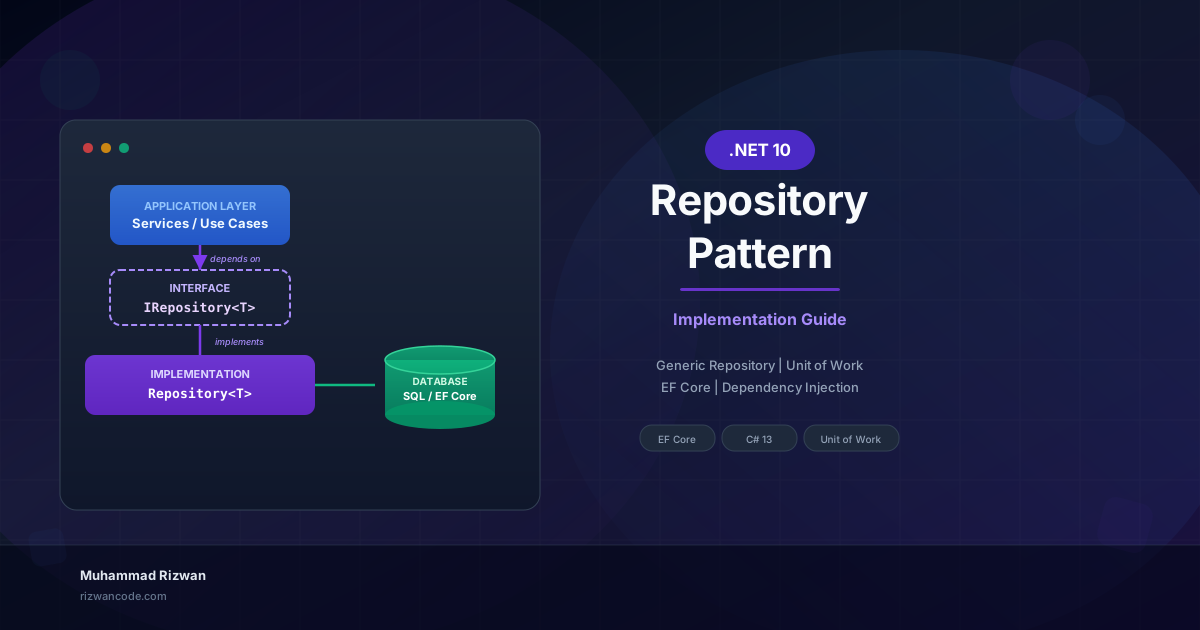
.NET 10 API Versioning - The Complete Practical Guide

Muhammad Rizwan
2026-03-23
26 min read
.NET 10 API Versioning - The Complete Practical Guide

Imagine your team has shipped a REST API that dozens of client applications are calling. A mobile application, the web frontend, three external partners. Everything is stable. Then a new product requirement lands: the response shape for the products endpoint needs to change. You need to add new required fields, rename existing ones, and restructure the nested objects.

If you simply deploy that change, every single one of those clients breaks overnight. The mobile app throws null reference errors. The partners send angry emails. The monitoring dashboards light up red.

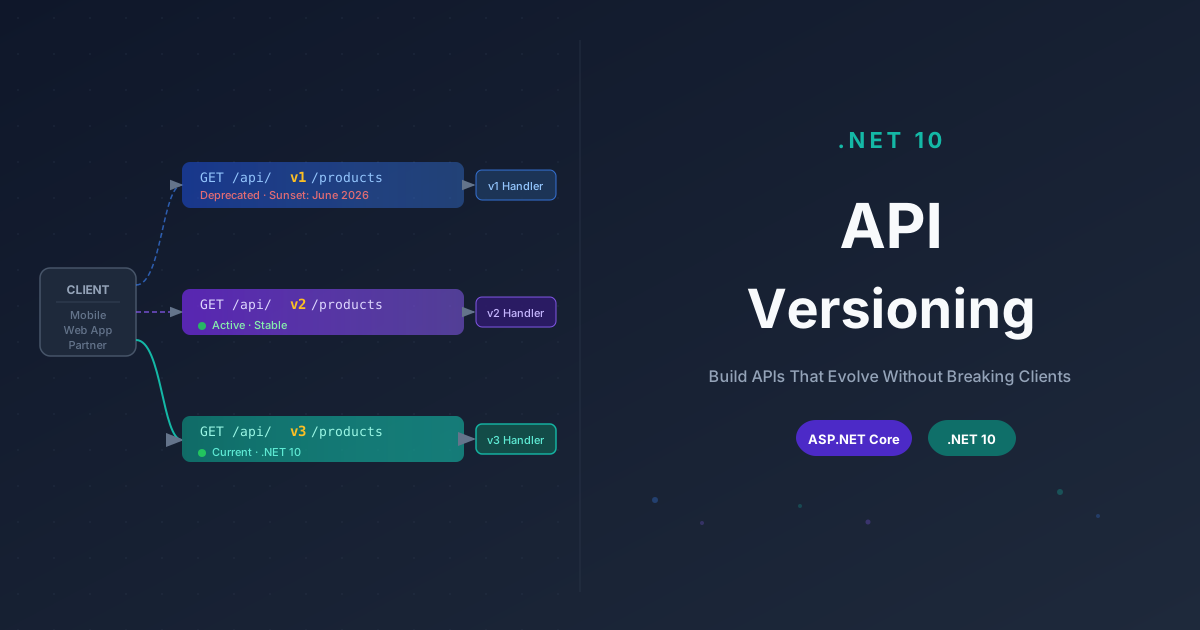
This is the exact problem API versioning is designed to prevent. It lets you introduce breaking changes in a new API version without disrupting any existing consumer. Old clients keep calling version one and receive exactly what they expect. New clients adopt version two and benefit from the improved contract. Both versions live in the same codebase, served by the same running application.

In this guide, we will walk through API versioning in .NET 10 from scratch. We will cover the four main strategies, how to implement all of them with the Asp.Versioning library, how to handle deprecation properly, how to build versioned minimal APIs using Version Sets, and how to wire everything up with Swagger so your documentation stays accurate across every version.

Let us get into it.


What API Versioning Is and Why Your API Needs It

At its core, API versioning is the practice of maintaining multiple concurrent releases of your API so that consumers can continue using the version they were built against while you freely evolve newer releases.

Without versioning, your API contract is fragile. Any change that modifies response field names, required versus optional fields, HTTP status codes, endpoint paths, or authentication requirements is a breaking change that risks disrupting every consumer at the moment of deployment.

Some teams try to avoid this by freezing the API and never making breaking changes. In practice, this approach results in bloated responses full of historical fields that exist purely for backward compatibility, increasingly awkward semantics, and a codebase that becomes painful to work with over time. You end up building new features around old constraints indefinitely.

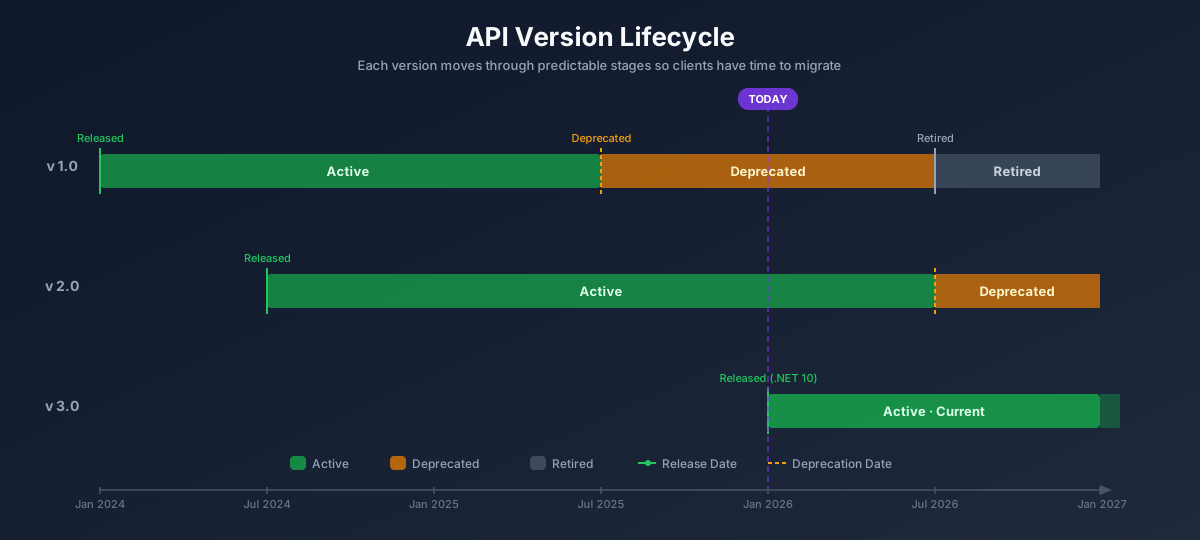
A better approach is to version your API intentionally and manage the lifecycle of each version:

  1. Release a new version with the breaking change
  2. Keep the previous version alive long enough for consumers to migrate
  3. Announce a sunset date for the old version
  4. Retire it once all clients have moved on

API Version Lifecycle

This becomes especially important in certain situations:

Public APIs — External developers consuming your API cannot update their code the moment you deploy a change. They need time to plan and test.

Mobile applications — Users of a mobile application often stay on older app versions for months. If your API changes under them, the app breaks for all users who have not updated yet.

Microservices ecosystems — In a microservices architecture, updating two services atomically is rarely practical. API versioning lets each service evolve on its own timeline without forcing coordinated deployments.

B2B integrations — Enterprise clients operate under heavyweight change management processes. A stable versioned endpoint means they can plan migrations on their own schedule without being dependent on your deployment calendar.

For an internal tool used by a single team, strict API versioning is often unnecessary overhead. But the moment your API crosses a team or organizational boundary, versioning becomes something you will eventually wish you had in place from the start.


The Four API Versioning Strategies

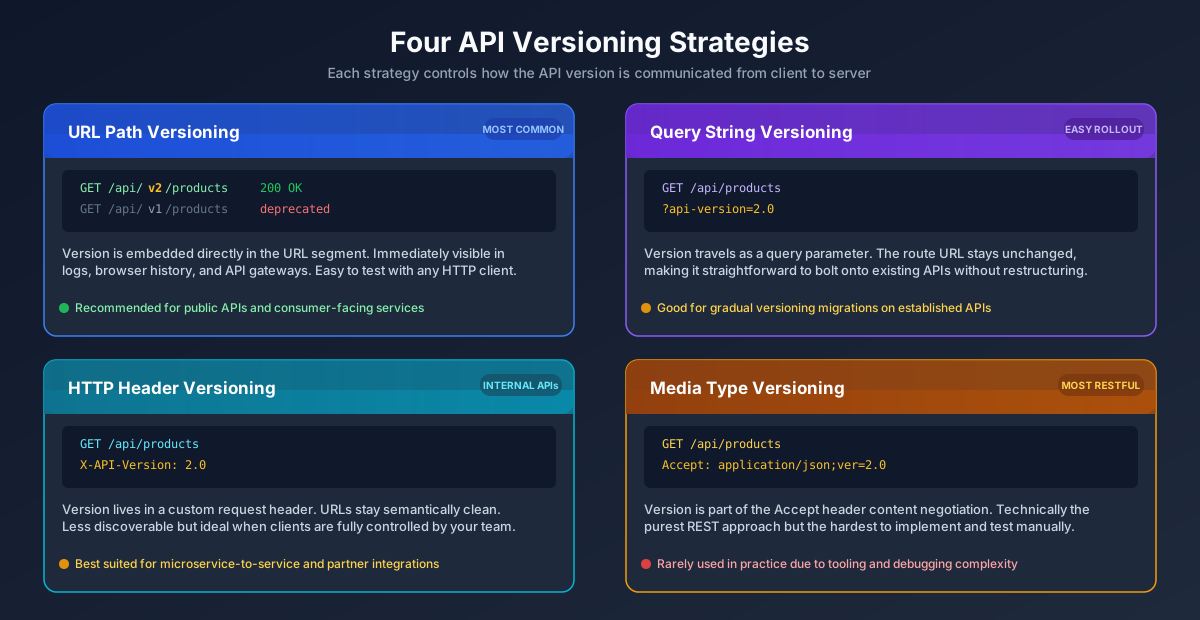
There are four main strategies for telling the API server which version a request is targeting. Each has its own strengths and trade-offs.

Four API Versioning Strategies

Free Newsletter

Enjoying the article? Stay in the loop.

  • Production-ready code samples every week
  • In-depth .NET, C# & React tutorials
  • Career tips & dev insights
500+ developers · No spam · Unsubscribe anytime

Join the community

Get new articles delivered every week.

No credit card · No spam · Cancel anytime · Learn more

URL Path Versioning

The version is embedded directly in the URL path:

http
GET /api/v1/products GET /api/v2/products

This is the most visible and widely adopted approach. The version is immediately obvious to anyone looking at the URL in a browser, a log file, or a gateway dashboard. It is trivial to test with any HTTP client, including curl and the browser address bar. Proxy servers and API gateways can route by version without needing to inspect request headers or body contents.

The objection sometimes raised is that a URL is supposed to identify a resource, not a specific representation of it. Different versions of the same resource should theoretically share the same URL. Some developers find versioned paths inelegant for this reason.

For most real-world teams, the operational simplicity of URL path versioning outweighs the theoretical purity concern. If you are not certain which strategy to choose, start here.

Query String Strategy Overview

The version is passed as a query parameter:

http
GET /api/products?api-version=1.0 GET /api/products?api-version=2.0

This keeps the base URL clean and preserves the idea that the same URL always refers to the same resource. It is also relatively easy to add to an existing API without restructuring routes. The version concern is appended to every request without changing the path structure.

The drawback is that query parameters get lost in some caching layers, feel awkward in formal documentation, and require every client to remember to include the parameter. It is not immediately obvious what value to pass without consulting documentation.

Query string versioning works well when you are adding versioning to an API that was not designed with versioning in mind from the start.

HTTP Header Strategy Overview

The version is communicated through a custom request header:

http
GET /api/products X-API-Version: 2.0

This keeps URLs semantically clean and is a common choice for internal or partner APIs where you have full control over all clients. The version concern is entirely separated from the resource identifier.

The challenge is discoverability. Someone browsing your API who does not have prior knowledge of the header convention will not be able to construct a working request just by looking at the URL. It is also harder to test manually with browser tools. Logs that only capture URLs will not include version information.

Header versioning is a strong choice for internal service-to-service calls where every client is maintained by your team.

Media Type Strategy Overview

The version is embedded in the Accept header using content negotiation:

http
GET /api/products Accept: application/json;ver=2.0

Or using custom vendor media types:

http
GET /api/products Accept: application/vnd.myapp.v2+json

This is the most technically correct REST approach if you define REST strictly. The URL identifies the resource. The client negotiates the representation format it wants, including the version of that representation.

In practice, this is the most complex strategy to implement correctly, the hardest to test with basic tooling, and the most likely to cause confusion among developers working with the API. It is rarely the right default choice.

The recommendation: Pick URL path versioning unless you have a compelling reason to choose otherwise. It is transparent, universally understood, and compatible with virtually every HTTP tooling solution in existence.


Installing Asp.Versioning in .NET 10

The official library for API versioning in .NET is the Asp.Versioning package, maintained by Chris Martinez. Earlier versions of this library lived under the Microsoft.AspNetCore.ApiVersioning namespace but it has since moved to the community-maintained Asp.Versioning organization on NuGet.

The older Microsoft.AspNetCore.Mvc.Versioning package is deprecated. Do not use it for new projects.

Install the appropriate packages based on your project type.

For controller-based APIs (MVC):

bash
dotnet add package Asp.Versioning.Mvc dotnet add package Asp.Versioning.Mvc.ApiExplorer

For minimal APIs:

bash
dotnet add package Asp.Versioning.Http

Once installed, register the versioning services inside your Program.cs file. Here is a baseline configuration:

csharp
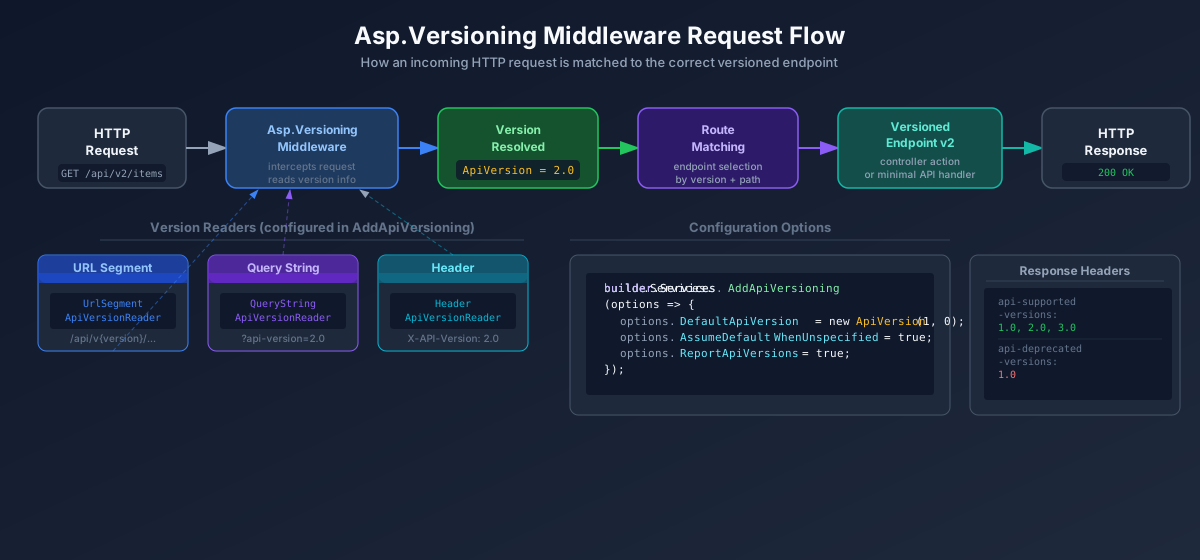
builder.Services.AddApiVersioning(options => { options.DefaultApiVersion = new ApiVersion(1, 0); options.AssumeDefaultVersionWhenUnspecified = true; options.ReportApiVersions = true; options.ApiVersionReader = new UrlSegmentApiVersionReader(); }) .AddMvc() .AddApiExplorer(options => { options.GroupNameFormat = "'v'VVV"; options.SubstituteApiVersionInUrl = true; });

Let us break down what each option actually does:

DefaultApiVersion sets the version that will be assumed when no version information is present in the request. Setting this to 1.0 means existing clients that were built before versioning was introduced will continue working transparently.

AssumeDefaultVersionWhenUnspecified tells the middleware to fall back to the default version when no version can be found in the request. Without this option, requests that include no version information return a 400 Bad Request response, which will break any clients that were not written to include version identifiers.

ReportApiVersions adds two headers to every response: api-supported-versions lists all supported versions of the endpoint, and api-deprecated-versions lists any versions that have been marked for removal. Clients can inspect these headers to discover version availability.

ApiVersionReader tells the middleware where to look for the version information in the incoming request. UrlSegmentApiVersionReader reads it from the {version} route segment. We will cover additional readers when we get to combined strategies.

.AddMvc() wires up the versioning system for controller-based APIs.

.AddApiExplorer() registers the provider that generates per-version metadata for the API Explorer, which Swagger documentation relies on. GroupNameFormat controls how the version number appears in the generated document names, and SubstituteApiVersionInUrl causes the API Explorer to replace the {version} route parameter with the actual version number in documentation.

Asp.Versioning Middleware Request Flow


URL Path Versioning with Controller APIs

URL path versioning in controller-based .NET APIs requires a specific route template that includes a {version:apiVersion} constraint. This route constraint is provided by the Asp.Versioning middleware and allows the framework to extract and validate the version segment.

Let us build a realistic example using a product catalog API. We will start with a Product entity and then create versioned controllers that return different shapes of data.

The Domain Model

csharp
namespace ProductCatalog.Domain.Entities; public class Product { public Guid Id { get; set; } public string Name { get; set; } = string.Empty; public string Description { get; set; } = string.Empty; public decimal Price { get; set; } public string Sku { get; set; } = string.Empty; public int StockQuantity { get; set; } public DateTime CreatedAt { get; set; } public DateTime? UpdatedAt { get; set; } }

Version One: The Initial Contract

The first version of the API returns a simplified product response. It was designed before the inventory management requirements were added:

csharp
// V1 response shape public record ProductResponseV1( Guid Id, string Name, decimal Price );
csharp
using Asp.Versioning; using Microsoft.AspNetCore.Mvc; namespace ProductCatalog.Api.Controllers.V1; [ApiController] [ApiVersion("1.0")] [Route("api/v{version:apiVersion}/products")] public class ProductsController : ControllerBase { private readonly IProductRepository _repository; public ProductsController(IProductRepository repository) { _repository = repository; } [HttpGet] public async Task<IActionResult> GetAll() { var products = await _repository.GetAllAsync(); var response = products.Select(p => new ProductResponseV1(p.Id, p.Name, p.Price)); return Ok(response); } [HttpGet("{id:guid}")] public async Task<IActionResult> GetById(Guid id) { var product = await _repository.GetByIdAsync(id); if (product is null) return NotFound(); return Ok(new ProductResponseV1(product.Id, product.Name, product.Price)); } [HttpPost] public async Task<IActionResult> Create([FromBody] CreateProductRequestV1 request) { var product = new Product { Id = Guid.NewGuid(), Name = request.Name, Price = request.Price, CreatedAt = DateTime.UtcNow }; await _repository.AddAsync(product); return CreatedAtAction(nameof(GetById), new { id = product.Id, version = "1.0" }, new ProductResponseV1(product.Id, product.Name, product.Price)); } } public record CreateProductRequestV1(string Name, decimal Price);

Version Two: The Improved Contract

Version two adds inventory tracking, SKU identifiers, and an update timestamp. This is a breaking change because removing fields from the response would break clients that depend on them, so we create a new version rather than modifying the existing one:

csharp
// V2 response shape - richer data public record ProductResponseV2( Guid Id, string Name, string Description, decimal Price, string Sku, int StockQuantity, DateTime CreatedAt, DateTime? UpdatedAt );
csharp
using Asp.Versioning; using Microsoft.AspNetCore.Mvc; namespace ProductCatalog.Api.Controllers.V2; [ApiController] [ApiVersion("2.0")] [Route("api/v{version:apiVersion}/products")] public class ProductsController : ControllerBase { private readonly IProductRepository _repository; public ProductsController(IProductRepository repository) { _repository = repository; } [HttpGet] public async Task<IActionResult> GetAll([FromQuery] bool? inStockOnly = null) { var products = await _repository.GetAllAsync(); if (inStockOnly == true) products = products.Where(p => p.StockQuantity > 0).ToList(); var response = products.Select(p => new ProductResponseV2( p.Id, p.Name, p.Description, p.Price, p.Sku, p.StockQuantity, p.CreatedAt, p.UpdatedAt)); return Ok(response); } [HttpGet("{id:guid}")] public async Task<IActionResult> GetById(Guid id) { var product = await _repository.GetByIdAsync(id); if (product is null) return NotFound(); return Ok(new ProductResponseV2( product.Id, product.Name, product.Description, product.Price, product.Sku, product.StockQuantity, product.CreatedAt, product.UpdatedAt)); } [HttpPost] public async Task<IActionResult> Create([FromBody] CreateProductRequestV2 request) { var product = new Product { Id = Guid.NewGuid(), Name = request.Name, Description = request.Description, Price = request.Price, Sku = request.Sku, StockQuantity = request.InitialStock, CreatedAt = DateTime.UtcNow }; await _repository.AddAsync(product); return CreatedAtAction(nameof(GetById), new { id = product.Id, version = "2.0" }, new ProductResponseV2( product.Id, product.Name, product.Description, product.Price, product.Sku, product.StockQuantity, product.CreatedAt, product.UpdatedAt)); } [HttpPatch("{id:guid}/stock")] public async Task<IActionResult> UpdateStock(Guid id, [FromBody] UpdateStockRequest request) { var product = await _repository.GetByIdAsync(id); if (product is null) return NotFound(); product.StockQuantity = request.NewQuantity; product.UpdatedAt = DateTime.UtcNow; await _repository.UpdateAsync(product); return NoContent(); } } public record CreateProductRequestV2( string Name, string Description, decimal Price, string Sku, int InitialStock ); public record UpdateStockRequest(int NewQuantity);

This solution uses separate controller classes per version. This is the cleanest approach and the one I recommend. Controllers for version one only know about version one concerns. Controllers for version two only know about version two concerns. They share the same repository interface but map to completely different response shapes.

Now the API is reachable at both /api/v1/products and /api/v2/products simultaneously.


Single Controller, Multiple Version Mappings

An alternative to separate controller classes is to use a single controller mapped to multiple versions, with individual actions mapped to specific versions using the [MapToApiVersion] attribute:

csharp
[ApiController] [ApiVersion("1.0")] [ApiVersion("2.0")] [Route("api/v{version:apiVersion}/orders")] public class OrdersController : ControllerBase { [HttpGet] [MapToApiVersion("1.0")] public IActionResult GetOrdersV1() { return Ok(new { Message = "Orders V1" }); } [HttpGet] [MapToApiVersion("2.0")] public IActionResult GetOrdersV2() { return Ok(new { Message = "Orders V2 with enhanced data" }); } }

This approach is convenient for endpoints that differ minimally between versions. When the differences become larger, as they usually do over time, keeping everything in one controller class makes the file harder to navigate and reason about. My preference is to separate controller files when the response shapes diverge significantly.


Query String Versioning

To switch from URL path versioning to query string versioning, you change the ApiVersionReader and the route template:

csharp
builder.Services.AddApiVersioning(options => { options.DefaultApiVersion = new ApiVersion(1, 0); options.AssumeDefaultVersionWhenUnspecified = true; options.ReportApiVersions = true; options.ApiVersionReader = new QueryStringApiVersionReader("api-version"); }) .AddMvc();

The controller route template no longer includes the {version} segment:

csharp
[ApiController] [ApiVersion("1.0")] [Route("api/products")] public class ProductsController : ControllerBase { [HttpGet] public IActionResult GetAll() { return Ok("Version 1 products"); } }

Requests are now versioned via the query string:

http
GET /api/products?api-version=1.0 GET /api/products?api-version=2.0

When AssumeDefaultVersionWhenUnspecified is true, a request to /api/products without any version parameter will be handled by the default version (1.0 in this case). This is what allows existing unversioned clients to keep working transparently.


Free Newsletter

Enjoying the article? Stay in the loop.

  • Production-ready code samples every week
  • In-depth .NET, C# & React tutorials
  • Career tips & dev insights
500+ developers · No spam · Unsubscribe anytime

Join the community

Get new articles delivered every week.

No credit card · No spam · Cancel anytime · Learn more

HTTP Header Versioning

Header versioning follows the same pattern, but reads the version from a named request header instead:

csharp
builder.Services.AddApiVersioning(options => { options.DefaultApiVersion = new ApiVersion(1, 0); options.AssumeDefaultVersionWhenUnspecified = true; options.ReportApiVersions = true; options.ApiVersionReader = new HeaderApiVersionReader("X-API-Version"); }) .AddMvc();

The route template stays clean without any version token:

csharp
[ApiController] [ApiVersion("1.0")] [ApiVersion("2.0")] [Route("api/products")] public class ProductsController : ControllerBase { [HttpGet] [MapToApiVersion("1.0")] public IActionResult GetAllV1() { return Ok("Version 1 products"); } [HttpGet] [MapToApiVersion("2.0")] public IActionResult GetAllV2() { return Ok("Version 2 products with full details"); } }

Clients send the version in the header:

http
GET /api/products X-API-Version: 2.0

Combining Multiple Version Readers

In practice, many APIs need to support more than one strategy simultaneously, especially during a migration period. ApiVersionReader.Combine lets you specify multiple readers, and the middleware will check each one in order until it finds a version:

csharp
builder.Services.AddApiVersioning(options => { options.DefaultApiVersion = new ApiVersion(1, 0); options.AssumeDefaultVersionWhenUnspecified = true; options.ReportApiVersions = true; options.ApiVersionReader = ApiVersionReader.Combine( new UrlSegmentApiVersionReader(), new QueryStringApiVersionReader("api-version"), new HeaderApiVersionReader("X-API-Version"), new MediaTypeApiVersionReader("ver") ); }) .AddMvc() .AddApiExplorer(options => { options.GroupNameFormat = "'v'VVV"; options.SubstituteApiVersionInUrl = true; });

With this configuration, the following requests all target version 2:

http
GET /api/v2/products GET /api/products?api-version=2.0 GET /api/products X-API-Version: 2.0 GET /api/products Accept: application/json;ver=2.0

This is useful when you have multiple client types. Browser-based clients might use URL paths. Partner integrations might prefer headers. Internal services might use query strings. Combining readers accommodates all of them without requiring you to choose just one.


Minimal APIs with Version Sets

Minimal APIs in .NET 10 use a different mechanism for versioning called Version Sets. Rather than decorating controllers with attributes, you define a version set that declares all the versions your minimal API supports, and then assign each endpoint to a specific version within that set.

First, install the Asp.Versioning.Http package instead of Asp.Versioning.Mvc:

bash
dotnet add package Asp.Versioning.Http

Then configure versioning without calling .AddMvc():

csharp
builder.Services.AddApiVersioning(options => { options.DefaultApiVersion = new ApiVersion(1, 0); options.AssumeDefaultVersionWhenUnspecified = true; options.ReportApiVersions = true; options.ApiVersionReader = new UrlSegmentApiVersionReader(); }); var app = builder.Build();

After building the app, define a version set and attach endpoints to it:

csharp
var versionSet = app.NewApiVersionSet() .HasApiVersion(new ApiVersion(1, 0)) .HasApiVersion(new ApiVersion(2, 0)) .ReportApiVersions() .Build(); // Version 1 endpoints app.MapGet("/api/v{version:apiVersion}/products", async (IProductRepository repo) => { var products = await repo.GetAllAsync(); return Results.Ok(products.Select(p => new ProductResponseV1(p.Id, p.Name, p.Price))); }) .WithApiVersionSet(versionSet) .MapToApiVersion(1, 0); // Version 2 endpoints app.MapGet("/api/v{version:apiVersion}/products", async ( IProductRepository repo, bool? inStockOnly = null) => { var products = await repo.GetAllAsync(); if (inStockOnly == true) products = products.Where(p => p.StockQuantity > 0).ToList(); return Results.Ok(products.Select(p => new ProductResponseV2( p.Id, p.Name, p.Description, p.Price, p.Sku, p.StockQuantity, p.CreatedAt, p.UpdatedAt))); }) .WithApiVersionSet(versionSet) .MapToApiVersion(2, 0); app.MapPost("/api/v{version:apiVersion}/products", async ( CreateProductRequestV2 request, IProductRepository repo) => { var product = new Product { Id = Guid.NewGuid(), Name = request.Name, Description = request.Description, Price = request.Price, Sku = request.Sku, StockQuantity = request.InitialStock, CreatedAt = DateTime.UtcNow }; await repo.AddAsync(product); return Results.Created($"/api/v2/products/{product.Id}", new ProductResponseV2( product.Id, product.Name, product.Description, product.Price, product.Sku, product.StockQuantity, product.CreatedAt, product.UpdatedAt)); }) .WithApiVersionSet(versionSet) .MapToApiVersion(2, 0); app.Run();

The Version Sets approach maps cleanly to the minimal API philosophy of explicit, co-located endpoint definitions. Each endpoint declares exactly which version it belongs to, and the version set acts as the registry of all available versions for that group of endpoints.


Deprecating Old API Versions

Deprecation is the formal process of signaling to clients that a version is scheduled for removal. It is a two-step process: first you mark the version as deprecated in code to update the response headers and documentation, then you enforce an actual sunset date after which the version stops responding.

Marking a Version as Deprecated

Add Deprecated = true to the [ApiVersion] attribute on the controller:

csharp
[ApiController] [ApiVersion("1.0", Deprecated = true)] [Route("api/v{version:apiVersion}/products")] public class ProductsV1Controller : ControllerBase { // Existing v1 endpoints remain here, unchanged }

This action alone does two things automatically when ReportApiVersions is enabled:

  1. The api-deprecated-versions response header will now list 1.0
  2. The Swagger documentation for v1 will display a deprecation notice

Clients that check this header can show warnings to their developers or log alerts indicating that migration is needed.

Sending Sunset and Deprecation Headers

The industry standard way to communicate deprecation metadata over HTTP uses three headers defined in RFC 8594 and related specifications:

  • Sunset — The date and time after which the API version will no longer be available
  • Deprecation — The date from which the version was considered deprecated
  • Link — A relation link pointing to the successor version

You can add these using a simple middleware or an action filter. Here is a clean middleware approach:

csharp
app.Use(async (context, next) => { await next(); // Add sunset headers for deprecated v1 var apiVersion = context.GetRequestedApiVersion(); if (apiVersion?.MajorVersion == 1) { context.Response.Headers.TryAdd("Sunset", "Sun, 01 Jun 2026 00:00:00 GMT"); context.Response.Headers.TryAdd("Deprecation", "Mon, 01 Jan 2026 00:00:00 GMT"); context.Response.Headers.TryAdd( "Link", "</api/v2/products>; rel=\"successor-version\""); } });

After the sunset date arrives, you replace the middleware logic to return a 410 Gone response for all version one requests, giving clients a clear indication that the endpoint has been retired rather than just returning a confusing 404.

csharp
app.Use(async (context, next) => { var apiVersion = context.GetRequestedApiVersion(); if (apiVersion?.MajorVersion == 1) { context.Response.StatusCode = StatusCodes.Status410Gone; await context.Response.WriteAsJsonAsync(new { error = "This API version has been retired.", details = "Please migrate to v2. See: /api/v2/products", retiredOn = "2026-06-01" }); return; } await next(); });

This is far more helpful to clients than silently redirecting or returning an unexpected response shape.


OpenAPI and Swagger Integration

Generating accurate Swagger documentation across multiple API versions requires a few additional setup steps. The key is that each API version needs its own separate OpenAPI document, and the Swagger UI needs to know about all of them.

Setting Up Multi-Version Swagger Documentation

After installing both Asp.Versioning.Mvc.ApiExplorer and Swashbuckle (Swashbuckle.AspNetCore), the setup looks like this:

bash
dotnet add package Swashbuckle.AspNetCore

Create a ConfigureSwaggerOptions class that dynamically generates one Swagger document per discovered API version:

csharp
using Asp.Versioning.ApiExplorer; using Microsoft.Extensions.Options; using Microsoft.OpenApi.Models; using Swashbuckle.AspNetCore.SwaggerGen; public class ConfigureSwaggerOptions : IConfigureOptions<SwaggerGenOptions> { private readonly IApiVersionDescriptionProvider _provider; public ConfigureSwaggerOptions(IApiVersionDescriptionProvider provider) { _provider = provider; } public void Configure(SwaggerGenOptions options) { foreach (var description in _provider.ApiVersionDescriptions) { options.SwaggerDoc(description.GroupName, CreateApiInfo(description)); } } private static OpenApiInfo CreateApiInfo(ApiVersionDescription description) { var info = new OpenApiInfo { Title = "Product Catalog API", Version = description.ApiVersion.ToString(), Contact = new OpenApiContact { Name = "Muhammad Rizwan", Url = new Uri("https://rizwanashraf.dev/contact") } }; if (description.IsDeprecated) { info.Description = string.Concat( info.Description ?? string.Empty, " This API version has been deprecated. ", "Please migrate to a current version."); } return info; } }

Register it in your Program.cs:

csharp
// Add the configure options class builder.Services.AddTransient<IConfigureOptions<SwaggerGenOptions>, ConfigureSwaggerOptions>(); // Register Swagger generator builder.Services.AddSwaggerGen(); // Versioning setup builder.Services.AddApiVersioning(options => { options.DefaultApiVersion = new ApiVersion(1, 0); options.AssumeDefaultVersionWhenUnspecified = true; options.ReportApiVersions = true; options.ApiVersionReader = new UrlSegmentApiVersionReader(); }) .AddMvc() .AddApiExplorer(options => { options.GroupNameFormat = "'v'VVV"; options.SubstituteApiVersionInUrl = true; });

Then configure the middleware to serve all version documents:

csharp
var app = builder.Build(); app.UseSwagger(); app.UseSwaggerUI(options => { // Retrieve all registered version descriptions var provider = app.Services.GetRequiredService<IApiVersionDescriptionProvider>(); foreach (var description in provider.ApiVersionDescriptions.Reverse()) { options.SwaggerEndpoint( $"/swagger/{description.GroupName}/swagger.json", $"Product Catalog API {description.ApiVersion}"); } });

With this setup, the Swagger UI will display a dropdown that lets users switch between API version documentation instantly. Deprecated versions will show a deprecation notice in their documentation description. The URL for each auto-generated document follows the pattern /swagger/v1/swagger.json, /swagger/v2/swagger.json, and so on.
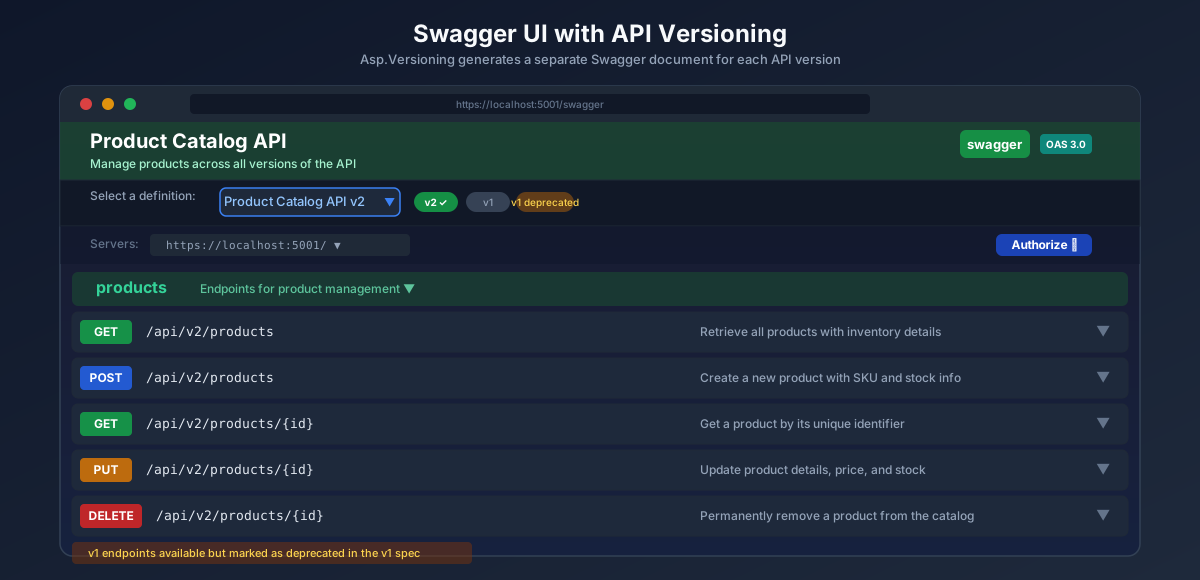
Swagger UI with API Versioning

Using the Built-in OpenAPI Support in .NET 9 and 10

Starting with .NET 9, ASP.NET Core includes a first-party OpenAPI document generation package that does not require Swashbuckle. For .NET 10 projects that do not need Swashbuckle specifically, you can use Microsoft.AspNetCore.OpenApi instead:

bash
dotnet add package Microsoft.AspNetCore.OpenApi

Register a separate OpenAPI document per version:

csharp
builder.Services.AddOpenApi("v1"); builder.Services.AddOpenApi("v2");

Then map the document endpoint in middleware:

csharp
app.MapOpenApi("/openapi/{documentName}.json");

You can render this with Scalar, a modern OpenAPI UI, as an alternative to Swagger UI:

bash
dotnet add package Scalar.AspNetCore
csharp
app.MapScalarApiReference();

Both approaches produce accurate per-version OpenAPI documents. Swashbuckle remains the more widely used option in the community due to its maturity and plugin ecosystem, but the built-in approach is catching up quickly in .NET 10.


Version Selection Policies

There are a few additional options worth understanding as you tune the behavior of your versioning setup.

Neutral Versioning

Sometimes you have endpoints that should respond to any version, without requiring consumers to specify a version at all. A health check endpoint is a common example. You can decorate it with [ApiVersionNeutral]:

csharp
[ApiController] [ApiVersionNeutral] [Route("health")] public class HealthController : ControllerBase { [HttpGet] public IActionResult Check() => Ok(new { status = "healthy" }); }

This endpoint will be reachable regardless of which version is requested, or whether a version is included at all.

Custom Error Responses for Unsupported Versions

By default, requesting an unsupported version returns a 400 Bad Request with a generic error. You can customize this response by injecting a custom error response provider:

csharp
builder.Services.AddApiVersioning(options => { options.DefaultApiVersion = new ApiVersion(1, 0); options.AssumeDefaultVersionWhenUnspecified = true; options.ReportApiVersions = true; options.UnsupportedApiVersionStatusCode = StatusCodes.Status422UnprocessableEntity; });

Or implement IErrorResponseProvider for fully custom error bodies. This gives you control over the exact JSON shape returned when a client requests a version that does not exist or has been retired.


Testing Your Versioned API

A versioned API requires slightly different testing strategies to make sure every version behaves as expected both independently and in relation to each other.

Integration Tests

Using WebApplicationFactory<TProgram> from Microsoft.AspNetCore.Mvc.Testing, you can write integration tests that target specific versions:

csharp
public class ProductsApiTests : IClassFixture<WebApplicationFactory<Program>> { private readonly HttpClient _client; public ProductsApiTests(WebApplicationFactory<Program> factory) { _client = factory.CreateClient(); } [Fact] public async Task GetProductsV1_Returns_SimpleShape() { var response = await _client.GetAsync("/api/v1/products"); response.EnsureSuccessStatusCode(); var json = await response.Content.ReadFromJsonAsync<List<ProductResponseV1>>(); Assert.NotNull(json); Assert.All(json, p => { Assert.NotEqual(Guid.Empty, p.Id); Assert.NotEmpty(p.Name); Assert.True(p.Price > 0); }); } [Fact] public async Task GetProductsV2_Returns_FullShape_With_Stock() { var response = await _client.GetAsync("/api/v2/products"); response.EnsureSuccessStatusCode(); var json = await response.Content.ReadFromJsonAsync<List<ProductResponseV2>>(); Assert.NotNull(json); Assert.All(json, p => { Assert.NotEmpty(p.Sku); Assert.True(p.StockQuantity >= 0); }); } [Fact] public async Task GetProducts_ReturnsVersionHeaders() { var response = await _client.GetAsync("/api/v2/products"); Assert.True(response.Headers.Contains("api-supported-versions")); var supported = response.Headers.GetValues("api-supported-versions").First(); Assert.Contains("2.0", supported); } }

Testing with .http Files

.NET's built-in HTTP file support in Visual Studio and JetBrains Rider makes it easy to manually test each version. Create a ProductsApi.http file in your project:

http
@baseUrl = https://localhost:5001 ### Get all products - Version 1 GET {{baseUrl}}/api/v1/products Accept: application/json ### Get all products - Version 2 GET {{baseUrl}}/api/v2/products Accept: application/json ### Get version 2 with stock filter GET {{baseUrl}}/api/v2/products?inStockOnly=true Accept: application/json ### Test header versioning (if configured) GET {{baseUrl}}/api/products X-API-Version: 2.0 Accept: application/json ### Test deprecated version response headers GET {{baseUrl}}/api/v1/products ### # Inspect the response headers for: # api-deprecated-versions: 1.0 # Sunset: ... # Deprecation: ...

Running these requests directly from your IDE gives you rapid feedback without needing a separate tool.

Free Newsletter

Enjoying the article? Stay in the loop.

  • Production-ready code samples every week
  • In-depth .NET, C# & React tutorials
  • Career tips & dev insights
500+ developers · No spam · Unsubscribe anytime

Join the community

Get new articles delivered every week.

No credit card · No spam · Cancel anytime · Learn more

Real World Guidance: When to Create a New Version

Not every change requires a new version. Creating a new API version introduces maintenance overhead, documentation complexity, and migration work for clients. Reserve it for changes that are genuinely breaking.

Changes that do NOT require a new version:

  • Adding new optional fields to a response (clients that do not know about the new field will simply ignore it)
  • Adding new optional request parameters
  • Adding entirely new endpoints
  • Relaxing validation rules (accepting more inputs than before)
  • Adding new enum values to response enums (though clients should handle unknown values defensively)
  • Performance improvements with no behavioral changes

Changes that REQUIRE a new version:

  • Removing fields from a response
  • Renaming fields in a response
  • Changing a field's data type (string to integer, for example)
  • Making a previously optional field required in a request
  • Changing the HTTP method for an existing endpoint
  • Changing the authentication or authorization requirements
  • Changing the meaning of a status code in a response

A useful rule of thumb: if an existing client, running unchanged code, would encounter an exception or incorrect behavior after your deployment, you need a new version.

Versioning cadence: do not create new versions too frequently. Most stable production APIs release a new major version once or twice per year at most. Frequent minor versions undermine the stability promise that versioning is supposed to provide.

Sunset timelines: give clients adequate time to migrate. For public APIs with unknown consumer bases, six months to one year is a reasonable minimum. For internal APIs with a known group of teams, three months might be sufficient. Always communicate the sunset date in advance, ideally in your developer documentation and in the Sunset response header.


Folder Structure Recommendation

Organizing a versioned API project is important for maintainability. Here is a folder structure that scales well as versions accumulate:

ProductCatalog.Api/
├── Controllers/
│   ├── V1/
│   │   └── ProductsController.cs
│   ├── V2/
│   │   └── ProductsController.cs
│   └── HealthController.cs        (ApiVersionNeutral)
├── Models/
│   ├── V1/
│   │   ├── ProductResponseV1.cs
│   │   └── CreateProductRequestV1.cs
│   └── V2/
│       ├── ProductResponseV2.cs
│       ├── CreateProductRequestV2.cs
│       └── UpdateStockRequest.cs
├── Infrastructure/
│   └── Swagger/
│       └── ConfigureSwaggerOptions.cs
└── Program.cs

Separating controllers and models by version folder keeps each version isolated. A developer working on v3 adjustments does not need to navigate through v1 and v2 concerns to find what they are looking for.


Complete Program.cs Reference

Here is a complete Program.cs that brings together all the setup covered in this guide, ready to use as a starting template:

csharp
using Asp.Versioning; using Asp.Versioning.ApiExplorer; using Microsoft.Extensions.Options; using Swashbuckle.AspNetCore.SwaggerGen; var builder = WebApplication.CreateBuilder(args); // Add services builder.Services.AddControllers(); builder.Services.AddEndpointsApiExplorer(); // API versioning builder.Services.AddApiVersioning(options => { options.DefaultApiVersion = new ApiVersion(1, 0); options.AssumeDefaultVersionWhenUnspecified = true; options.ReportApiVersions = true; options.ApiVersionReader = ApiVersionReader.Combine( new UrlSegmentApiVersionReader(), new QueryStringApiVersionReader("api-version"), new HeaderApiVersionReader("X-API-Version") ); }) .AddMvc() .AddApiExplorer(options => { options.GroupNameFormat = "'v'VVV"; options.SubstituteApiVersionInUrl = true; }); // Swagger with multi-version support builder.Services.AddTransient<IConfigureOptions<SwaggerGenOptions>, ConfigureSwaggerOptions>(); builder.Services.AddSwaggerGen(); // Register repositories and services here // builder.Services.AddScoped<IProductRepository, ProductRepository>(); var app = builder.Build(); // Middleware for sunset headers on deprecated versions app.Use(async (context, next) => { await next(); var apiVersion = context.GetRequestedApiVersion(); if (apiVersion?.MajorVersion == 1) { context.Response.Headers.TryAdd("Sunset", "Sun, 01 Jun 2026 00:00:00 GMT"); context.Response.Headers.TryAdd("Deprecation", "Mon, 01 Jan 2026 00:00:00 GMT"); context.Response.Headers.TryAdd( "Link", "</api/v2/products>; rel=\"successor-version\""); } }); if (app.Environment.IsDevelopment()) { var provider = app.Services.GetRequiredService<IApiVersionDescriptionProvider>(); app.UseSwagger(); app.UseSwaggerUI(options => { foreach (var description in provider.ApiVersionDescriptions.Reverse()) { options.SwaggerEndpoint( $"/swagger/{description.GroupName}/swagger.json", $"Product Catalog API {description.ApiVersion}"); } }); } app.UseHttpsRedirection(); app.UseAuthorization(); app.MapControllers(); app.Run();

Resources Worth Reading

The Asp.Versioning GitHub repository at github.com/dotnet/aspnet-api-versioning contains the canonical documentation, a rich set of sample projects covering every scenario in this guide, and the library's changelog. The sample projects in particular are worth working through because they show real integration patterns that go beyond the basics.

If you want to understand the philosophical underpinning of API lifecycle management, Roy Fielding's original REST dissertation at ics.uci.edu/~fielding/pubs/dissertation/rest_arch_style.htm remains the most precise articulation of what REST actually means, even if its conclusions about versioning are more academic than practical.

For the HTTP Sunset header specification, RFC 8594 at rfc-editor.org/rfc/rfc8594 defines the standard semantics that HTTP clients and intermediaries use to process deprecation metadata.


Wrapping Up

API versioning does not have to be complicated, but it does require a deliberate approach. The Asp.Versioning library gives you a solid, well-tested foundation that handles the mechanics. The real challenge is the human part: deciding when to version, communicating deprecations clearly, and giving consumers enough runway to migrate without disrupting their production systems.

The key decisions to make early:

  • Choose URL path versioning as your primary strategy for most APIs
  • Enable ReportApiVersions so clients always know what is available
  • Set a clear versioning policy for your team: what counts as a breaking change
  • Plan your deprecation and sunset timeline before you ship the first breaking change

Get these in place before you need them. Adding versioning to an existing API that has no versioning infrastructure is significantly harder than building it in from the beginning.

The code in this guide is production-ready. The package and configuration patterns reflect how modern .NET 10 applications are built today. If you run into edge cases or more advanced scenarios, the Asp.Versioning repository's sample projects cover nearly everything you will encounter.

Share this post

About the Author

Muhammad Rizwan

Muhammad Rizwan

Software Engineer · .NET & Cloud Developer

A passionate software developer with expertise in .NET Core, C#, JavaScript, TypeScript, React and Azure. Loves building scalable web applications and sharing practical knowledge with the developer community.


Did you find this helpful?

I would love to hear your thoughts. Your feedback helps me create better content for the community.

Leave Feedback

Related Articles

Explore more posts on similar topics

Redis Implementation in .NET 10

Redis Implementation in .NET 10

A complete hands on guide to implementing Redis in .NET 10 with StackExchange.Redis. This article covers distributed caching, session management, Pub/Sub messaging, rate limiting, health checks, and production ready patterns with real C# code you can use today.

2026-03-1127 min read
Repository Pattern Implementation in .NET 10

Repository Pattern Implementation in .NET 10

A complete walkthrough of implementing the Repository pattern in .NET 10 with Entity Framework Core. This guide covers the generic repository, specific repositories, the Unit of Work pattern, dependency injection, testing, and real production decisions with working C# code.

2026-02-2725 min read
Clean Architecture in .NET - Practical Guide

Clean Architecture in .NET - Practical Guide

A hands-on walkthrough of Clean Architecture in .NET - why it matters, how to structure your projects, and real code examples you can use today. No fluff, no over-engineering, just practical patterns that actually work in production.

2026-02-2416 min read

Patreon Exclusive

Go deeper - exclusive content every month

Members get complete source-code projects, advanced architecture deep-dives, and monthly 1:1 code reviews.

$5/mo
Supporter
  • Supporter badge on website & my eternal gratitude
  • Your name listed on the website as a supporter
  • Monthly community Q&A (comments priority)
  • Early access to every new blog post
Join for $5/mo
Most Popular
$15/mo
Developer Pro
  • All Supporter benefits plus:
  • Exclusive .NET & Azure deep-dive posts (not on blog)
  • Full source-code project downloads every month
  • Downloadable architecture blueprints & templates
  • Private community access
Join for $15/mo
Best Value
$29/mo
Architect
  • All Developer Pro benefits plus:
  • Monthly 30-min 1:1 code review session
  • Priority answers to your architecture questions
  • Exclusive system design blueprints
  • Your name/logo featured on the website
  • Monthly live Q&A sessions
  • Early access to new courses or products
Join for $29/mo
Teams
$49/mo
Enterprise Partner
  • All Architect benefits plus:
  • Your company logo on my website & blog
  • Dedicated technical consultation session
  • Featured blog post about your company
  • Priority feature requests & custom content
Join for $49/mo

Secure billing via Patreon · Cancel anytime · Card & PayPal accepted

View Patreon page →

Your Feedback Matters

Have thoughts on my content, tutorials, or resources? I read every piece of feedback and use it to improve. No account needed. It only takes a minute.

Free Newsletter

Enjoying the article? Stay in the loop.

  • Production-ready code samples every week
  • In-depth .NET, C# & React tutorials
  • Career tips & dev insights
500+ developers · No spam · Unsubscribe anytime

Join the community

Get new articles delivered every week.

No credit card · No spam · Cancel anytime · Learn more