Clean Architecture in .NET - Practical Guide

Muhammad Rizwan
2026-02-24
16 min read
Clean Architecture in .NET - Practical Guide

If you have ever inherited a .NET project where the business logic lives inside controllers, the database context is referenced everywhere, and changing anything feels like defusing a bomb then you already know why architecture matters.

Clean Architecture isn't about impressing people with buzzwords. It's about writing software that's easy to change, easy to test, and easy to understand six months from now and even when the team has doubled in size.

I have been working with .NET long enough to know that patterns are easy to learn and hard to apply well. So this isn't going to be another "copy-paste the diagram from Uncle Bob's book" article. We will get into the WHY, the HOW, and the real-world decisions you will face when applying Clean Architecture to actual .NET projects.

Let's get into it.


What Even Is Clean Architecture?

Clean Architecture was popularized by Robert C. Martin (a.k.a. Uncle Bob) in his 2012 blog post and later in his book. But the core idea isn't new however it builds on decades of thinking from Hexagonal Architecture (Ports & Adapters), Onion Architecture, and plain old separation of concerns.

The big idea? Source code dependencies should only point inward.

Your business rules should never know or care about what database you are using, what web framework serves the endpoints, or whether notifications go out via email or SMS. Those details live on the outer rings. The core part is your domain and use cases should be blissfully ignorant of the outside world.

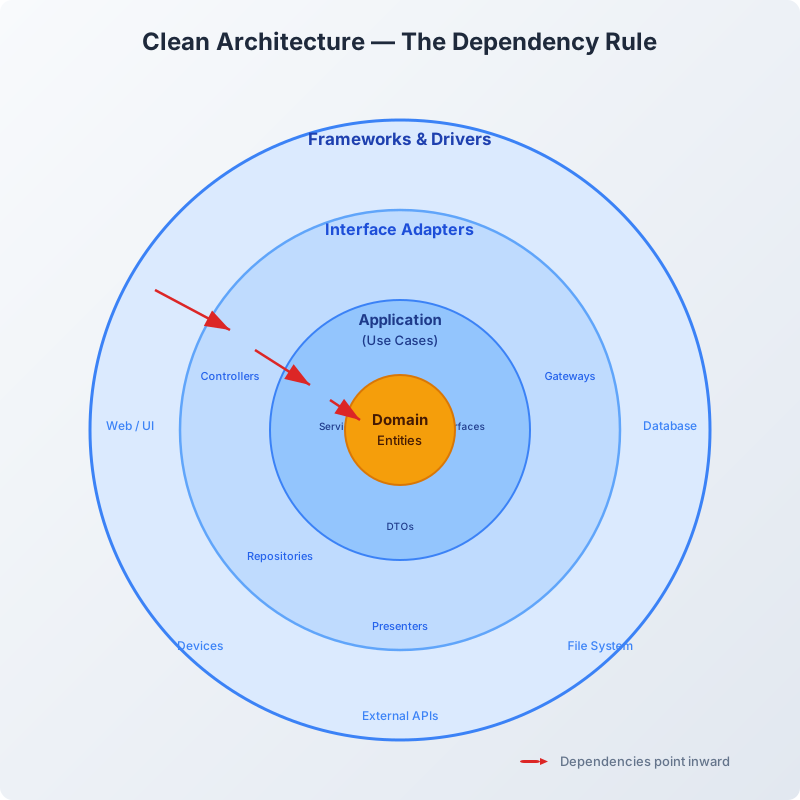
Here's the classic diagram, adapted for .NET:

Clean Architecture Layers Diagram

The inner circle (Domain Entities) is the most stable part of your app. It changes the least. The outer circles change the most, then frameworks get updated, databases get swapped, UI technologies come and go. That's fine, because nothing in the inner circles depends on the outer circles.

This is the Dependency Rule, and it's the single most important thing to internalize.


Free Newsletter

Enjoying the article? Stay in the loop.

  • Production-ready code samples every week
  • In-depth .NET, C# & React tutorials
  • Career tips & dev insights
500+ developers · No spam · Unsubscribe anytime

Join the community

Get new articles delivered every week.

No credit card · No spam · Cancel anytime · Learn more

Why Should .NET Developers Care?

Look, I get it. You have got a working project. The controllers call the DbContext directly. It works. Why bother with all these layers?

Here's the honest answer: for a small personal project or a quick prototype, you probably don't need this. Ship it and move on.

But the moment your project:

  • Has more than one developer
  • Needs unit tests (not just integration tests that spin up a database)
  • Will live in production for more than a few months
  • Has business logic more complex than basic CRUD

...you'll want some kind of structure. And Clean Architecture is one of the best options we have in the .NET ecosystem right now.

What you get:

  • Testability - Your business logic is isolated. You can test it without a database, without HTTP, without anything external.
  • Flexibility - Want to swap SQL Server for PostgreSQL? Done. Switch from SendGrid to AWS SES? The domain layer doesn't even blink.
  • Onboarding - New developers can look at the solution structure and immediately know where things live.
  • Longevity - The core of your app stays clean even as the frameworks around it evolve.

The Four Application Layers

Let me break down each layer the way I would explain it to a colleague over coffee.

1. Domain Layer (The Heart)

This is where your business entities live, the concepts your application is built around. Think Product, Order, Customer, Invoice.

It also includes:

  • Value Objects (like Money, Address, Email, things defined by their value, not identity)
  • Enums (like OrderStatus.Pending, OrderStatus.Shipped)
  • Domain Exceptions (like InsufficientStockException)
  • Domain Events (optional, but useful for reactive patterns)

Rules:

  • No dependencies on anything else. Period. No NuGet packages (except maybe a validation library). No reference to EF Core, no reference to ASP.NET.
  • This layer defines what the business looks like, not how it's implemented.

Here's a real example:

csharp
namespace CleanArch.Domain.Entities; public class Product { public Guid Id { get; private set; } public string Name { get; private set; } public string Description { get; private set; } public decimal Price { get; private set; } public int StockQuantity { get; private set; } public DateTime CreatedAt { get; private set; } public DateTime? UpdatedAt { get; private set; } // Private constructor for EF Core private Product() { } public Product(string name, string description, decimal price, int stockQuantity) { Id = Guid.NewGuid(); Name = name ?? throw new ArgumentNullException(nameof(name)); Description = description ?? string.Empty; Price = price > 0 ? price : throw new ArgumentException("Price must be positive.", nameof(price)); StockQuantity = stockQuantity >= 0 ? stockQuantity : throw new ArgumentException("Stock can't be negative.", nameof(stockQuantity)); CreatedAt = DateTime.UtcNow; } public void UpdatePrice(decimal newPrice) { if (newPrice <= 0) throw new ArgumentException("Price must be positive."); Price = newPrice; UpdatedAt = DateTime.UtcNow; } public void ReduceStock(int quantity) { if (quantity > StockQuantity) throw new InvalidOperationException("Insufficient stock."); StockQuantity -= quantity; UpdatedAt = DateTime.UtcNow; } }

Notice a few things:

  • The setters are private. No one outside can mess with the state directly.
  • Validation happens inside the entity. The entity protects its own invariants.
  • There's no [Table("Products")] attribute, no EF-specific junk. This is pure business logic.

2. Application Layer (The Use Cases)

This is where things get orchestrated. The Application layer defines what your system can do, the operations, the workflows, the use cases.

It contains:

  • Service interfaces (like IProductService)
  • Repository interfaces (like IProductRepository)
  • DTOs (Data Transfer Objects: what goes in and out of use cases)
  • Validators (input validation with something like FluentValidation)
  • Application service implementations

Rules:

  • References the Domain layer only.
  • Defines interfaces that the outer layers will implement.
  • No concrete infrastructure code here. If you see SqlConnection or SmtpClient in this layer, something's wrong.

Here's how an interface and a service might look:

csharp
namespace CleanArch.Application.Interfaces; public interface IProductRepository { Task<Product?> GetByIdAsync(Guid id, CancellationToken ct = default); Task<IEnumerable<Product>> GetAllAsync(CancellationToken ct = default); Task AddAsync(Product product, CancellationToken ct = default); Task UpdateAsync(Product product, CancellationToken ct = default); Task DeleteAsync(Guid id, CancellationToken ct = default); }
csharp
namespace CleanArch.Application.Interfaces; public interface IUnitOfWork { Task<int> SaveChangesAsync(CancellationToken ct = default); }

And the DTOs:

csharp
namespace CleanArch.Application.DTOs; public record CreateProductRequest( string Name, string Description, decimal Price, int StockQuantity ); public record ProductResponse( Guid Id, string Name, string Description, decimal Price, int StockQuantity, DateTime CreatedAt );

Now the service that ties it all together:

csharp
using CleanArch.Application.DTOs; using CleanArch.Application.Interfaces; using CleanArch.Domain.Entities; namespace CleanArch.Application.Services; public class ProductService { private readonly IProductRepository _productRepository; private readonly IUnitOfWork _unitOfWork; public ProductService(IProductRepository productRepository, IUnitOfWork unitOfWork) { _productRepository = productRepository; _unitOfWork = unitOfWork; } public async Task<ProductResponse> CreateProductAsync(CreateProductRequest request, CancellationToken ct = default) { var product = new Product( request.Name, request.Description, request.Price, request.StockQuantity ); await _productRepository.AddAsync(product, ct); await _unitOfWork.SaveChangesAsync(ct); return new ProductResponse( product.Id, product.Name, product.Description, product.Price, product.StockQuantity, product.CreatedAt ); } public async Task<ProductResponse?> GetProductByIdAsync(Guid id, CancellationToken ct = default) { var product = await _productRepository.GetByIdAsync(id, ct); if (product is null) return null; return new ProductResponse( product.Id, product.Name, product.Description, product.Price, product.StockQuantity, product.CreatedAt ); } public async Task<IEnumerable<ProductResponse>> GetAllProductsAsync(CancellationToken ct = default) { var products = await _productRepository.GetAllAsync(ct); return products.Select(p => new ProductResponse( p.Id, p.Name, p.Description, p.Price, p.StockQuantity, p.CreatedAt )); } }

See how clean this is? The service doesn't know about databases, HTTP, or any framework. It just works with interfaces and domain objects. That's the whole point.


3. Infrastructure Layer (The Dirty Work)

This is where reality shows up. The Infrastructure layer provides the concrete implementations of all those interfaces you defined in the Application layer.

It contains:

  • EF Core DbContext and configurations
  • Repository implementations
  • External service integrations (email, messaging, file storage, payment gateways)
  • Authentication implementations
  • Dependency Injection registration

Rules:

  • References both Domain and Application layers.
  • Implements the interfaces defined in the Application layer.
  • This is where NuGet packages like Microsoft.EntityFrameworkCore, SendGrid, MassTransit, etc., belong.

Here's the DbContext:

csharp
using CleanArch.Domain.Entities; using Microsoft.EntityFrameworkCore; namespace CleanArch.Infrastructure.Persistence; public class AppDbContext : DbContext { public AppDbContext(DbContextOptions<AppDbContext> options) : base(options) { } public DbSet<Product> Products => Set<Product>(); protected override void OnModelCreating(ModelBuilder modelBuilder) { modelBuilder.Entity<Product>(entity => { entity.HasKey(e => e.Id); entity.Property(e => e.Name).IsRequired().HasMaxLength(200); entity.Property(e => e.Price).HasPrecision(18, 2); }); base.OnModelCreating(modelBuilder); } }

And the repository implementation:

csharp
using CleanArch.Application.Interfaces; using CleanArch.Domain.Entities; using CleanArch.Infrastructure.Persistence; using Microsoft.EntityFrameworkCore; namespace CleanArch.Infrastructure.Repositories; public class ProductRepository : IProductRepository { private readonly AppDbContext _context; public ProductRepository(AppDbContext context) { _context = context; } public async Task<Product?> GetByIdAsync(Guid id, CancellationToken ct = default) => await _context.Products.FindAsync(new object[] { id }, ct); public async Task<IEnumerable<Product>> GetAllAsync(CancellationToken ct = default) => await _context.Products.ToListAsync(ct); public async Task AddAsync(Product product, CancellationToken ct = default) => await _context.Products.AddAsync(product, ct); public async Task UpdateAsync(Product product, CancellationToken ct = default) { _context.Products.Update(product); await Task.CompletedTask; } public async Task DeleteAsync(Guid id, CancellationToken ct = default) { var product = await _context.Products.FindAsync(new object[] { id }, ct); if (product is not null) _context.Products.Remove(product); } }

Unit of Work implementation (wrapping EF Core's SaveChanges):

csharp
using CleanArch.Application.Interfaces; using CleanArch.Infrastructure.Persistence; namespace CleanArch.Infrastructure.Repositories; public class UnitOfWork : IUnitOfWork { private readonly AppDbContext _context; public UnitOfWork(AppDbContext context) { _context = context; } public async Task<int> SaveChangesAsync(CancellationToken ct = default) => await _context.SaveChangesAsync(ct); }

And here's the DI registration helper that keeps Program.cs tidy:

csharp
using CleanArch.Application.Interfaces; using CleanArch.Infrastructure.Persistence; using CleanArch.Infrastructure.Repositories; using Microsoft.EntityFrameworkCore; using Microsoft.Extensions.Configuration; using Microsoft.Extensions.DependencyInjection; namespace CleanArch.Infrastructure; public static class DependencyInjection { public static IServiceCollection AddInfrastructure(this IServiceCollection services, IConfiguration configuration) { services.AddDbContext<AppDbContext>(options => options.UseSqlServer(configuration.GetConnectionString("DefaultConnection"))); services.AddScoped<IProductRepository, ProductRepository>(); services.AddScoped<IUnitOfWork, UnitOfWork>(); return services; } }

4. Presentation / WebAPI Layer (The Front Door)

This is the entry point. In most .NET projects, it's an ASP.NET Core Web API project. It handles HTTP, routing, serialization, middleware, and wiring everything together.

Rules:

  • References Application and Infrastructure (for DI registration).
  • Should NOT contain business logic. A controller that's more than 10-15 lines per action is a code smell.
  • This is where you register everything in Program.cs.

Here's a clean controller:

csharp
using CleanArch.Application.DTOs; using CleanArch.Application.Services; using Microsoft.AspNetCore.Mvc; namespace CleanArch.WebAPI.Controllers; [ApiController] [Route("api/[controller]")] public class ProductsController : ControllerBase { private readonly ProductService _productService; public ProductsController(ProductService productService) { _productService = productService; } [HttpGet] public async Task<IActionResult> GetAll(CancellationToken ct) { var products = await _productService.GetAllProductsAsync(ct); return Ok(products); } [HttpGet("{id:guid}")] public async Task<IActionResult> GetById(Guid id, CancellationToken ct) { var product = await _productService.GetProductByIdAsync(id, ct); return product is null ? NotFound() : Ok(product); } [HttpPost] public async Task<IActionResult> Create([FromBody] CreateProductRequest request, CancellationToken ct) { var product = await _productService.CreateProductAsync(request, ct); return CreatedAtAction(nameof(GetById), new { id = product.Id }, product); } }

And Program.cs:

csharp
using CleanArch.Application.Services; using CleanArch.Infrastructure; var builder = WebApplication.CreateBuilder(args); // Infrastructure layer DI builder.Services.AddInfrastructure(builder.Configuration); // Application layer services builder.Services.AddScoped<ProductService>(); builder.Services.AddControllers(); builder.Services.AddEndpointsApiExplorer(); builder.Services.AddSwaggerGen(); var app = builder.Build(); if (app.Environment.IsDevelopment()) { app.UseSwagger(); app.UseSwaggerUI(); } app.UseHttpsRedirection(); app.UseAuthorization(); app.MapControllers(); app.Run();

Short, readable, no noise. Every layer does its job and nothing more.


Project Structure at a Glance

Here's how the solution looks when you lay it all out:
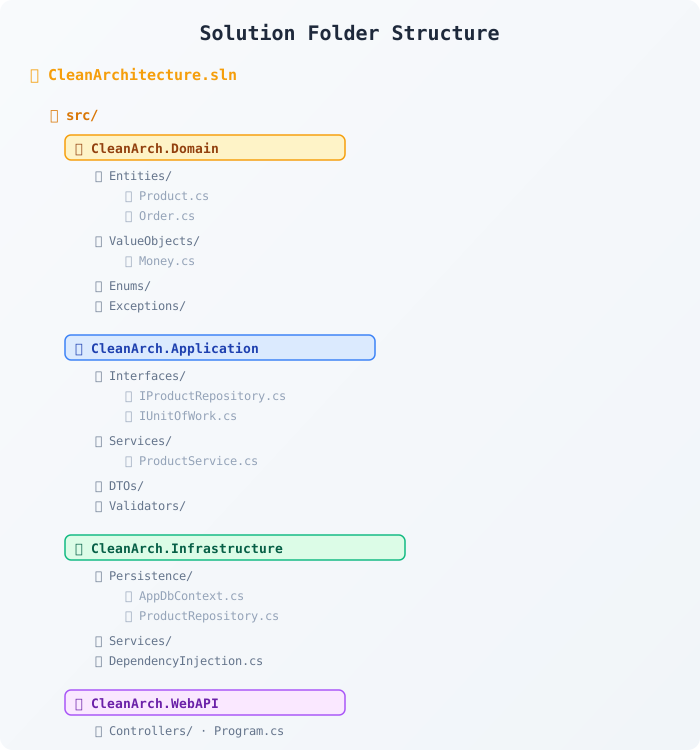
Clean Architecture Folder Structure

And here's the dependency flow between projects:
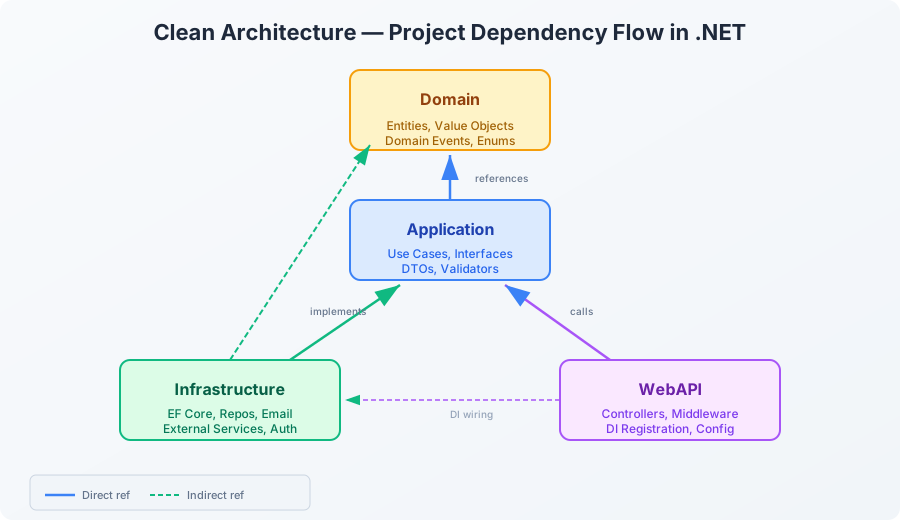
Clean Architecture Dependency Flow

The key insight from this diagram: Infrastructure and WebAPI both depend on Application, but Application never depends on them. That's the inversion of control at work.

Free Newsletter

Enjoying the article? Stay in the loop.

  • Production-ready code samples every week
  • In-depth .NET, C# & React tutorials
  • Career tips & dev insights
500+ developers · No spam · Unsubscribe anytime

Join the community

Get new articles delivered every week.

No credit card · No spam · Cancel anytime · Learn more

Setting Up the Solution From Scratch

If you want to build this yourself, here are the CLI commands to get started:

bash
# Create solution dotnet new sln -n CleanArchitecture # Create projects dotnet new classlib -n CleanArch.Domain -o src/CleanArch.Domain dotnet new classlib -n CleanArch.Application -o src/CleanArch.Application dotnet new classlib -n CleanArch.Infrastructure -o src/CleanArch.Infrastructure dotnet new webapi -n CleanArch.WebAPI -o src/CleanArch.WebAPI # Add projects to solution dotnet sln add src/CleanArch.Domain dotnet sln add src/CleanArch.Application dotnet sln add src/CleanArch.Infrastructure dotnet sln add src/CleanArch.WebAPI # Set up project references (the dependency rule!) dotnet add src/CleanArch.Application reference src/CleanArch.Domain dotnet add src/CleanArch.Infrastructure reference src/CleanArch.Application dotnet add src/CleanArch.Infrastructure reference src/CleanArch.Domain dotnet add src/CleanArch.WebAPI reference src/CleanArch.Application dotnet add src/CleanArch.WebAPI reference src/CleanArch.Infrastructure # Add EF Core to Infrastructure dotnet add src/CleanArch.Infrastructure package Microsoft.EntityFrameworkCore.SqlServer dotnet add src/CleanArch.Infrastructure package Microsoft.EntityFrameworkCore.Design

That's it. You have got a Clean Architecture solution in under a minute.


The CQRS Question - Do You Need MediatR?

You will see a lot of Clean Architecture tutorials that immediately reach for MediatR and full-blown CQRS (Command Query Responsibility Segregation). And look, MediatR is a solid library. But here's my honest take:

You don't need MediatR to do Clean Architecture.

MediatR gives you a nice pipeline for cross-cutting concerns (logging, validation, caching), and the command/query separation is a clean pattern. But for many projects, plain services with constructor-injected dependencies work just fine.

If your project has:

  • Under 20-30 use cases
  • A single team working on it
  • Straightforward request/response patterns

...then injecting ProductService directly is completely fine. Don't let architecture astronauts convince you otherwise.

When MediatR does shine:

  • Large projects with many use cases and multiple teams
  • When you want a clean pipeline for validation, authorization, and caching
  • When you are doing real event sourcing or complex domain event handling

The point is: start simple, add complexity when you feel the pain.


Testing - Where Clean Architecture Really Pays Off

Here is where this whole exercise pays dividends. Because your business logic has zero infrastructure dependencies, you can test it with fast, reliable unit tests.

csharp
using CleanArch.Domain.Entities; namespace CleanArch.Tests.Domain; public class ProductTests { [Fact] public void Constructor_WithValidData_CreatesProduct() { var product = new Product("Laptop", "A good laptop", 999.99m, 50); Assert.Equal("Laptop", product.Name); Assert.Equal(999.99m, product.Price); Assert.Equal(50, product.StockQuantity); } [Fact] public void Constructor_WithNegativePrice_ThrowsException() { Assert.Throws<ArgumentException>(() => new Product("Laptop", "A good laptop", -100m, 50)); } [Fact] public void ReduceStock_WithInsufficientQuantity_ThrowsException() { var product = new Product("Mouse", "Wireless mouse", 25m, 5); Assert.Throws<InvalidOperationException>(() => product.ReduceStock(10)); } [Fact] public void ReduceStock_WithValidQuantity_UpdatesStock() { var product = new Product("Keyboard", "Mechanical keyboard", 75m, 20); product.ReduceStock(5); Assert.Equal(15, product.StockQuantity); } }

And for the Application layer, you can mock the repository:

csharp
using CleanArch.Application.DTOs; using CleanArch.Application.Interfaces; using CleanArch.Application.Services; using CleanArch.Domain.Entities; using Moq; namespace CleanArch.Tests.Application; public class ProductServiceTests { private readonly Mock<IProductRepository> _repoMock; private readonly Mock<IUnitOfWork> _uowMock; private readonly ProductService _service; public ProductServiceTests() { _repoMock = new Mock<IProductRepository>(); _uowMock = new Mock<IUnitOfWork>(); _service = new ProductService(_repoMock.Object, _uowMock.Object); } [Fact] public async Task CreateProductAsync_ReturnsCreatedProduct() { var request = new CreateProductRequest("Laptop", "Gaming laptop", 1500m, 10); _uowMock.Setup(u => u.SaveChangesAsync(It.IsAny<CancellationToken>())) .ReturnsAsync(1); var result = await _service.CreateProductAsync(request); Assert.Equal("Laptop", result.Name); Assert.Equal(1500m, result.Price); _repoMock.Verify(r => r.AddAsync(It.IsAny<Product>(), It.IsAny<CancellationToken>()), Times.Once); _uowMock.Verify(u => u.SaveChangesAsync(It.IsAny<CancellationToken>()), Times.Once); } [Fact] public async Task GetProductByIdAsync_WhenNotFound_ReturnsNull() { _repoMock.Setup(r => r.GetByIdAsync(It.IsAny<Guid>(), It.IsAny<CancellationToken>())) .ReturnsAsync((Product?)null); var result = await _service.GetProductByIdAsync(Guid.NewGuid()); Assert.Null(result); } }

No database. No HTTP. No Docker container spinning up. Just fast, deterministic tests that give you confidence your logic is correct.


Common Mistakes I have Seen (and Made)

After working with Clean Architecture for a while, here are the pitfalls I've run into:

1. Leaking EF Core into the Domain

The most common mistake. You will see entities with [Key], [Required], [MaxLength] attributes, or navigation properties that only make sense in the context of EF Core. Keep your domain models clean. Use EF Core's Fluent API for configuration instead of attributes.

2. Anemic Domain Models

If your entities are just bags of public getters and setters with zero behavior, you've got an anemic domain model. The entity should enforce its own rules. product.ReduceStock(5) is better than product.StockQuantity -= 5 scattered everywhere.

3. Too Many Layers for a Simple App

If your app has 5 endpoints and does basic CRUD, a full Clean Architecture setup might be overkill. A well-structured single-project approach with folders for separation can work perfectly fine. Architecture should serve the project, not the other way around.

Free Newsletter

Enjoying the article? Stay in the loop.

  • Production-ready code samples every week
  • In-depth .NET, C# & React tutorials
  • Career tips & dev insights
500+ developers · No spam · Unsubscribe anytime

Join the community

Get new articles delivered every week.

No credit card · No spam · Cancel anytime · Learn more

4. Interfaces for Everything

I have seen projects where every single class has an interface like IProductService implemented by ProductService, IEmailHelper implemented by EmailHelper, and so on, even when there's only ever going to be one implementation. Interfaces are for abstracting things that might change or need to be mocked. Don't go overboard.

5. Business Logic in Controllers

If your controller is doing more than receiving a request, calling a service, and returning a response, move that logic into the Application layer. Controllers should be thin because they are just traffic cops.


When NOT to Use Clean Architecture

This might be controversial, but I will say it: Clean Architecture isn't always the answer.

Don't use it when:

  • You are building a prototype or hackathon project (speed > structure)
  • It's a small internal tool with 3-5 endpoints and one developer
  • You are building a serverless function (Azure Functions, AWS Lambda) as these are inherently simple and don't need four layers
  • The project is temporary and will be thrown away in a few months

Use it when:

  • Multiple developers are working on the same codebase
  • The project has complex business logic beyond simple CRUD
  • You need comprehensive unit testing
  • The application will evolve and be maintained for years
  • You might need to swap out infrastructure components

The best architecture is the one that fits your situation, not the one that looks impressive on your resume.


Wrapping Up

Clean Architecture in .NET isn't magic. It's just a disciplined way of organizing your code so that the things that matter most, your business logic are protected from the things that change the most in your frameworks and infrastructure.

Here's the TL;DR:

Layer Contains Depends On
Domain Entities, Value Objects, Domain Events Nothing
Application Use Cases, Interfaces, DTOs, Validators Domain
Infrastructure EF Core, Repositories, External Services Domain + Application
WebAPI Controllers, Middleware, DI Config Application + Infrastructure

The dependency rule is simple: always point inward. If you follow just that one rule, you are already ahead of most codebases out there.

Start with the structure. Add complexity only when you feel the pain. And remember - the goal isn't a perfect architecture. The goal is software that works, that you can test, and that your team can maintain without wanting to quit.

Happy coding.


Further Reading

Share this post

About the Author

Muhammad Rizwan

Muhammad Rizwan

Software Engineer · .NET & Cloud Developer

A passionate software developer with expertise in .NET Core, C#, JavaScript, TypeScript, React and Azure. Loves building scalable web applications and sharing practical knowledge with the developer community.


Did you find this helpful?

I would love to hear your thoughts. Your feedback helps me create better content for the community.

Leave Feedback

Related Articles

Explore more posts on similar topics

Repository Pattern Implementation in .NET 10

Repository Pattern Implementation in .NET 10

A complete walkthrough of implementing the Repository pattern in .NET 10 with Entity Framework Core. This guide covers the generic repository, specific repositories, the Unit of Work pattern, dependency injection, testing, and real production decisions with working C# code.

2026-02-2725 min read
CQRS and MediatR in .NET: When It Is Worth It and When It Is Not

CQRS and MediatR in .NET: When It Is Worth It and When It Is Not

A practical, honest guide to implementing CQRS with MediatR in .NET. Learn how the pattern works, when it genuinely helps, when it just adds noise, and how to implement it step by step with real world C# code.

2026-02-2118 min read
Vertical Slice Architecture in .NET - Alternative to Clean Architecture

Vertical Slice Architecture in .NET - Alternative to Clean Architecture

A hands-on guide to Vertical Slice Architecture in .NET. Learn why organizing code by feature instead of by layer leads to faster development, easier maintenance, and less ceremony with real C# code, honest opinions, and practical examples.

2026-02-2024 min read

Patreon Exclusive

Go deeper - exclusive content every month

Members get complete source-code projects, advanced architecture deep-dives, and monthly 1:1 code reviews.

$5/mo
Supporter
  • Supporter badge on website & my eternal gratitude
  • Your name listed on the website as a supporter
  • Monthly community Q&A (comments priority)
  • Early access to every new blog post
Join for $5/mo
Most Popular
$15/mo
Developer Pro
  • All Supporter benefits plus:
  • Exclusive .NET & Azure deep-dive posts (not on blog)
  • Full source-code project downloads every month
  • Downloadable architecture blueprints & templates
  • Private community access
Join for $15/mo
Best Value
$29/mo
Architect
  • All Developer Pro benefits plus:
  • Monthly 30-min 1:1 code review session
  • Priority answers to your architecture questions
  • Exclusive system design blueprints
  • Your name/logo featured on the website
  • Monthly live Q&A sessions
  • Early access to new courses or products
Join for $29/mo
Teams
$49/mo
Enterprise Partner
  • All Architect benefits plus:
  • Your company logo on my website & blog
  • Dedicated technical consultation session
  • Featured blog post about your company
  • Priority feature requests & custom content
Join for $49/mo

Secure billing via Patreon · Cancel anytime · Card & PayPal accepted

View Patreon page →

Your Feedback Matters

Have thoughts on my content, tutorials, or resources? I read every piece of feedback and use it to improve. No account needed. It only takes a minute.

Free Newsletter

Enjoying the article? Stay in the loop.

  • Production-ready code samples every week
  • In-depth .NET, C# & React tutorials
  • Career tips & dev insights
500+ developers · No spam · Unsubscribe anytime

Join the community

Get new articles delivered every week.

No credit card · No spam · Cancel anytime · Learn more