Rate Limiting with Redis
Rate limiting is another area where Redis shines because of its atomic operations. The INCR command increments a value and returns the new count in a single atomic operation, which means there are no race conditions even under heavy concurrent load.
Implementing a Sliding Window Rate Limiter
csharp
public class RedisRateLimiter
{
private readonly IConnectionMultiplexer _redis;
public RedisRateLimiter(IConnectionMultiplexer redis)
{
_redis = redis;
}
public async Task<RateLimitResult> CheckRateLimitAsync(
string clientId, int maxRequests, TimeSpan window)
{
var database = _redis.GetDatabase();
var key = $"ratelimit:{clientId}";
var now = DateTimeOffset.UtcNow.ToUnixTimeMilliseconds();
var windowStart = now - (long)window.TotalMilliseconds;
var transaction = database.CreateTransaction();
_ = transaction.SortedSetRemoveRangeByScoreAsync(
key, 0, windowStart);
_ = transaction.SortedSetAddAsync(key, now.ToString(), now);
var countTask = transaction.SortedSetLengthAsync(key);
_ = transaction.KeyExpireAsync(key, window);
await transaction.ExecuteAsync();
var requestCount = await countTask;
return new RateLimitResult
{
IsAllowed = requestCount <= maxRequests,
CurrentCount = (int)requestCount,
MaxRequests = maxRequests,
RetryAfter = requestCount > maxRequests
? window
: null
};
}
}
public record RateLimitResult
{
public bool IsAllowed { get; init; }
public int CurrentCount { get; init; }
public int MaxRequests { get; init; }
public TimeSpan? RetryAfter { get; init; }
}
Rate Limiting Middleware
csharp
public class RateLimitingMiddleware
{
private readonly RequestDelegate _next;
private readonly RedisRateLimiter _rateLimiter;
public RateLimitingMiddleware(RequestDelegate next,
RedisRateLimiter rateLimiter)
{
_next = next;
_rateLimiter = rateLimiter;
}
public async Task InvokeAsync(HttpContext context)
{
var clientId = context.Connection.RemoteIpAddress?.ToString()
?? "unknown";
var result = await _rateLimiter.CheckRateLimitAsync(
clientId, maxRequests: 100,
window: TimeSpan.FromMinutes(1));
context.Response.Headers["X-RateLimit-Limit"] =
result.MaxRequests.ToString();
context.Response.Headers["X-RateLimit-Remaining"] =
Math.Max(0, result.MaxRequests - result.CurrentCount)
.ToString();
if (!result.IsAllowed)
{
context.Response.StatusCode =
StatusCodes.Status429TooManyRequests;
if (result.RetryAfter.HasValue)
{
context.Response.Headers["Retry-After"] =
((int)result.RetryAfter.Value.TotalSeconds)
.ToString();
}
await context.Response.WriteAsJsonAsync(new
{
Error = "Too many requests. Please try again later."
});
return;
}
await _next(context);
}
}
This sliding window approach is more accurate than a simple fixed window counter because it smooths out burst traffic at the window boundaries. The sorted set stores each request with a timestamp as the score, and before counting, we remove any entries that fall outside the current window.
Numbers tell the story better than words. Here is what a typical mid sized .NET application sees after implementing Redis caching properly.
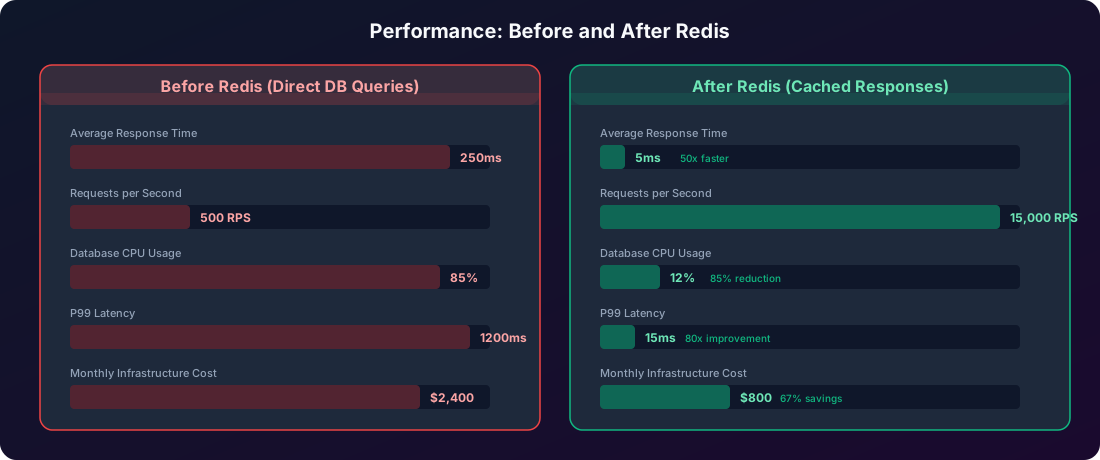
These numbers come from real world observations across multiple production systems. The exact improvements will vary depending on your data access patterns, cache hit ratio, and workload characteristics, but the magnitude of improvement is consistently significant.
The key insight is that caching does not just make your application faster. It also reduces the load on your database server, which means you can defer expensive database scaling decisions. Many teams find that adding a Redis cache layer lets them serve 10 to 30 times more traffic on the same database hardware they already have.
Health Checks and Monitoring
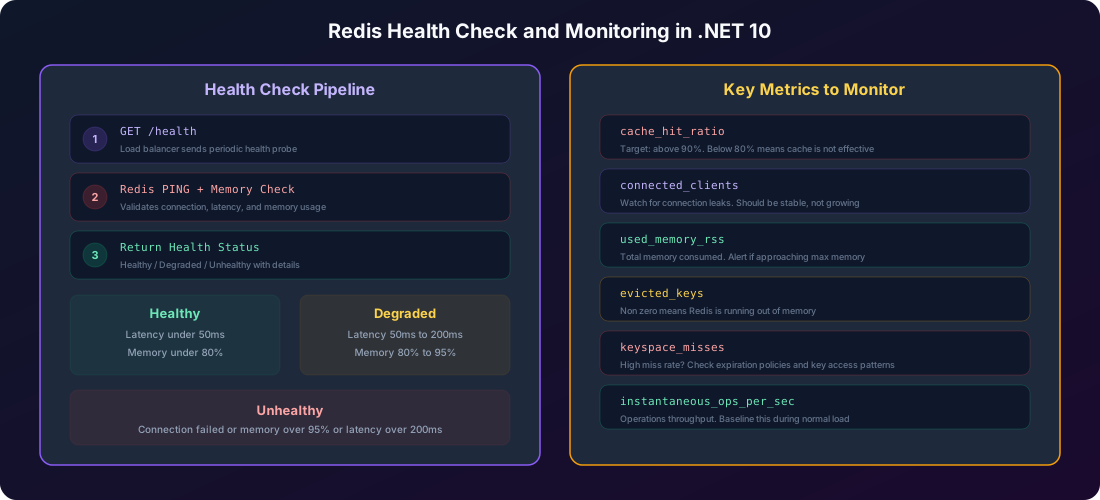
Running Redis in production without proper health checks and monitoring is like driving a car without a dashboard. Everything seems fine until it suddenly is not, and you have no warning.
Implementing Redis Health Checks
.NET 10 has excellent built in support for health checks. Let us add a Redis health check that goes beyond a simple ping.
csharp
using Microsoft.Extensions.Diagnostics.HealthChecks;
using StackExchange.Redis;
public class RedisHealthCheck : IHealthCheck
{
private readonly IConnectionMultiplexer _redis;
public RedisHealthCheck(IConnectionMultiplexer redis)
{
_redis = redis;
}
public async Task<HealthCheckResult> CheckHealthAsync(
HealthCheckContext context,
CancellationToken cancellationToken = default)
{
try
{
var database = _redis.GetDatabase();
var stopwatch = System.Diagnostics.Stopwatch.StartNew();
await database.PingAsync();
stopwatch.Stop();
var latency = stopwatch.ElapsedMilliseconds;
var server = _redis.GetServer(
_redis.GetEndPoints()[0]);
var info = await server.InfoAsync("memory");
var memorySection = info.FirstOrDefault();
var data = new Dictionary<string, object>
{
{ "latency_ms", latency },
{ "connected_clients",
_redis.GetCounters().TotalOutstanding },
{ "is_connected", _redis.IsConnected }
};
if (memorySection is not null)
{
foreach (var pair in memorySection)
{
data[pair.Key] = pair.Value;
}
}
if (!_redis.IsConnected)
{
return HealthCheckResult.Unhealthy(
"Redis connection is not established", null, data);
}
if (latency > 200)
{
return HealthCheckResult.Unhealthy(
$"Redis latency is {latency}ms (threshold: 200ms)",
null, data);
}
if (latency > 50)
{
return HealthCheckResult.Degraded(
$"Redis latency is {latency}ms (threshold: 50ms)",
null, data);
}
return HealthCheckResult.Healthy(
$"Redis is healthy. Latency: {latency}ms", data);
}
catch (Exception ex)
{
return HealthCheckResult.Unhealthy(
"Redis health check failed", ex);
}
}
}
Registering Health Checks
csharp
builder.Services.AddHealthChecks()
.AddCheck<RedisHealthCheck>(
"redis",
failureStatus: HealthStatus.Unhealthy,
tags: new[] { "infrastructure", "cache" });
var app = builder.Build();
app.MapHealthChecks("/health", new HealthCheckOptions
{
ResponseWriter = async (context, report) =>
{
context.Response.ContentType = "application/json";
var result = JsonSerializer.Serialize(new
{
Status = report.Status.ToString(),
Duration = report.TotalDuration.TotalMilliseconds,
Checks = report.Entries.Select(e => new
{
Name = e.Key,
Status = e.Value.Status.ToString(),
Description = e.Value.Description,
Duration = e.Value.Duration.TotalMilliseconds,
Data = e.Value.Data
})
});
await context.Response.WriteAsync(result);
}
});
Cache Hit Ratio Tracking
The single most important metric for your caching layer is the cache hit ratio. If your cache is not being hit, it is not helping and you are just adding complexity. Let us build a simple tracker.
csharp
public class CacheMetrics
{
private long _hits;
private long _misses;
public void RecordHit() => Interlocked.Increment(ref _hits);
public void RecordMiss() => Interlocked.Increment(ref _misses);
public double HitRatio
{
get
{
var total = _hits + _misses;
return total == 0 ? 0 : (double)_hits / total * 100;
}
}
public long Hits => _hits;
public long Misses => _misses;
}
Then integrate it into your cache service:
csharp
public async Task<T> GetOrSetAsync<T>(string key,
Func<Task<T>> factory, TimeSpan? expiry = null,
CancellationToken cancellationToken = default)
{
var cached = await GetAsync<T>(key, cancellationToken);
if (cached is not null)
{
_metrics.RecordHit();
return cached;
}
_metrics.RecordMiss();
var value = await factory();
await SetAsync(key, value, expiry, cancellationToken);
return value;
}
Cache Key Management
One of the most overlooked aspects of Redis caching is key management. Bad key naming leads to key collisions, difficulty debugging, and stale data that is impossible to invalidate cleanly.
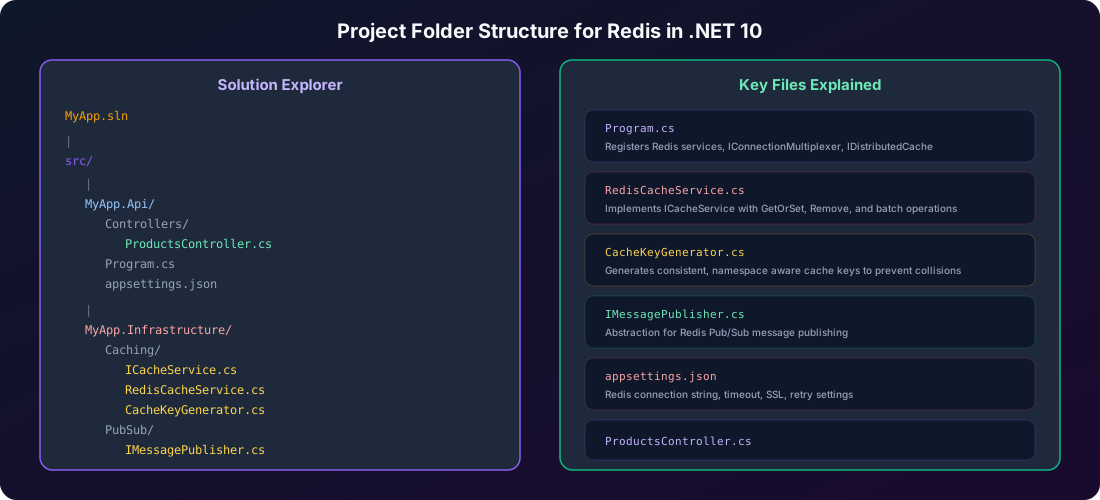
Building a Cache Key Generator
csharp
public static class CacheKeys
{
private const string Prefix = "myapp";
public static string Product(int id)
=> $"{Prefix}:product:{id}";
public static string ProductsByCategory(string category)
=> $"{Prefix}:products:category:{category.ToLowerInvariant()}";
public static string UserProfile(string userId)
=> $"{Prefix}:user:profile:{userId}";
public static string UserOrders(string userId, int page)
=> $"{Prefix}:user:{userId}:orders:page:{page}";
public static string RateLimit(string clientId)
=> $"{Prefix}:ratelimit:{clientId}";
public static string Session(string sessionId)
=> $"{Prefix}:session:{sessionId}";
}
There are three rules for good cache keys. First, they should be predictable. Given the same inputs, the key should always be the same. Second, they should be namespaced to prevent collisions between different data types. Third, they should include enough structure that you can invalidate groups of related keys using prefix matching.
Notice how using products:category: as a prefix lets you invalidate all category caches at once with a single RemoveByPrefixAsync call. This is hugely valuable when someone updates a product and you need to refresh all the category listings that might include it.
Common Mistakes and How to Avoid Them
After years of working with Redis in .NET applications, these are the mistakes I see most frequently.
Mistake 1: Creating New Connections Per Request
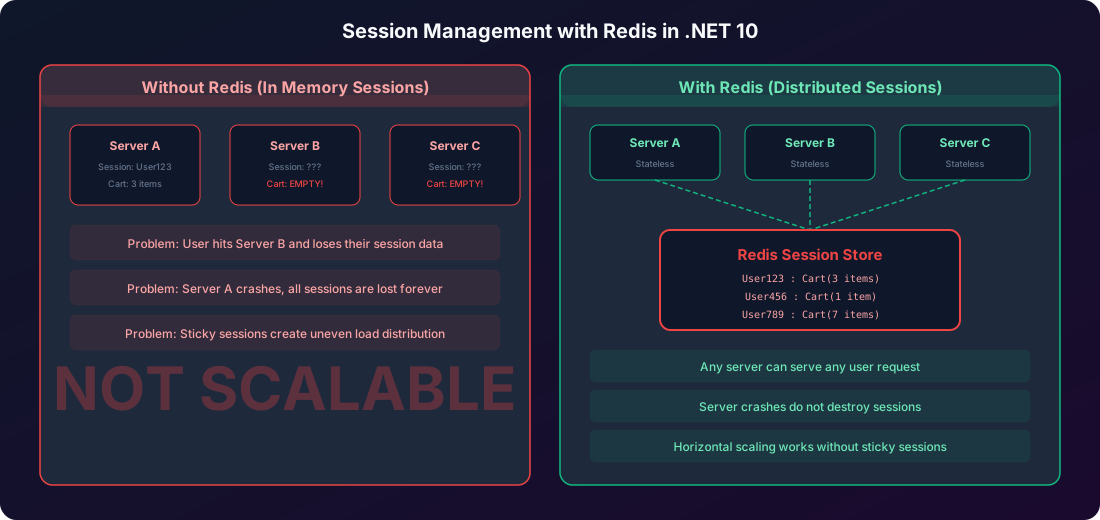
This is the most common and most damaging mistake. The IConnectionMultiplexer is designed to be a singleton. It internally manages a pool of connections and handles reconnection automatically. If you create a new ConnectionMultiplexer for every request, you will exhaust Redis connection limits within minutes under load.
csharp
public class BadCacheService
{
public async Task<string?> GetAsync(string key)
{
using var redis = await ConnectionMultiplexer
.ConnectAsync("localhost:6379");
var db = redis.GetDatabase();
return await db.StringGetAsync(key);
}
}
public class GoodCacheService
{
private readonly IDatabase _database;
public GoodCacheService(IConnectionMultiplexer redis)
{
_database = redis.GetDatabase();
}
public async Task<string?> GetAsync(string key)
{
return await _database.StringGetAsync(key);
}
}
Mistake 2: Caching Without Expiration
If you set cache entries without an expiration time, they will live in Redis forever until you explicitly delete them or Redis runs out of memory. This leads to stale data that never refreshes and steadily growing memory usage.
Always set an expiration. Even if you think the data is permanent, set a long expiration like 24 hours. This gives you a safety net against stale data.
csharp
await _cache.SetAsync("product:123", product);
await _cache.SetAsync("product:123", product,
TimeSpan.FromMinutes(15));
Mistake 3: Not Handling Redis Failures Gracefully
Redis is an external dependency and it can fail. Your application should treat Redis as a performance optimization, not a hard requirement. If Redis is down, the application should fall back to the database, not crash.
csharp
public async Task<T?> GetAsync<T>(string key,
CancellationToken cancellationToken = default)
{
try
{
var value = await _database.StringGetAsync(key);
if (value.IsNullOrEmpty)
return default;
return JsonSerializer.Deserialize<T>(value!, _jsonOptions);
}
catch (RedisConnectionException ex)
{
_logger.LogWarning(ex,
"Redis connection failed for key {Key}. " +
"Falling back to database", key);
return default;
}
}
Mistake 4: Storing Large Objects in Redis
Redis stores everything in memory, and memory is expensive. Storing massive serialized objects in Redis negates its speed advantage because serialization and network transfer time dominate the response. Keep your cached values lean. Cache the specific data you need, not entire entity graphs with all their navigation properties.
Mistake 5: Ignoring the Thundering Herd Problem
When a popular cache entry expires, hundreds of concurrent requests simultaneously discover the cache miss and all hit the database at once. This is called the thundering herd problem. The fix is to use a distributed lock so that only one request fetches from the database while others wait.
csharp
public async Task<T> GetOrSetWithLockAsync<T>(string key,
Func<Task<T>> factory, TimeSpan expiry)
{
var cached = await GetAsync<T>(key);
if (cached is not null)
return cached;
var lockKey = $"lock:{key}";
var lockValue = Guid.NewGuid().ToString();
var acquired = await _database.StringSetAsync(
lockKey, lockValue, TimeSpan.FromSeconds(10),
When.NotExists);
if (acquired)
{
try
{
cached = await GetAsync<T>(key);
if (cached is not null)
return cached;
var value = await factory();
await SetAsync(key, value, expiry);
return value;
}
finally
{
var script = @"
if redis.call('get', KEYS[1]) == ARGV[1] then
return redis.call('del', KEYS[1])
else
return 0
end";
await _database.ScriptEvaluateAsync(script,
new RedisKey[] { lockKey },
new RedisValue[] { lockValue });
}
}
await Task.Delay(100);
return await GetOrSetAsync(key, factory, expiry);
}
When to Use Redis and When to Avoid It
Redis is not the answer to every performance problem. Be honest with yourself about whether your application actually needs it.
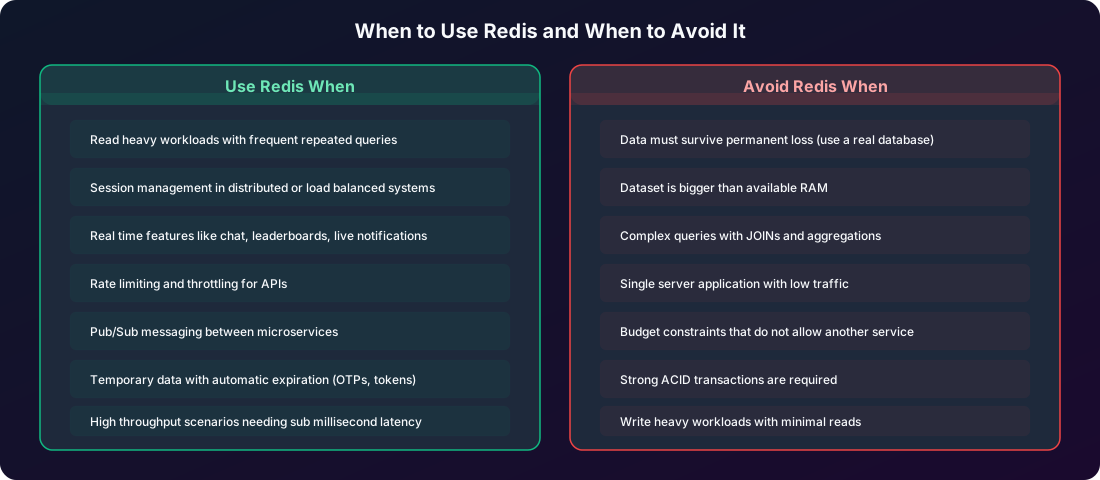
The honest answer is: if you are building a single server application with low to moderate traffic and your database queries are properly indexed and performing well, you probably do not need Redis. Adding Redis introduces operational complexity, another service to monitor, another point of failure, and another thing for your team to understand. That complexity is only worth it when you are actually hitting a scaling wall.
But if you are running multiple server instances, serving thousands of requests per second, or building real time features, Redis is one of the best tools in the .NET ecosystem. It is battle tested at enormous scale. Stack Overflow serves millions of requests per day with Redis. Twitter uses Redis for its timeline cache. GitHub uses Redis for caching and background job processing.
Production Configuration Tips
Before you deploy Redis to production, there are several configuration settings that deserve attention.
Connection String Best Practices
json
{
"ConnectionStrings": {
"Redis": "your-redis-host:6380,password=your-secure-password,ssl=True,abortConnect=false,connectRetry=3,connectTimeout=5000,syncTimeout=5000,asyncTimeout=5000,defaultDatabase=0"
}
}
For Azure Cache for Redis, always use SSL (port 6380) in production. The abortConnect=false setting is critical because it prevents the application from crashing if Redis is temporarily unreachable during startup. The retry and timeout settings give your application resilience against brief network interruptions.
Connection Multiplexer Events
Monitor connection events to get early warning of Redis issues:
csharp
var multiplexer = ConnectionMultiplexer.Connect(configuration);
multiplexer.ConnectionFailed += (sender, args) =>
{
logger.LogError("Redis connection failed: {FailureType} - {Exception}",
args.FailureType, args.Exception?.Message);
};
multiplexer.ConnectionRestored += (sender, args) =>
{
logger.LogInformation(
"Redis connection restored: {EndPoint}", args.EndPoint);
};
multiplexer.ErrorMessage += (sender, args) =>
{
logger.LogWarning("Redis error: {Message}", args.Message);
};
Testing Your Redis Implementation
Testing cache behavior is critical because caching bugs are some of the hardest to diagnose in production. Fortunately, you can test your cache service without a running Redis instance by mocking the interface.
csharp
public class ProductServiceTests
{
private readonly Mock<ICacheService> _cacheMock;
private readonly Mock<AppDbContext> _dbContextMock;
private readonly ProductService _service;
public ProductServiceTests()
{
_cacheMock = new Mock<ICacheService>();
_dbContextMock = new Mock<AppDbContext>();
_service = new ProductService(
_cacheMock.Object, _dbContextMock.Object);
}
[Fact]
public async Task GetProductById_WhenCached_ReturnsFromCache()
{
var expected = new ProductDto
{
Id = 1,
Name = "Test Product",
Price = 29.99m
};
_cacheMock
.Setup(c => c.GetOrSetAsync(
"product:1",
It.IsAny<Func<Task<ProductDto?>>>(),
It.IsAny<TimeSpan?>(),
It.IsAny<CancellationToken>()))
.ReturnsAsync(expected);
var result = await _service.GetProductByIdAsync(1);
Assert.Equal(expected.Name, result!.Name);
Assert.Equal(expected.Price, result.Price);
}
}
For integration tests, you can use Testcontainers to spin up a real Redis instance in Docker:
csharp
public class RedisIntegrationTests : IAsyncLifetime
{
private readonly RedisContainer _container =
new RedisBuilder().Build();
public async Task InitializeAsync()
{
await _container.StartAsync();
}
public async Task DisposeAsync()
{
await _container.DisposeAsync();
}
[Fact]
public async Task SetAndGet_RoundTrip_ReturnsOriginalValue()
{
var redis = await ConnectionMultiplexer
.ConnectAsync(_container.GetConnectionString());
var cache = new RedisCacheService(redis);
var product = new ProductDto
{
Id = 1,
Name = "Test",
Price = 10.00m
};
await cache.SetAsync("test:product:1", product,
TimeSpan.FromMinutes(5));
var result = await cache.GetAsync<ProductDto>(
"test:product:1");
Assert.NotNull(result);
Assert.Equal("Test", result!.Name);
}
}