How Is This Different From Clean Architecture?
This is the question I get the most. If you have read my Clean Architecture article, you know I am a fan of that approach too. So let me be precise about where they differ.
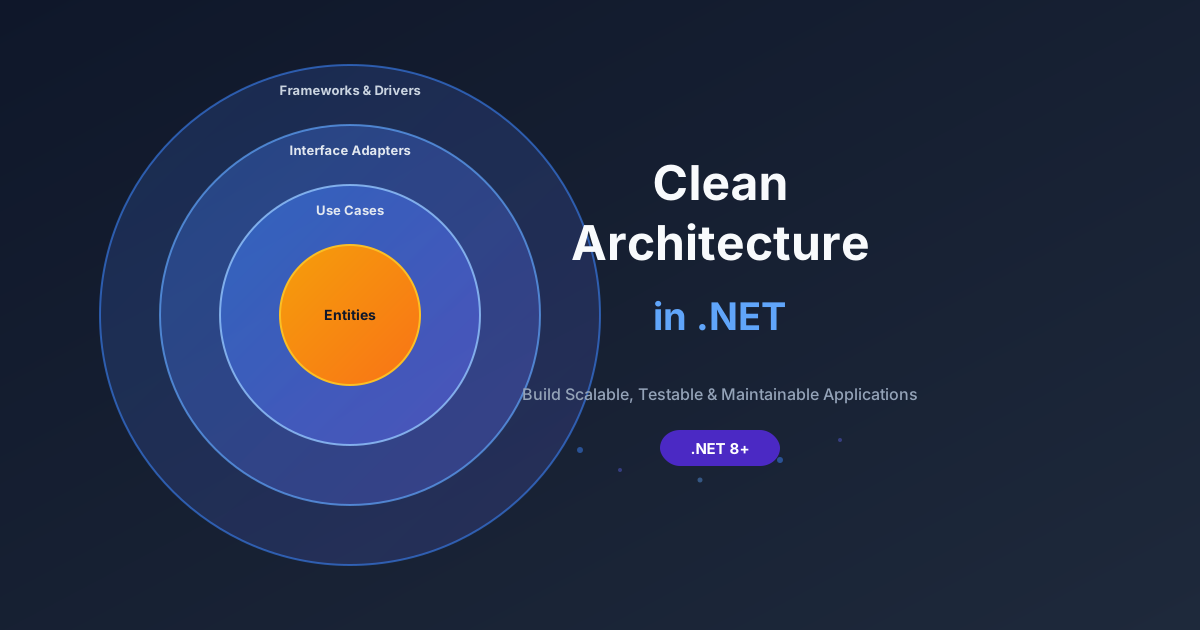
Clean Architecture organizes code in concentric layers with strict dependency rules. The domain is at the center, use cases wrap around it, and infrastructure is on the outside. Dependencies always point inward. It is excellent for applications with complex domain logic that needs to be protected from infrastructure concerns.
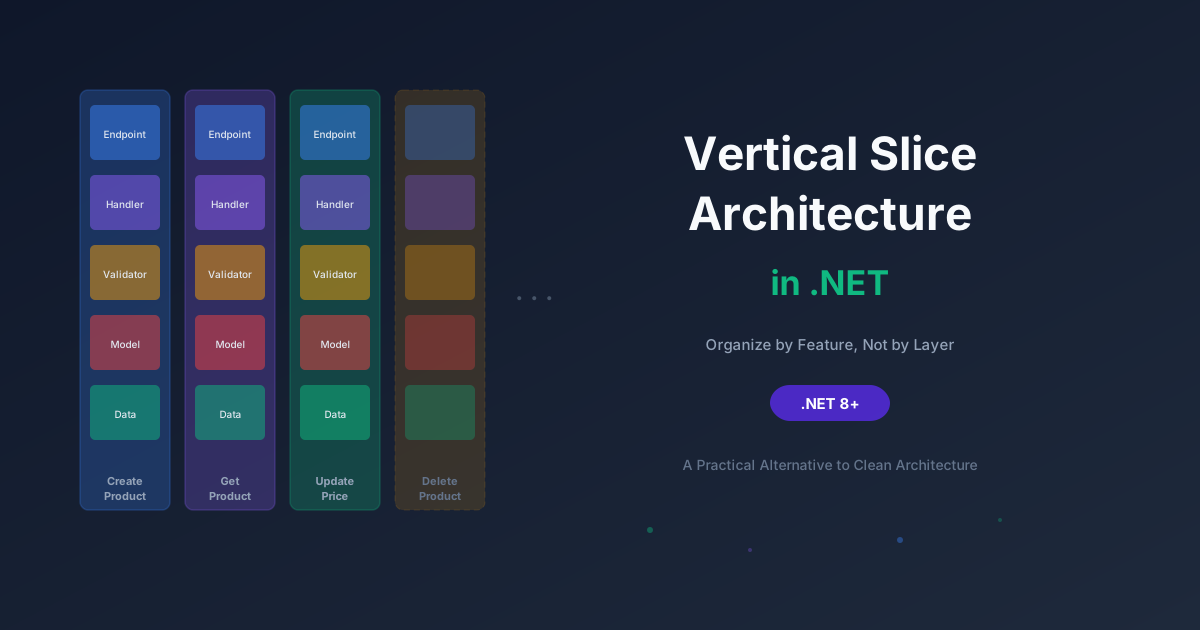
Vertical Slice Architecture organizes code by feature. Each slice is independent and self-contained. There are no enforced layers. Each slice can use whatever pattern makes sense for that specific feature, one slice might use a full repository pattern, another might query the database directly with EF Core, and that is perfectly fine.
| Aspect |
Clean Architecture |
Vertical Slice Architecture |
| Organization |
By technical layer |
By feature/use case |
| Coupling |
Features coupled through shared abstractions |
Features decoupled from each other |
| Dependency rules |
Strict inward-only dependencies |
No enforced dependency direction |
| Abstractions |
Many interfaces and abstractions upfront |
Minimal - add abstractions when needed |
| Code reuse |
Through shared services and repositories |
Through shared utilities only when proven |
| Consistency |
Every feature follows the same pattern |
Each feature uses the pattern that fits |
| Ideal for |
Complex domains, large teams, long-lived systems |
Feature-heavy apps, rapid iteration, microservices |
The honest truth? They are not mutually exclusive. You can use vertical slices inside a Clean Architecture solution. You can have a domain layer with rich entities and still organize your use cases as self-contained slices. The architecture world is not as binary as Twitter debates make it seem.
But in practice, most teams pick one organizational style as their primary approach, and vertical slices are an increasingly popular choice.
Building Vertical Slices in .NET - The Practical Part
Enough philosophy. Let us write some actual code.
I am going to build a simple Product API using Vertical Slice Architecture. The goal is to show you how the slices are structured, how they handle different levels of complexity, and how they stay independent of each other.
Project Structure
Here is how I organize a vertical slice project:
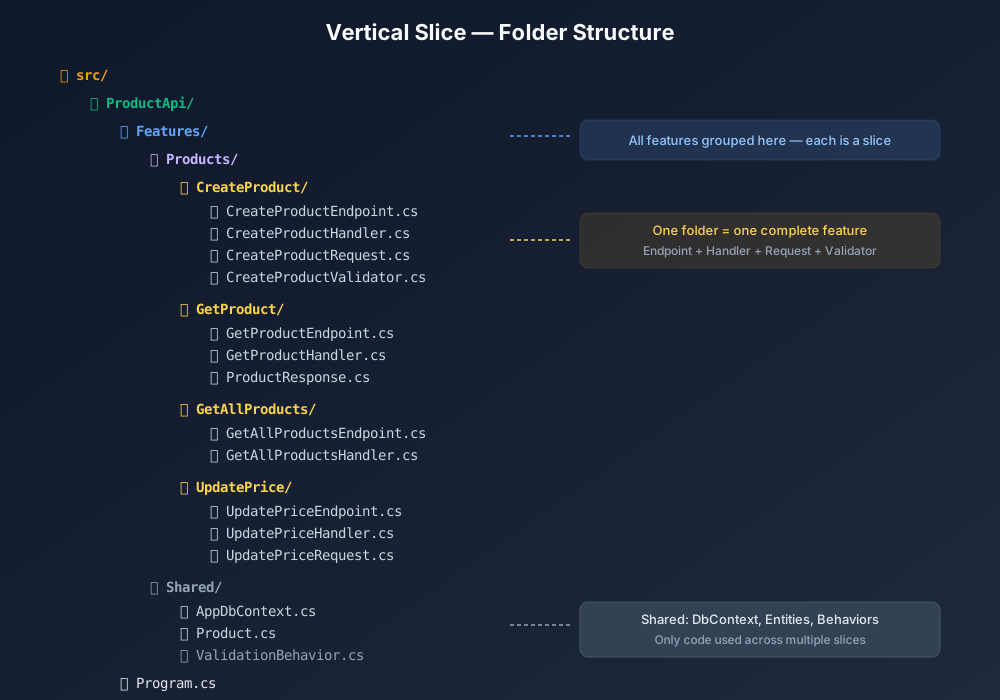
src/
  ProductApi/
    Features/
      Products/
        CreateProduct/
          CreateProductEndpoint.cs
          CreateProductHandler.cs
          CreateProductValidator.cs
          CreateProductRequest.cs
          CreateProductResponse.cs
        GetProduct/
          GetProductEndpoint.cs
          GetProductHandler.cs
        GetAllProducts/
          GetAllProductsEndpoint.cs
          GetAllProductsHandler.cs
        UpdatePrice/
          UpdatePriceEndpoint.cs
          UpdatePriceHandler.cs
          UpdatePriceValidator.cs
    Shared/
      Database/
        AppDbContext.cs
      Entities/
        Product.cs
      Middleware/
        ExceptionHandlingMiddleware.cs
    Program.cs
Notice a few things:
- Every feature has its own folder under
Features/Products/.
- Each folder contains only the files needed for that slice.
- There is no
Services/ folder. No Repositories/ folder. No Interfaces/ folder full of IProductService and IProductRepository.
- The
Shared/ folder holds things that are genuinely shared the database context, entities, and cross-cutting concerns like middleware.
This structure communicates intent. When a new developer joins the team and needs to understand how "Create Product" works, they open one folder. Everything is there.
The Shared Parts
Before we build the slices, let us set up the things that are truly shared.
The Entity:
csharp
namespace ProductApi.Shared.Entities;
public class Product
{
public Guid Id { get; set; }
public string Name { get; set; } = string.Empty;
public string Description { get; set; } = string.Empty;
public decimal Price { get; set; }
public string Category { get; set; } = string.Empty;
public bool IsActive { get; set; } = true;
public DateTime CreatedAt { get; set; } = DateTime.UtcNow;
public DateTime? UpdatedAt { get; set; }
}
The DbContext:
csharp
using Microsoft.EntityFrameworkCore;
using ProductApi.Shared.Entities;
namespace ProductApi.Shared.Database;
public class AppDbContext : DbContext
{
public AppDbContext(DbContextOptions<AppDbContext> options) : base(options) { }
public DbSet<Product> Products => Set<Product>();
protected override void OnModelCreating(ModelBuilder modelBuilder)
{
modelBuilder.Entity<Product>(entity =>
{
entity.HasKey(e => e.Id);
entity.Property(e => e.Name).HasMaxLength(200).IsRequired();
entity.Property(e => e.Price).HasPrecision(18, 2);
entity.Property(e => e.Category).HasMaxLength(100);
});
}
}
That is our shared foundation. Minimal, focused, and only the things that genuinely need to be shared. Now let us build the slices.
Slice 1: Create Product
This is a straightforward write operation with validation. The entire feature lives in one folder.
The Request and Response:
csharp
namespace ProductApi.Features.Products.CreateProduct;
public record CreateProductRequest(
string Name,
string Description,
decimal Price,
string Category
);
public record CreateProductResponse(
Guid Id,
string Name,
decimal Price,
DateTime CreatedAt
);
Using records here because they are perfect for immutable request and response objects. Clean, concise, and they give you value equality for free.
The Validator:
csharp
using FluentValidation;
namespace ProductApi.Features.Products.CreateProduct;
public class CreateProductValidator : AbstractValidator<CreateProductRequest>
{
public CreateProductValidator()
{
RuleFor(x => x.Name)
.NotEmpty().WithMessage("Product name is required")
.MaximumLength(200).WithMessage("Product name cannot exceed 200 characters");
RuleFor(x => x.Price)
.GreaterThan(0).WithMessage("Price must be greater than zero");
RuleFor(x => x.Category)
.NotEmpty().WithMessage("Category is required")
.MaximumLength(100).WithMessage("Category cannot exceed 100 characters");
}
}
The Handler:
csharp
using ProductApi.Shared.Database;
using ProductApi.Shared.Entities;
namespace ProductApi.Features.Products.CreateProduct;
public class CreateProductHandler
{
private readonly AppDbContext _db;
public CreateProductHandler(AppDbContext db)
{
_db = db;
}
public async Task<CreateProductResponse> HandleAsync(
CreateProductRequest request,
CancellationToken cancellationToken = default)
{
var product = new Product
{
Id = Guid.NewGuid(),
Name = request.Name,
Description = request.Description,
Price = request.Price,
Category = request.Category,
CreatedAt = DateTime.UtcNow
};
_db.Products.Add(product);
await _db.SaveChangesAsync(cancellationToken);
return new CreateProductResponse(
product.Id,
product.Name,
product.Price,
product.CreatedAt
);
}
}
Notice something? The handler uses AppDbContext directly. There is no IProductRepository wrapping EF Core just to satisfy an interface. The handler knows exactly what it needs, and it accesses it directly.
This is one of the key mindset shifts in Vertical Slice Architecture: do not abstract what does not need abstracting. If this slice only ever talks to EF Core, let it talk to EF Core.
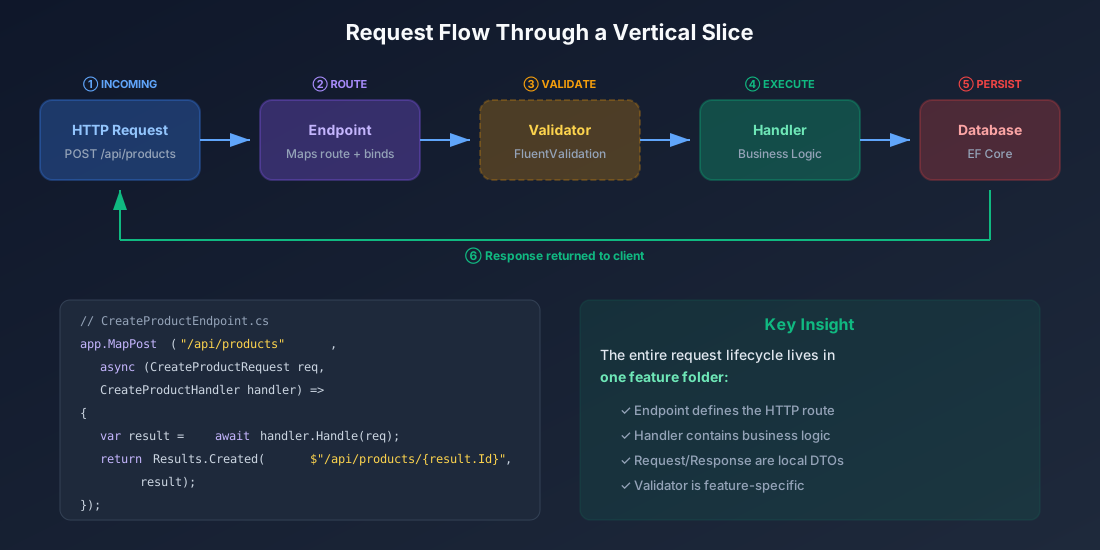
The Endpoint:
csharp
using FluentValidation;
namespace ProductApi.Features.Products.CreateProduct;
public static class CreateProductEndpoint
{
public static void Map(IEndpointRouteBuilder app)
{
app.MapPost("/api/products", async (
CreateProductRequest request,
CreateProductHandler handler,
IValidator<CreateProductRequest> validator,
CancellationToken cancellationToken) =>
{
var validationResult = await validator.ValidateAsync(request, cancellationToken);
if (!validationResult.IsValid)
{
return Results.ValidationProblem(
validationResult.ToDictionary());
}
var result = await handler.HandleAsync(request, cancellationToken);
return Results.Created($"/api/products/{result.Id}", result);
});
}
}
I am using Minimal APIs here because they align perfectly with the vertical slice philosophy. Each endpoint is mapped explicitly. No controller inheritance, no action filters you have to reason about, no [ApiController] magic. Just a function that handles a request.
Slice 2: Get Product By Id
This is a simple read operation. Notice how it is even leaner than the create slice because it does not need validation.
csharp
using Microsoft.EntityFrameworkCore;
using ProductApi.Shared.Database;
namespace ProductApi.Features.Products.GetProduct;
public record GetProductResponse(
Guid Id,
string Name,
string Description,
decimal Price,
string Category,
bool IsActive,
DateTime CreatedAt
);
public class GetProductHandler
{
private readonly AppDbContext _db;
public GetProductHandler(AppDbContext db)
{
_db = db;
}
public async Task<GetProductResponse?> HandleAsync(
Guid id,
CancellationToken cancellationToken = default)
{
var product = await _db.Products
.AsNoTracking()
.FirstOrDefaultAsync(p => p.Id == id, cancellationToken);
if (product is null) return null;
return new GetProductResponse(
product.Id,
product.Name,
product.Description,
product.Price,
product.Category,
product.IsActive,
product.CreatedAt
);
}
}
csharp
namespace ProductApi.Features.Products.GetProduct;
public static class GetProductEndpoint
{
public static void Map(IEndpointRouteBuilder app)
{
app.MapGet("/api/products/{id:guid}", async (
Guid id,
GetProductHandler handler,
CancellationToken cancellationToken) =>
{
var result = await handler.HandleAsync(id, cancellationToken);
return result is not null
? Results.Ok(result)
: Results.NotFound();
});
}
}
Two files. That is the entire feature. No interface, no service, no mapper configuration, no repository. Just a handler that reads from the database and an endpoint that calls it.
Compare this to what the same feature looks like in a traditional layered setup: you would have ProductController.GetById() calling IProductService.GetByIdAsync() calling IProductRepository.GetByIdAsync() calling _context.Products.FindAsync(), with DTOs and AutoMapper profiles in separate folders. Four layers deep for a query that is literally one line of EF Core.
Slice 3: Get All Products (With Filtering)
Let us make this slice slightly more interesting by adding query parameters for filtering and pagination.
csharp
using Microsoft.EntityFrameworkCore;
using ProductApi.Shared.Database;
namespace ProductApi.Features.Products.GetAllProducts;
public record GetAllProductsRequest(
string? Category = null,
decimal? MinPrice = null,
decimal? MaxPrice = null,
int Page = 1,
int PageSize = 20
);
public record ProductSummary(
Guid Id,
string Name,
decimal Price,
string Category,
bool IsActive
);
public record GetAllProductsResponse(
List<ProductSummary> Products,
int TotalCount,
int Page,
int PageSize
);
public class GetAllProductsHandler
{
private readonly AppDbContext _db;
public GetAllProductsHandler(AppDbContext db)
{
_db = db;
}
public async Task<GetAllProductsResponse> HandleAsync(
GetAllProductsRequest request,
CancellationToken cancellationToken = default)
{
var query = _db.Products.AsNoTracking().AsQueryable();
if (!string.IsNullOrWhiteSpace(request.Category))
query = query.Where(p => p.Category == request.Category);
if (request.MinPrice.HasValue)
query = query.Where(p => p.Price >= request.MinPrice.Value);
if (request.MaxPrice.HasValue)
query = query.Where(p => p.Price <= request.MaxPrice.Value);
var totalCount = await query.CountAsync(cancellationToken);
var products = await query
.OrderBy(p => p.Name)
.Skip((request.Page - 1) * request.PageSize)
.Take(request.PageSize)
.Select(p => new ProductSummary(
p.Id, p.Name, p.Price, p.Category, p.IsActive))
.ToListAsync(cancellationToken);
return new GetAllProductsResponse(
products, totalCount, request.Page, request.PageSize);
}
}
csharp
namespace ProductApi.Features.Products.GetAllProducts;
public static class GetAllProductsEndpoint
{
public static void Map(IEndpointRouteBuilder app)
{
app.MapGet("/api/products", async (
string? category,
decimal? minPrice,
decimal? maxPrice,
int? page,
int? pageSize,
GetAllProductsHandler handler,
CancellationToken cancellationToken) =>
{
var request = new GetAllProductsRequest(
category, minPrice, maxPrice,
page ?? 1, pageSize ?? 20);
var result = await handler.HandleAsync(request, cancellationToken);
return Results.Ok(result);
});
}
}
This slice has filtering, pagination, and a projection and it is still just two files. Each slice grows to exactly the complexity it needs and no more.