Validation Behavior
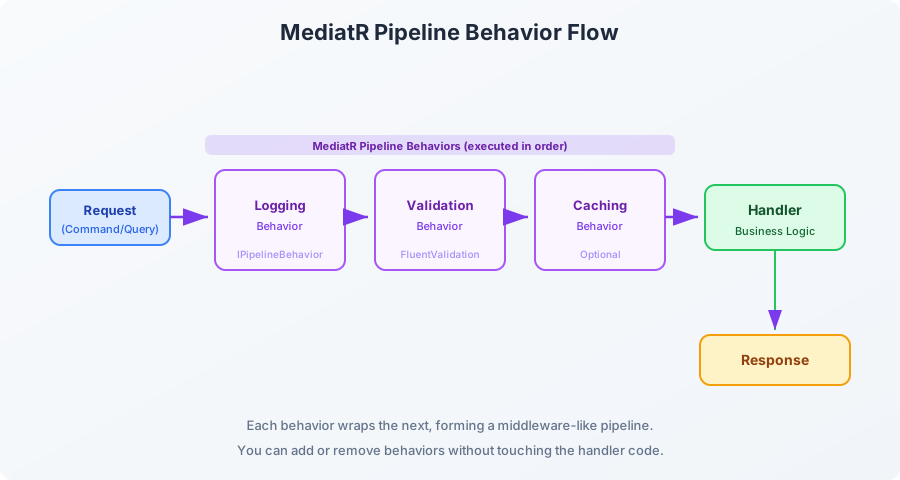
This hooks FluentValidation into the MediatR pipeline so that every command and query gets validated automatically before it reaches the handler:
csharp
using FluentValidation;
using MediatR;
namespace MyApp.Application.Behaviors;
public class ValidationBehavior<TRequest, TResponse>
: IPipelineBehavior<TRequest, TResponse>
where TRequest : notnull
{
private readonly IEnumerable<IValidator<TRequest>> _validators;
public ValidationBehavior(IEnumerable<IValidator<TRequest>> validators)
{
_validators = validators;
}
public async Task<TResponse> Handle(
TRequest request,
RequestHandlerDelegate<TResponse> next,
CancellationToken cancellationToken)
{
if (!_validators.Any())
return await next();
var context = new ValidationContext<TRequest>(request);
var failures = _validators
.Select(v => v.Validate(context))
.SelectMany(result => result.Errors)
.Where(f => f is not null)
.ToList();
if (failures.Any())
throw new ValidationException(failures);
return await next();
}
}
Logging Behavior
Want to log every request that comes through your application layer? One class handles it for all commands and queries:
csharp
using System.Diagnostics;
using MediatR;
using Microsoft.Extensions.Logging;
namespace MyApp.Application.Behaviors;
public class LoggingBehavior<TRequest, TResponse>
: IPipelineBehavior<TRequest, TResponse>
where TRequest : notnull
{
private readonly ILogger<LoggingBehavior<TRequest, TResponse>> _logger;
public LoggingBehavior(ILogger<LoggingBehavior<TRequest, TResponse>> logger)
{
_logger = logger;
}
public async Task<TResponse> Handle(
TRequest request,
RequestHandlerDelegate<TResponse> next,
CancellationToken cancellationToken)
{
var requestName = typeof(TRequest).Name;
_logger.LogInformation("Handling {RequestName}", requestName);
var stopwatch = Stopwatch.StartNew();
var response = await next();
stopwatch.Stop();
_logger.LogInformation(
"Handled {RequestName} in {ElapsedMs}ms",
requestName,
stopwatch.ElapsedMilliseconds);
return response;
}
}
This one logs a warning if any request takes longer than a threshold:
csharp
using System.Diagnostics;
using MediatR;
using Microsoft.Extensions.Logging;
namespace MyApp.Application.Behaviors;
public class PerformanceBehavior<TRequest, TResponse>
: IPipelineBehavior<TRequest, TResponse>
where TRequest : notnull
{
private readonly ILogger<PerformanceBehavior<TRequest, TResponse>> _logger;
private readonly Stopwatch _timer;
public PerformanceBehavior(ILogger<PerformanceBehavior<TRequest, TResponse>> logger)
{
_logger = logger;
_timer = new Stopwatch();
}
public async Task<TResponse> Handle(
TRequest request,
RequestHandlerDelegate<TResponse> next,
CancellationToken cancellationToken)
{
_timer.Start();
var response = await next();
_timer.Stop();
var elapsed = _timer.ElapsedMilliseconds;
if (elapsed > 500)
{
_logger.LogWarning(
"Long running request: {RequestName} took {ElapsedMs}ms. Request: {@Request}",
typeof(TRequest).Name,
elapsed,
request);
}
return response;
}
}
Register All Behaviors
csharp
using MyApp.Application.Behaviors;
using FluentValidation;
using System.Reflection;
var builder = WebApplication.CreateBuilder(args);
builder.Services.AddMediatR(cfg =>
{
cfg.RegisterServicesFromAssembly(Assembly.GetExecutingAssembly());
cfg.AddBehavior(typeof(IPipelineBehavior<,>), typeof(LoggingBehavior<,>));
cfg.AddBehavior(typeof(IPipelineBehavior<,>), typeof(ValidationBehavior<,>));
cfg.AddBehavior(typeof(IPipelineBehavior<,>), typeof(PerformanceBehavior<,>));
});
builder.Services.AddValidatorsFromAssembly(Assembly.GetExecutingAssembly());
Now every single command and query that flows through MediatR automatically gets logged, validated, and performance monitored. You wrote this logic once. It applies everywhere. That right there is the reason people reach for MediatR.
Folder Structure
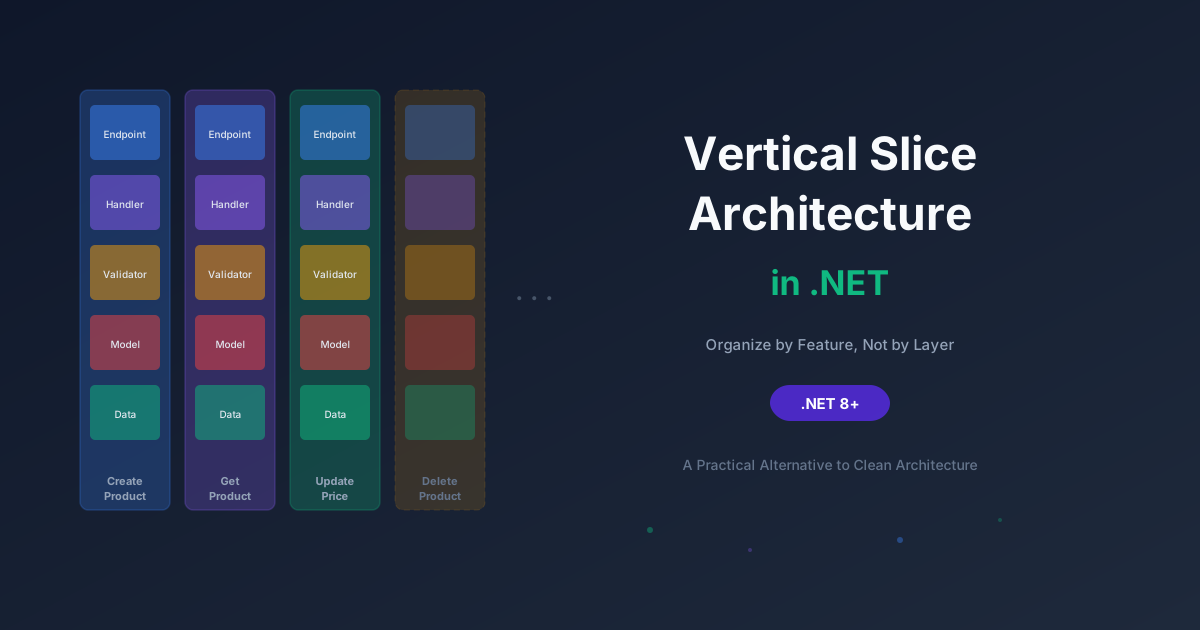
One of the less discussed but highly practical benefits of CQRS with MediatR is the way it organizes your code. Instead of grouping by technical concern (all services in one folder, all DTOs in another), you group by feature:
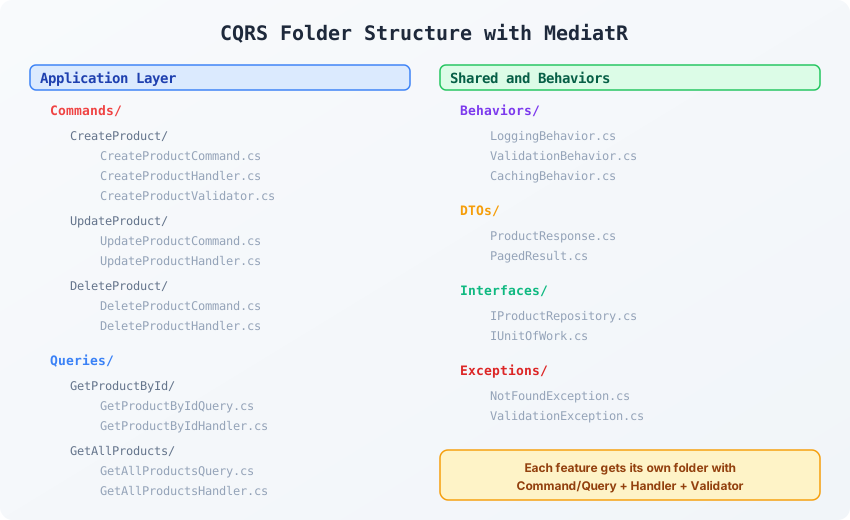
Every feature is self-contained. If someone new joins the team and needs to understand how product creation works, they open one folder and everything is right there: the command, the handler, and the validator. There is no treasure hunt across six directories.
This is sometimes called feature slicing and it works beautifully with CQRS.
Now for the part that actually matters. When should you reach for this combo?
Complex Business Logic
If your application has workflows that involve multiple steps, conditional branching, side effects (sending emails, publishing events, calling external APIs), and serious validation, CQRS gives you a clean way to organize that complexity. Each command handler deals with one specific operation. The handler can focus on getting it right without worrying about polluting a god service class.
Different Read and Write Models
This is the textbook use case. Your write operations work with rich domain entities that enforce business rules. But your read operations need to return flattened DTOs, aggregated views, or joined data from multiple tables. With CQRS, you can optimize each independently. Your query handler can bypass the repository and hit a raw SQL view if that is what gives you the best performance.
Cross-Cutting Concerns
If you need consistent logging, validation, authorization, caching, or error handling across many operations, the MediatR pipeline behaviors are a massive win. You write the behavior once and it applies to every request automatically. Without MediatR, you end up copy-pasting the same try-catch and validation boilerplate into every service method.
Large Teams
When multiple developers or squads work on the same application, CQRS with feature folders reduces merge conflicts and makes code ownership clearer. Team A works on the order commands. Team B works on the product queries. Their code does not intersect.
Event-Driven Requirements
If your application needs to publish domain events when certain actions happen (order placed, payment received, user registered), MediatR has built-in support for notifications. You can publish a ProductCreatedNotification from your command handler and have multiple independent handlers react to it without coupling them together.
csharp
using MediatR;
namespace MyApp.Application.Notifications;
public record ProductCreatedNotification(Guid ProductId, string Name) : INotification;
public class SendWelcomeEmailHandler : INotificationHandler<ProductCreatedNotification>
{
public Task Handle(ProductCreatedNotification notification, CancellationToken ct)
{
return Task.CompletedTask;
}
}
public class UpdateSearchIndexHandler : INotificationHandler<ProductCreatedNotification>
{
public Task Handle(ProductCreatedNotification notification, CancellationToken ct)
{
return Task.CompletedTask;
}
}
Both handlers respond to the same event independently. Adding a new reaction means adding a new handler. You do not modify existing code.
Here is where I need to be honest, because blindly applying CQRS has caused more harm than good on many projects I have reviewed.
Simple CRUD Applications
If your application is essentially a thin layer over a database where most endpoints map directly to insert, update, delete, and select operations with minimal business logic, CQRS is overkill. You are creating a command, a handler, a validator, and a response class for what could be a five line service method.
A ProductService.CreateAsync() method that calls _context.Products.Add() and SaveChangesAsync() is perfectly fine for simple scenarios.
Small Projects with One or Two Developers
The overhead of CQRS is organizational. It pays off when the codebase is large enough and the team is big enough that the structure prevents chaos. If it is just you and maybe one other developer building a 10 endpoint API, the extra files and indirection will slow you down without giving you anything in return.
Prototypes and MVPs
Speed matters more than structure when you are validating an idea. Get it working first. If the product survives and grows, you can refactor toward CQRS later. Starting with it before you even know what the product looks like is premature architecture.
When You Only Use It for the Dispatch
I have seen codebases where MediatR is installed, commands and queries are created, but there are zero pipeline behaviors. No validation behavior. No logging behavior. No caching. Just the dispatch. At that point, MediatR is adding a layer of indirection for the sake of indirection. A simple service class with constructor injected dependencies would do the same job with less ceremony.
Serverless Functions
Azure Functions, AWS Lambda, and similar platforms are already structured around single purpose handlers. Adding MediatR inside a function that only does one thing is adding a mediator to mediate between one caller and one handler. That is pointless.
The Honest Cost-Benefit Breakdown
Let me lay it out in a table so you can make a practical decision:
| Factor |
With CQRS and MediatR |
Without |
| File count |
High (command, handler, validator, response per feature) |
Lower (service method, DTO) |
| Cross-cutting concerns |
Centralized via pipeline behaviors |
Manual per-method or via middleware |
| Testability |
Excellent (each handler is isolated) |
Good (services are testable too) |
| Onboarding |
Steeper initial learning curve |
Simpler to understand at first |
| Scalability |
Handles growth well |
Can become messy at scale |
| Read/Write optimization |
Independent by design |
Requires discipline to separate |
| Debugging |
Request flow is less obvious (indirection) |
Direct call chains are easy to follow |
A Word on Event Sourcing
People often conflate CQRS with event sourcing. They are not the same thing.
CQRS is about separating read and write responsibilities. You can do this with a single relational database. Your commands write through EF Core. Your queries read through Dapper or raw SQL. Same database, different paths.
Event sourcing is about storing state as a sequence of events rather than as a current snapshot. Instead of storing that a product has a price of 29.99, you store the events: product created, price set to 24.99, price updated to 29.99. You rebuild current state by replaying events.
You can use CQRS without event sourcing. Most teams do. Event sourcing adds significant complexity around event storage, event versioning, and state rebuilding. Only consider it if you have a genuine need for an audit trail of every state change or if you need to rebuild state at any point in time.
For most .NET applications, CQRS with a single database and MediatR for the pipeline is the sweet spot.