Building Multi-Tenant Applications in .NET 10

Muhammad Rizwan
2026-03-26
24 min read
Building Multi-Tenant Applications in .NET 10

Imagine your SaaS product just landed its tenth customer. Then its fiftieth. Then its two-hundredth. If you deployed a separate instance of the application for each one, you are now maintaining two-hundred deployment pipelines, two-hundred databases, and two-hundred sets of infrastructure. Your cloud bill has become the most terrifying document in the company.

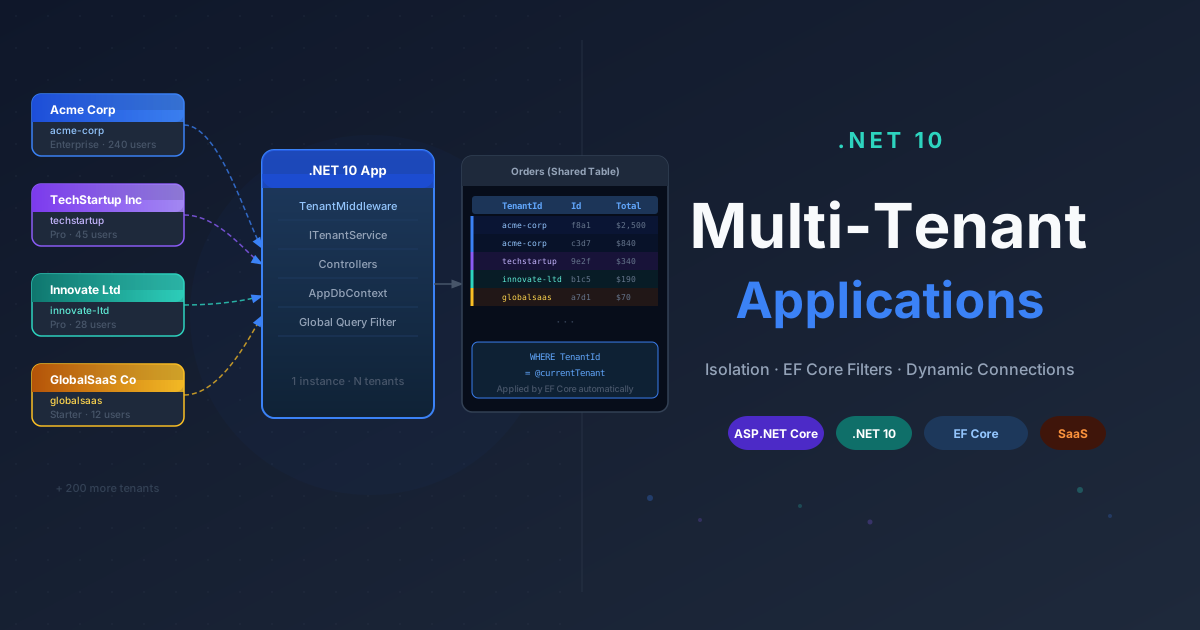
Multi-tenancy is the architectural answer to this problem. One deployed application. One pipeline. One set of infrastructure. Every customer, called a tenant, shares the same running instance while their data stays completely isolated from every other tenant.

This is how Salesforce, Shopify, GitHub, and virtually every serious SaaS product operates. If you are building a .NET SaaS product and not thinking about multi-tenancy early, you will be retrofitting it later. Retrofitting multi-tenancy into an existing application is one of the most painful migrations you will ever run.

Let us build it correctly from the start.


What Is Multi-Tenancy?

A tenant is a customer, organization, or account holder using your application. Multi-tenancy means a single instance of your application serves multiple tenants simultaneously, with complete data isolation between them.

It is not the same as having multiple user accounts. Alice and Bob can both be users inside the same tenant, representing one company. But Acme Corp and TechStartup Inc are separate tenants. Alice from Acme Corp should never see a single record belonging to TechStartup Inc, even if they both use the same endpoint at the same moment.

Think of it as an apartment building. Everyone shares the same structure, the same utilities, and the same lobby. But each apartment is private. Your neighbor does not have a key to your unit.


Types of Multi-Tenant Architectures

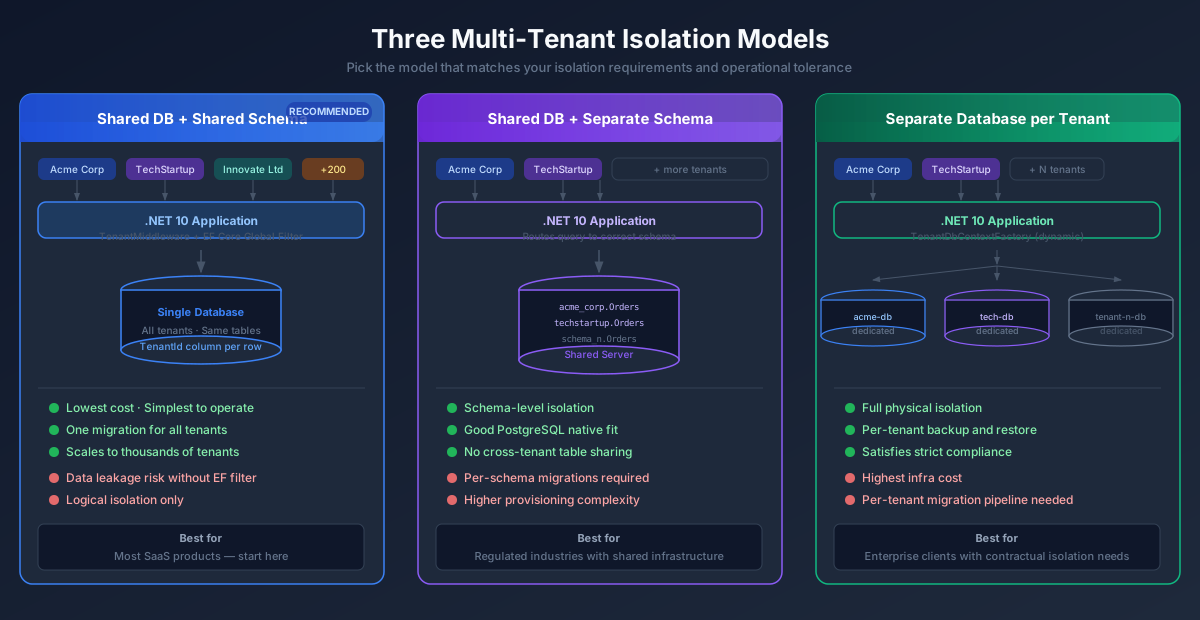
There are three main isolation models. The right one depends on your product's isolation requirements, customer expectations, and how much operational complexity you are willing to carry.

1. Shared Database + Shared Schema

Every tenant's data lives in the same tables. A TenantId column on every row is the only thing separating Acme Corp's records from TechStartup Inc's records.

sql
SELECT * FROM Orders WHERE TenantId = 'acme-corp'

This is the cheapest, most scalable approach. One database, all tenants, one migration to rule them all. The risk is data leakage: a single missing WHERE TenantId = clause exposes one tenant's data to another. EF Core's global query filters are the primary mitigation.

2. Shared Database + Separate Schema

All tenants share the same physical database server but each gets their own SQL schema.

sql
SELECT * FROM acme_corp.Orders SELECT * FROM techstartup.Orders

Better isolation than shared schema, more complexity to manage. Running migrations means updating N schemas. This model works well with PostgreSQL where schemas are a first-class citizen.

3. Separate Database per Tenant

Every tenant gets their own database. Maximum isolation, maximum cost.

acme-corp-db.database.windows.net
techstartup-db.database.windows.net

Migrations must run against every tenant database individually. Connection strings must be resolved dynamically per request. But if a customer's legal team says their data cannot physically coexist with any other company's data, this is the only option that satisfies the requirement.

Free Newsletter

Enjoying the article? Stay in the loop.

  • Production-ready code samples every week
  • In-depth .NET, C# & React tutorials
  • Career tips & dev insights
500+ developers · No spam · Unsubscribe anytime

Join the community

Get new articles delivered every week.

No credit card · No spam · Cancel anytime · Learn more

Comparison Table

Factor Shared DB + Shared Schema Shared DB + Separate Schema Separate Database
Cost Lowest Medium Highest
Complexity Low Medium High
Data Isolation Logical only Schema-level Full physical
Scalability Highest High Medium
Migration Effort Single migration Per-schema migration Per-database migration
Risk of Data Leakage High (no filter = leak) Low Minimal
Best For Most SaaS products Regulated + shared infra Enterprise / regulated

Multi-Tenant Isolation Models

My take: Start with Shared Database + Shared Schema. It handles ninety percent of SaaS use cases without the operational burden of the other two. Add per-schema or per-database isolation only when a specific business, contractual, or compliance requirement forces the issue.


Tenant Resolution Strategies

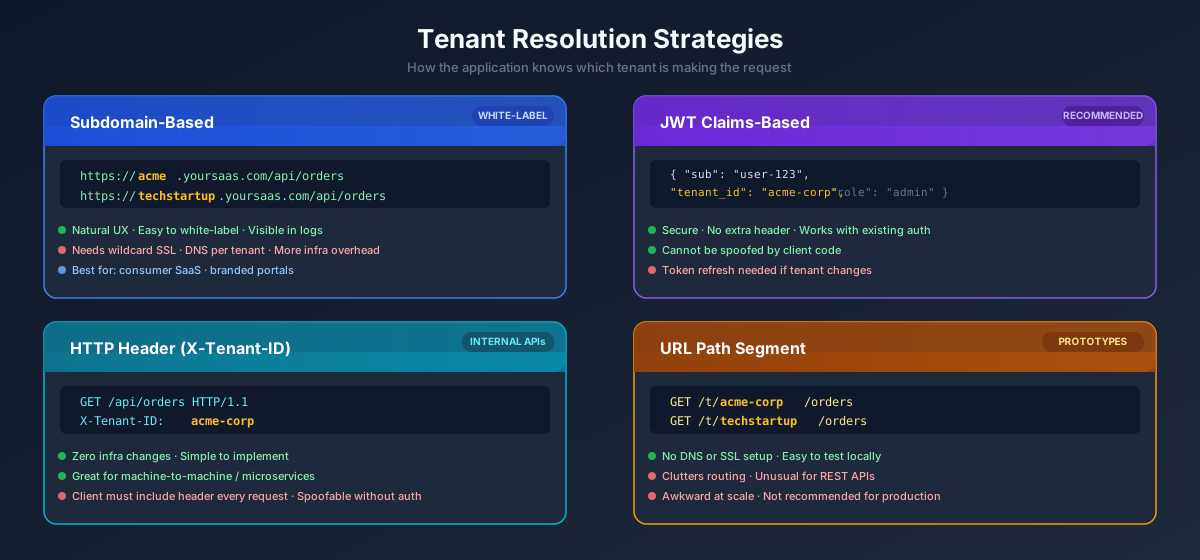
Before your application can do anything tenant-aware, it needs to figure out which tenant is making the request. There are four main strategies, each with different trade-offs.
Tenant Resolution Strategies

Subdomain-based Resolution

https://acme.yoursaas.com/api/orders
https://techstartup.yoursaas.com/api/orders

How it works: Extract the subdomain from HttpContext.Request.Host and look up the corresponding tenant.

Pros: Human-readable URLs, excellent UX, natural fit for white-labeling, easy to configure at the DNS and reverse proxy level.

Cons: Requires wildcard SSL certificates (*.yoursaas.com), DNS provisioning per tenant, more infrastructure setup.

Best for: Consumer-facing SaaS products where per-tenant branding matters.

Header-based Resolution (X-Tenant-ID)

http
GET /api/orders HTTP/1.1 Host: api.yoursaas.com X-Tenant-ID: acme-corp Authorization: Bearer <token>

How it works: Client sends a custom header with every request. The middleware reads it and resolves the tenant.

Pros: Simple to implement, zero infrastructure changes, great for API-first products and machine-to-machine communication.

Cons: Relies on the client always sending the correct header. Not natural for browser-based apps where custom request headers are not automatically included.

Best for: Internal APIs, microservice-to-microservice calls.

JWT Claims-based Resolution

json
{ "sub": "user-123", "email": "alice@acme.com", "tenant_id": "acme-corp", "tenant_name": "ACME Corporation", "role": "admin" }

How it works: The tenant identifier is embedded in the JWT token at the time of authentication. Middleware extracts it from the user's claims on every request.

Pros: Secure (the identity provider controls the token contents), no extra round-trips, works seamlessly with existing authentication flows, tenant cannot be spoofed by the client.

Cons: Requires a token refresh if tenant affiliation changes. Slightly more complex initial setup if you are rolling your own identity.

Best for: Most production SaaS applications. This is the approach this guide uses.

URL Path-based Resolution

https://yoursaas.com/t/acme-corp/orders
https://yoursaas.com/t/techstartup/orders

How it works: Tenant identifier is part of the route path. Middleware reads the route value.

Pros: No special DNS or SSL setup. Easy to test locally without any infrastructure.

Cons: Clutters routing, unusual for REST APIs, awkward to maintain at scale.

Best for: Quick prototypes, internal tools, admin dashboards.


Step-by-Step Implementation in .NET 10

Let us build the core of a multi-tenant .NET 10 application using the Shared Database + Shared Schema model with JWT claims-based tenant resolution. This is the most common production setup and the right starting point for most SaaS products.

1. TenantContext Model

Start with a simple model representing the resolved tenant for the current request.

csharp
namespace YourApp.MultiTenancy; public sealed record TenantContext { public required string TenantId { get; init; } public required string TenantName { get; init; } public bool IsResolved { get; init; } = true; public static TenantContext Unresolved() => new() { TenantId = string.Empty, TenantName = string.Empty, IsResolved = false }; }

Keep this model lean. It is not the place to store feature flags, plan tiers, or billing state. Those live elsewhere and are loaded on demand.

2. ITenantService

A scoped service that holds the resolved tenant for the lifetime of a single HTTP request. Scoped lifetime is non-negotiable here.

csharp
namespace YourApp.MultiTenancy; public interface ITenantService { TenantContext Current { get; } void SetTenant(TenantContext context); } public sealed class TenantService : ITenantService { private TenantContext _current = TenantContext.Unresolved(); public TenantContext Current => _current; public void SetTenant(TenantContext context) { ArgumentNullException.ThrowIfNull(context); _current = context; } }

3. Tenant Resolution Middleware

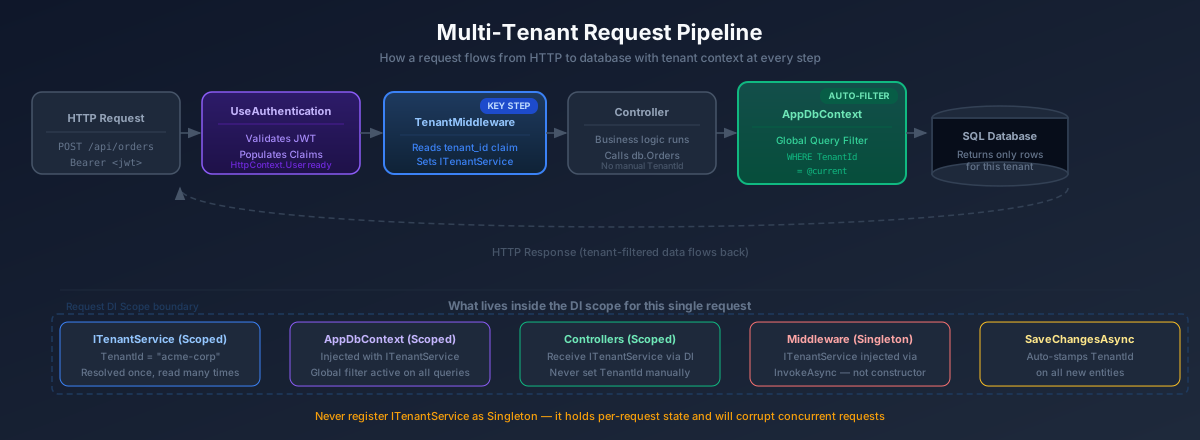
This middleware runs early in the pipeline, resolves the tenant from the authenticated user's JWT claims, and populates the scoped ITenantService.

csharp
namespace YourApp.MultiTenancy; public sealed class TenantResolutionMiddleware(RequestDelegate next) { public async Task InvokeAsync(HttpContext context, ITenantService tenantService) { var tenantId = context.User.FindFirst("tenant_id")?.Value; var tenantName = context.User.FindFirst("tenant_name")?.Value; if (!string.IsNullOrWhiteSpace(tenantId)) { tenantService.SetTenant(new TenantContext { TenantId = tenantId, TenantName = tenantName ?? tenantId, IsResolved = true }); } await next(context); } }

Notice that ITenantService is injected through the InvokeAsync method signature, not the constructor. This is intentional. ITenantService is scoped, and the middleware itself is a singleton in the ASP.NET Core pipeline. Constructor injection would create a captive dependency problem, where the singleton middleware would hold a single scoped instance across all requests. Method injection on InvokeAsync resolves the scoped service correctly from the current request's DI scope.

4. Registering Services in DI

csharp
using YourApp.MultiTenancy; using Microsoft.AspNetCore.Authentication.JwtBearer; var builder = WebApplication.CreateBuilder(args); // Tenant services — scoped lifetime is required builder.Services.AddScoped<ITenantService, TenantService>(); // Authentication builder.Services.AddAuthentication(JwtBearerDefaults.AuthenticationScheme) .AddJwtBearer(options => { options.Authority = builder.Configuration["Auth:Authority"]; options.Audience = builder.Configuration["Auth:Audience"]; }); builder.Services.AddAuthorization(); // EF Core builder.Services.AddDbContext<AppDbContext>(options => options.UseSqlServer(builder.Configuration.GetConnectionString("DefaultConnection"))); builder.Services.AddControllers(); var app = builder.Build(); // Pipeline order is critical: authentication runs before tenant resolution // so that HttpContext.User is populated when the middleware reads claims app.UseAuthentication(); app.UseAuthorization(); app.UseMiddleware<TenantResolutionMiddleware>(); app.MapControllers(); app.Run();
Multi-Tenant Request Pipeline

5. Example Entity with TenantId

Every entity that belongs to a tenant carries a TenantId. Enforcing this through a base class ensures consistency and makes the contract explicit.

csharp
namespace YourApp.Domain; public interface ITenantEntity { string TenantId { get; set; } } public abstract class TenantEntityBase : ITenantEntity { public Guid Id { get; set; } = Guid.NewGuid(); public string TenantId { get; set; } = string.Empty; public DateTimeOffset CreatedAt { get; set; } = DateTimeOffset.UtcNow; } public sealed class Order : TenantEntityBase { public string CustomerName { get; set; } = string.Empty; public decimal TotalAmount { get; set; } public OrderStatus Status { get; set; } = OrderStatus.Pending; public List<OrderItem> Items { get; set; } = []; } public sealed class OrderItem { public Guid Id { get; set; } = Guid.NewGuid(); public Guid OrderId { get; set; } public string ProductName { get; set; } = string.Empty; public int Quantity { get; set; } public decimal UnitPrice { get; set; } } public enum OrderStatus { Pending, Confirmed, Shipped, Delivered, Cancelled }

6. EF Core DbContext with Global Query Filter

The global query filter is the single most important safety mechanism in the shared-schema approach. Every EF Core query against a tenant entity automatically receives a WHERE TenantId = @tenantId clause, regardless of who wrote the query or where it lives in the codebase.

csharp
using Microsoft.EntityFrameworkCore; using YourApp.Domain; using YourApp.MultiTenancy; namespace YourApp.Data; public sealed class AppDbContext : DbContext { private readonly ITenantService _tenantService; public AppDbContext(DbContextOptions<AppDbContext> options, ITenantService tenantService) : base(options) { _tenantService = tenantService; } public DbSet<Order> Orders => Set<Order>(); protected override void OnModelCreating(ModelBuilder modelBuilder) { // Global query filter — every query against Order automatically // includes WHERE TenantId = '<current tenant id>' modelBuilder.Entity<Order>() .HasQueryFilter(o => o.TenantId == _tenantService.Current.TenantId); // TenantId should be required and indexed for query performance modelBuilder.Entity<Order>() .Property(o => o.TenantId) .IsRequired() .HasMaxLength(100); modelBuilder.Entity<Order>() .HasIndex(o => o.TenantId); base.OnModelCreating(modelBuilder); } public override Task<int> SaveChangesAsync(CancellationToken cancellationToken = default) { // Auto-stamp TenantId on new entities before the INSERT hits the database. // Application code never needs to set TenantId manually. foreach (var entry in ChangeTracker.Entries<ITenantEntity>() .Where(e => e.State == EntityState.Added)) { entry.Entity.TenantId = _tenantService.Current.TenantId; } return base.SaveChangesAsync(cancellationToken); } }

The SaveChangesAsync override is just as important as the query filter. New entities get their TenantId stamped automatically at persistence time. No feature code ever touches TenantId directly — it is purely infrastructure-level behavior.

7. Example Controller Using Tenant-Aware Data

csharp
using Microsoft.AspNetCore.Authorization; using Microsoft.AspNetCore.Mvc; using Microsoft.EntityFrameworkCore; using YourApp.Data; using YourApp.Domain; using YourApp.MultiTenancy; namespace YourApp.Controllers; [ApiController] [Route("api/[controller]")] [Authorize] public sealed class OrdersController(AppDbContext db, ITenantService tenantService) : ControllerBase { [HttpGet] public async Task<IActionResult> GetOrders(CancellationToken ct) { // The global query filter adds WHERE TenantId = '<current>' automatically. // No manual filtering required here. var orders = await db.Orders .AsNoTracking() .OrderByDescending(o => o.CreatedAt) .ToListAsync(ct); return Ok(orders); } [HttpGet("{id:guid}")] public async Task<IActionResult> GetOrder(Guid id, CancellationToken ct) { // EF Core global filter ensures this tenant can only retrieve their own orders. // Even if a different tenant's order ID is passed, this returns null. var order = await db.Orders .AsNoTracking() .FirstOrDefaultAsync(o => o.Id == id, ct); return order is null ? NotFound() : Ok(order); } [HttpPost] public async Task<IActionResult> CreateOrder(CreateOrderRequest request, CancellationToken ct) { var order = new Order { CustomerName = request.CustomerName, TotalAmount = request.TotalAmount, Status = OrderStatus.Pending // TenantId is set automatically by the SaveChangesAsync override }; db.Orders.Add(order); await db.SaveChangesAsync(ct); return CreatedAtAction(nameof(GetOrder), new { id = order.Id }, order); } [HttpGet("tenant-info")] public IActionResult GetTenantInfo() { var tenant = tenantService.Current; return Ok(new { tenant.TenantId, tenant.TenantName, tenant.IsResolved }); } } public sealed record CreateOrderRequest(string CustomerName, decimal TotalAmount);

Advanced Scenario: Database per Tenant

When a large enterprise customer's legal team demands that their data cannot physically coexist with any other company's data, the shared-schema approach is off the table. You need the database-per-tenant model.

The central challenge is dynamic connection string resolution. Rather than reading a single connection string from appsettings.json, you look up the correct connection string based on the resolved tenant at request time.

Tenant Configuration Store

You need a place to store the mapping from tenant identifier to connection string. In production, this is typically a central configuration database or a secrets vault such as Azure Key Vault. For this example, an in-memory implementation illustrates the contract.

csharp
namespace YourApp.MultiTenancy; public sealed record TenantDatabaseConfig { public required string TenantId { get; init; } public required string TenantName { get; init; } public required string ConnectionString { get; init; } } public interface ITenantConfigurationProvider { Task<TenantDatabaseConfig?> GetAsync(string tenantId, CancellationToken ct = default); Task<IReadOnlyList<string>> GetAllTenantIdsAsync(CancellationToken ct = default); } // Production: replace with a database-backed or Key Vault-backed implementation public sealed class InMemoryTenantConfigurationProvider : ITenantConfigurationProvider { private static readonly Dictionary<string, TenantDatabaseConfig> _configs = new() { ["acme-corp"] = new TenantDatabaseConfig { TenantId = "acme-corp", TenantName = "ACME Corporation", ConnectionString = "Server=acme.database.windows.net;Database=AcmeDb;Authentication=Active Directory Default;" }, ["techstartup"] = new TenantDatabaseConfig { TenantId = "techstartup", TenantName = "TechStartup Inc", ConnectionString = "Server=techstartup.database.windows.net;Database=TechDb;Authentication=Active Directory Default;" } }; public Task<TenantDatabaseConfig?> GetAsync(string tenantId, CancellationToken ct = default) => Task.FromResult(_configs.TryGetValue(tenantId, out var config) ? config : null); public Task<IReadOnlyList<string>> GetAllTenantIdsAsync(CancellationToken ct = default) => Task.FromResult<IReadOnlyList<string>>([.. _configs.Keys]); }

Dynamic DbContext Factory

Rather than registering AppDbContext with AddDbContext, you use a factory that builds the context with the correct connection string for the current tenant on demand.

csharp
namespace YourApp.Data; public sealed class TenantDbContextFactory( ITenantService tenantService, ITenantConfigurationProvider configProvider, ILoggerFactory loggerFactory) { public async Task<AppDbContext> CreateAsync(CancellationToken ct = default) { var tenantId = tenantService.Current.TenantId; if (string.IsNullOrWhiteSpace(tenantId)) throw new InvalidOperationException( "Tenant is not resolved. Cannot create a database context."); var config = await configProvider.GetAsync(tenantId, ct) ?? throw new InvalidOperationException( $"No database configuration found for tenant '{tenantId}'."); var options = new DbContextOptionsBuilder<AppDbContext>() .UseSqlServer(config.ConnectionString) .UseLoggerFactory(loggerFactory) .Options; return new AppDbContext(options, tenantService); } }

DI Registration for Database-per-Tenant

csharp
// Do NOT use AddDbContext<AppDbContext> for the per-tenant model. // The factory handles context creation with the correct connection string. builder.Services.AddScoped<ITenantService, TenantService>(); builder.Services.AddSingleton<ITenantConfigurationProvider, InMemoryTenantConfigurationProvider>(); builder.Services.AddScoped<TenantDbContextFactory>();

Using the Factory in a Controller

csharp
[HttpGet] public async Task<IActionResult> GetOrders( [FromServices] TenantDbContextFactory dbFactory, CancellationToken ct) { await using var db = await dbFactory.CreateAsync(ct); var orders = await db.Orders .AsNoTracking() .OrderByDescending(o => o.CreatedAt) .ToListAsync(ct); return Ok(orders); }

When database-per-tenant makes sense:

  • Enterprise clients with contractual or regulatory data isolation requirements
  • Healthcare or financial services where co-tenancy is legally restricted
  • When a single tenant's data volume justifies dedicated infrastructure
  • When you need per-tenant backup, restore, and point-in-time recovery

When it does not make sense:

  • Standard SaaS with hundreds or thousands of small tenants
  • Early-stage products before you have validated product-market fit
  • When your operations team does not have the capacity to manage N databases

Free Newsletter

Enjoying the article? Stay in the loop.

  • Production-ready code samples every week
  • In-depth .NET, C# & React tutorials
  • Career tips & dev insights
500+ developers · No spam · Unsubscribe anytime

Join the community

Get new articles delivered every week.

No credit card · No spam · Cancel anytime · Learn more

Real-World Challenges and Pitfalls

Building the multi-tenant scaffold is the easy part. These are the problems that cause incidents in production.

Data Leakage

This is the highest-severity risk in the shared-schema model. A missing filter clause in a raw SQL query, a LINQ query that reaches for IgnoreQueryFilters() carelessly, or a Dapper call that skips EF Core entirely will silently expose one tenant's data to another. There will be no exception. The application will return wrong data, and you will find out when a customer files a support ticket — or worse, when they do not.

Mitigation strategies:

  • Let EF Core global query filters do the heavy lifting. They are your primary guard.
  • Never call IgnoreQueryFilters() in application code. Reserve it strictly for admin and migration tooling, with a code comment explaining why.
  • Wrap all data access behind a repository layer to centralize and audit filtering logic.
  • Write explicit tenant isolation tests (see the Testing section below).
csharp
// DANGEROUS: bypasses the global query filter entirely var allOrders = db.Orders.IgnoreQueryFilters().ToList(); // SAFE: global query filter is applied automatically var tenantOrders = await db.Orders.ToListAsync(ct);

Migrations per Tenant

With the shared-schema model, one migration updates all tenants simultaneously. This is operationally simple.

With per-tenant databases, migrations become an operational problem. Every new tenant database needs to be provisioned and brought to the current schema version. Every future migration needs to run against all N databases without failures leaving any one of them in a partially migrated state.

csharp
public sealed class TenantMigrationService( ITenantConfigurationProvider configProvider, ILogger<TenantMigrationService> logger) { public async Task MigrateAllTenantsAsync(CancellationToken ct) { var tenantIds = await configProvider.GetAllTenantIdsAsync(ct); foreach (var tenantId in tenantIds) { var config = await configProvider.GetAsync(tenantId, ct); if (config is null) continue; try { var tenantService = new TenantService(); tenantService.SetTenant(new TenantContext { TenantId = config.TenantId, TenantName = config.TenantName }); var options = new DbContextOptionsBuilder<AppDbContext>() .UseSqlServer(config.ConnectionString) .Options; await using var db = new AppDbContext(options, tenantService); logger.LogInformation("Migrating tenant {TenantId}", tenantId); await db.Database.MigrateAsync(ct); logger.LogInformation("Migration complete for tenant {TenantId}", tenantId); } catch (Exception ex) { // Log and continue — do not let one tenant failure block others logger.LogError(ex, "Migration failed for tenant {TenantId}", tenantId); } } } }

Run this migration service in a deployment pipeline step before the new application version goes live. Never run tenant migrations inside application startup.

Background Jobs (Hangfire / Hosted Services)

Background jobs run outside any HTTP request. There is no HttpContext, no claims principal, no middleware pipeline. The tenant is not resolved. This is the second most common source of multi-tenancy bugs after data leakage.

The typical failure: a Hangfire job that sends invoice emails calls db.Orders.ToListAsync(). Because ITenantService.Current.TenantId is empty string (unresolved), the global query filter returns zero results. No emails sent. No exceptions. Silent failure.

csharp
// Cross-tenant job: explicitly iterate all tenants public sealed class OrderProcessingJob( ITenantConfigurationProvider configProvider, IServiceScopeFactory scopeFactory, ILogger<OrderProcessingJob> logger) { public async Task ExecuteAsync(CancellationToken ct) { var tenantIds = await configProvider.GetAllTenantIdsAsync(ct); foreach (var tenantId in tenantIds) { // A fresh DI scope per tenant ensures isolation between iterations await using var scope = scopeFactory.CreateAsyncScope(); var tenantService = scope.ServiceProvider.GetRequiredService<ITenantService>(); tenantService.SetTenant(new TenantContext { TenantId = tenantId, TenantName = tenantId, IsResolved = true }); var db = scope.ServiceProvider.GetRequiredService<AppDbContext>(); var pendingOrders = await db.Orders .Where(o => o.Status == OrderStatus.Pending) .ToListAsync(ct); logger.LogInformation( "Processing {Count} pending orders for tenant {TenantId}", pendingOrders.Count, tenantId); // Process orders... } } } // Single-tenant job: pass TenantId as an explicit parameter public sealed class InvoiceGenerationJob(IServiceScopeFactory scopeFactory) { // TenantId is part of the job arguments, serialized by Hangfire public async Task ExecuteAsync(string tenantId, Guid orderId, CancellationToken ct) { await using var scope = scopeFactory.CreateAsyncScope(); var tenantService = scope.ServiceProvider.GetRequiredService<ITenantService>(); tenantService.SetTenant(new TenantContext { TenantId = tenantId, TenantName = tenantId, IsResolved = true }); var db = scope.ServiceProvider.GetRequiredService<AppDbContext>(); var order = await db.Orders.FirstOrDefaultAsync(o => o.Id == orderId, ct); if (order is null) { // Log and exit — do not throw, as Hangfire will retry return; } // Generate invoice... } }

The rule: Every background job must either explicitly set a tenant context before accessing data, or operate deliberately cross-tenant with a conscious call to IgnoreQueryFilters().

Caching Problems

Caching in multi-tenant applications is a trap. If you cache a query result without including the TenantId in the cache key, the first tenant's data gets cached and served to every subsequent tenant that hits the same endpoint until the cache expires.

csharp
// WRONG: shared cache key means every tenant sees the same data var cacheKey = "product-catalog"; // CORRECT: TenantId is always part of the cache key var tenantId = tenantService.Current.TenantId; var cacheKey = $"product-catalog:{tenantId}"; // With IMemoryCache if (!cache.TryGetValue(cacheKey, out List<Product>? products)) { products = await db.Products.AsNoTracking().ToListAsync(ct); cache.Set(cacheKey, products, TimeSpan.FromMinutes(5)); }

Also be deliberate about cache invalidation. When a tenant updates their data, only their cache entries should be evicted. Using the TenantId as a prefix makes this tractable.

Logging per Tenant

When something breaks in production, the first question is always: which tenant? Without tenant context in your logs, hunting down a production incident across thousands of interleaved log entries is genuinely painful.

csharp
public sealed class TenantLoggingMiddleware(RequestDelegate next) { public async Task InvokeAsync(HttpContext context, ITenantService tenantService) { var logger = context.RequestServices .GetRequiredService<ILogger<TenantLoggingMiddleware>>(); // BeginScope enriches every log entry written within this request // with TenantId and TenantName as structured properties using var scope = logger.BeginScope(new Dictionary<string, object> { ["TenantId"] = tenantService.Current.TenantId, ["TenantName"] = tenantService.Current.TenantName }); await next(context); } }

With Serilog, use LogContext.PushProperty in an enricher to attach TenantId to every structured log event automatically. In Application Insights, add it as a custom dimension via a TelemetryInitializer.

Performance Considerations

  • Index the TenantId column on every tenant-scoped table. Without this, every query that filters by tenant performs a full table scan.
  • Add composite indexes for commonly queried combinations: (TenantId, Status), (TenantId, CreatedAt DESC).
  • For very large tables, evaluate table partitioning by TenantId in SQL Server or declarative partitioning in PostgreSQL.
  • Monitor query performance per tenant separately. One tenant with an unusually large data set or an inefficient query pattern should not cause latency spikes for others.
  • Be careful with COUNT(*) and aggregation queries without tenant filters — those can become expensive as total data volume grows, even if individual tenants' data sets are small.

Free Newsletter

Enjoying the article? Stay in the loop.

  • Production-ready code samples every week
  • In-depth .NET, C# & React tutorials
  • Career tips & dev insights
500+ developers · No spam · Unsubscribe anytime

Join the community

Get new articles delivered every week.

No credit card · No spam · Cancel anytime · Learn more

Best Practices

Keep Tenant Context Scoped

This is not optional. The tenant context must be a scoped service — one instance per HTTP request, created fresh, discarded after the request completes. A singleton or static holding tenant context will cause tenant data to bleed across concurrent requests.

csharp
// CORRECT builder.Services.AddScoped<ITenantService, TenantService>(); // CATASTROPHICALLY WRONG — concurrent requests will corrupt each other's tenant context builder.Services.AddSingleton<ITenantService, TenantService>();

Always Enforce TenantId at the Database Level

Do not rely solely on application-layer filtering as your only line of defense. Add database-level enforcement as a second layer. SQL Server's Row-Level Security (RLS) can enforce tenant isolation at the engine level, meaning even a raw ADO.NET query or a tool connecting directly to the database cannot read cross-tenant data.

sql
-- SQL Server Row-Level Security for defense-in-depth CREATE FUNCTION dbo.fn_tenant_predicate(@TenantId NVARCHAR(100)) RETURNS TABLE WITH SCHEMABINDING AS RETURN SELECT 1 AS result WHERE @TenantId = CAST(SESSION_CONTEXT(N'TenantId') AS NVARCHAR(100)); CREATE SECURITY POLICY TenantIsolationPolicy ADD FILTER PREDICATE dbo.fn_tenant_predicate(TenantId) ON dbo.Orders WITH (STATE = ON);

Then set the session context in your DbContext or interceptor:

csharp
protected override void OnConfiguring(DbContextOptionsBuilder optionsBuilder) { optionsBuilder.AddInterceptors(new TenantSessionContextInterceptor(_tenantService)); } public sealed class TenantSessionContextInterceptor(ITenantService tenantService) : DbConnectionInterceptor { public override async Task ConnectionOpenedAsync( DbConnection connection, ConnectionEndEventData eventData, CancellationToken cancellationToken = default) { await using var cmd = connection.CreateCommand(); cmd.CommandText = "EXEC sp_set_session_context N'TenantId', @TenantId"; cmd.Parameters.Add(new SqlParameter("@TenantId", tenantService.Current.TenantId)); await cmd.ExecuteNonQueryAsync(cancellationToken); } }

Avoid Hardcoding Tenant Logic

All tenant resolution logic belongs in one place: the middleware. Every other part of the application reads from ITenantService.Current. This means switching from subdomain resolution to JWT claims resolution requires changing exactly one class.

If you find yourself checking tenant identifiers in controllers, services, or repositories (if (tenantId == "acme-corp") { ... }), that is a design smell. Tenant-specific behavior should be driven by tenant configuration, not by hardcoded identifiers.

Testing Strategies for Multi-Tenant Applications

Test tenant isolation explicitly and do not rely on code review alone. The global query filter must execute against a real EF Core pipeline, not a mock, to be meaningful.

csharp
public sealed class TenantIsolationTests : IDisposable { private readonly AppDbContext _db; private readonly TenantService _tenantService = new(); public TenantIsolationTests() { var options = new DbContextOptionsBuilder<AppDbContext>() .UseSqlite("Data Source=:memory:") .Options; _db = new AppDbContext(options, _tenantService); _db.Database.EnsureCreated(); } [Fact] public async Task Orders_Created_By_TenantA_Are_Invisible_To_TenantB() { // Arrange: create an order as Tenant A _tenantService.SetTenant(new TenantContext { TenantId = "tenant-a", TenantName = "Tenant A" }); _db.Orders.Add(new Order { CustomerName = "Tenant A Customer", TotalAmount = 250m }); await _db.SaveChangesAsync(); // Act: switch to Tenant B and query _tenantService.SetTenant(new TenantContext { TenantId = "tenant-b", TenantName = "Tenant B" }); var orders = await _db.Orders.ToListAsync(); // Assert: Tenant B sees zero orders Assert.Empty(orders); } [Fact] public async Task SaveChanges_Automatically_Stamps_TenantId() { _tenantService.SetTenant(new TenantContext { TenantId = "tenant-a", TenantName = "Tenant A" }); var order = new Order { CustomerName = "Test", TotalAmount = 100m }; _db.Orders.Add(order); await _db.SaveChangesAsync(); // Verify TenantId was stamped automatically Assert.Equal("tenant-a", order.TenantId); } public void Dispose() => _db.Dispose(); }

Run these tests in your CI pipeline. A green build should guarantee that the core tenant isolation guarantee holds.


When NOT to Use Multi-Tenancy

Multi-tenancy adds genuine complexity at the data access layer, the operations layer, and the testing layer. Not every application needs it.

Do not build multi-tenancy into your application if:

  • You are building for a single customer or a small, fixed set of known customers. A handful of large enterprises with dedicated contracts are often better served by separate deployments on a shared platform. The isolation is cleaner, the operational model is simpler, and the customer usually gets what they want from their contract.

  • Your application serves the general public with individual user accounts. A personal finance tracker where users log in with an email address is not a multi-tenant application — it is a multi-user application. Each user is not an independent organization. Standard authentication and per-user data ownership handles this case without any tenancy architecture.

  • Your isolation requirements are so strict that soft isolation via query filters is not sufficient. If a regulatory framework requires full physical database separation and you are serving only a dozen customers, separate deployments are more defensible and easier to audit than a shared deployment with per-tenant databases.

  • You are in the very early stages of a product and do not yet know whether multi-tenancy fits your business model at all. Validate the product first. Build for your first customer. Add tenancy as the second customer signs on and the shape of the problem becomes concrete. Premature architecture is a form of waste.

The right time to invest in multi-tenancy is when you know you will serve independent organizations, and the operational simplicity and cost efficiency of a shared deployment are worth the architectural discipline it demands.


Conclusion

Multi-tenancy is one of those patterns that rewards you for being opinionated. The teams that struggle with it are the ones who add it incrementally without a clear model. The teams that build it well pick a resolution strategy, pick an isolation model, implement it cleanly once, and then treat it as infrastructure — something that works invisibly in the background while the product team ships features.

Here is what to carry away from this guide:

Start with Shared Database + Shared Schema. It handles the overwhelming majority of SaaS use cases, keeps operational costs low, and scales further than most products will ever need. Move to per-schema or per-database isolation only when a concrete business or compliance requirement forces it.

EF Core global query filters are your most important safety net. Configure them in OnModelCreating from day one, never bypass them in application code, and test them explicitly.

Tenant context is request-scoped. Full stop. A scoped ITenantService set by middleware is all you need. No static classes, no ambient context, no singletons.

The SaveChangesAsync override is load-bearing. Stamping TenantId at the persistence layer means no application code ever forgets it. If you rely on each developer remembering to set it, they will eventually forget.

Background jobs need explicit tenant management. Every job that accesses data must either set a tenant context before doing so or deliberately iterate across all tenants using IgnoreQueryFilters(). There is no in-between.

Cache keys must include TenantId. Without it, a cached response will eventually end up serving one tenant's data to a different tenant.

Write tenant isolation tests. At minimum, one test that proves data created by Tenant A is invisible to Tenant B. Run it in CI. Never remove it.

Multi-tenant applications are not fundamentally harder to build than single-tenant ones. They require consistent discipline at the data access layer and a clear architectural contract that the whole team understands. Build the plumbing once, get it right, and ship the product. That is the goal.

Share this post

About the Author

Muhammad Rizwan

Muhammad Rizwan

Software Engineer · .NET & Cloud Developer

A passionate software developer with expertise in .NET Core, C#, JavaScript, TypeScript, React and Azure. Loves building scalable web applications and sharing practical knowledge with the developer community.


Did you find this helpful?

I would love to hear your thoughts. Your feedback helps me create better content for the community.

Leave Feedback

Related Articles

Explore more posts on similar topics

Repository Pattern Implementation in .NET 10

Repository Pattern Implementation in .NET 10

A complete walkthrough of implementing the Repository pattern in .NET 10 with Entity Framework Core. This guide covers the generic repository, specific repositories, the Unit of Work pattern, dependency injection, testing, and real production decisions with working C# code.

2026-02-2725 min read
.NET 10 API Versioning - The Complete Practical Guide

.NET 10 API Versioning - The Complete Practical Guide

A thorough, practical guide to API versioning in .NET 10. Learn the four versioning strategies, how to set up the Asp.Versioning library, how to deprecate old versions gracefully, integrate with built-in OpenAPI support, and make smart real-world decisions about evolving your API without breaking existing clients.

2026-03-2326 min read
Clean Architecture in .NET - Practical Guide

Clean Architecture in .NET - Practical Guide

A hands-on walkthrough of Clean Architecture in .NET - why it matters, how to structure your projects, and real code examples you can use today. No fluff, no over-engineering, just practical patterns that actually work in production.

2026-02-2416 min read

Patreon Exclusive

Go deeper - exclusive content every month

Members get complete source-code projects, advanced architecture deep-dives, and monthly 1:1 code reviews.

$5/mo
Supporter
  • Supporter badge on website & my eternal gratitude
  • Your name listed on the website as a supporter
  • Monthly community Q&A (comments priority)
  • Early access to every new blog post
Join for $5/mo
Most Popular
$15/mo
Developer Pro
  • All Supporter benefits plus:
  • Exclusive .NET & Azure deep-dive posts (not on blog)
  • Full source-code project downloads every month
  • Downloadable architecture blueprints & templates
  • Private community access
Join for $15/mo
Best Value
$29/mo
Architect
  • All Developer Pro benefits plus:
  • Monthly 30-min 1:1 code review session
  • Priority answers to your architecture questions
  • Exclusive system design blueprints
  • Your name/logo featured on the website
  • Monthly live Q&A sessions
  • Early access to new courses or products
Join for $29/mo
Teams
$49/mo
Enterprise Partner
  • All Architect benefits plus:
  • Your company logo on my website & blog
  • Dedicated technical consultation session
  • Featured blog post about your company
  • Priority feature requests & custom content
Join for $49/mo

Secure billing via Patreon · Cancel anytime · Card & PayPal accepted

View Patreon page →

Your Feedback Matters

Have thoughts on my content, tutorials, or resources? I read every piece of feedback and use it to improve. No account needed. It only takes a minute.

Free Newsletter

Enjoying the article? Stay in the loop.

  • Production-ready code samples every week
  • In-depth .NET, C# & React tutorials
  • Career tips & dev insights
500+ developers · No spam · Unsubscribe anytime

Join the community

Get new articles delivered every week.

No credit card · No spam · Cancel anytime · Learn more