The Generic Repository Implementation
Now let us implement this interface using Entity Framework Core. This is the concrete class that does the actual database work.
csharp
using System.Linq.Expressions;
using Microsoft.EntityFrameworkCore;
using ProductCatalog.Domain.Entities;
using ProductCatalog.Domain.Interfaces;
namespace ProductCatalog.Infrastructure.Persistence;
public class Repository<T> : IRepository<T> where T : BaseEntity
{
protected readonly AppDbContext Context;
protected readonly DbSet<T> DbSet;
public Repository(AppDbContext context)
{
Context = context;
DbSet = context.Set<T>();
}
public async Task<T?> GetByIdAsync(
Guid id, CancellationToken cancellationToken = default)
{
return await DbSet.FindAsync(new object[] { id }, cancellationToken);
}
public async Task<IReadOnlyList<T>> GetAllAsync(
CancellationToken cancellationToken = default)
{
return await DbSet
.AsNoTracking()
.ToListAsync(cancellationToken);
}
public async Task<IReadOnlyList<T>> FindAsync(
Expression<Func<T, bool>> predicate,
CancellationToken cancellationToken = default)
{
return await DbSet
.AsNoTracking()
.Where(predicate)
.ToListAsync(cancellationToken);
}
public async Task<T> AddAsync(
T entity, CancellationToken cancellationToken = default)
{
await DbSet.AddAsync(entity, cancellationToken);
return entity;
}
public void Update(T entity)
{
DbSet.Update(entity);
entity.UpdatedAt = DateTime.UtcNow;
}
public void Remove(T entity)
{
DbSet.Remove(entity);
}
public async Task<bool> ExistsAsync(
Guid id, CancellationToken cancellationToken = default)
{
return await DbSet.AnyAsync(e => e.Id == id, cancellationToken);
}
public async Task<int> CountAsync(
CancellationToken cancellationToken = default)
{
return await DbSet.CountAsync(cancellationToken);
}
}
There are a few deliberate choices here that are worth explaining.
I use AsNoTracking() for read operations like GetAllAsync and FindAsync. When you are just reading data and not planning to update it, disabling change tracking gives you a meaningful performance improvement. Entity Framework Core does not need to keep track of these entities in its internal change tracker, which reduces memory usage and speeds up the query. The EF Core documentation explains this in detail.
The Context and DbSet properties are protected rather than private. This is intentional because specific repositories that inherit from this class will need access to the context for custom queries. We will see this in action shortly.
The Update method automatically sets the UpdatedAt timestamp. This is a small convenience that ensures every update is audited consistently across the entire application without relying on individual services to remember to do it.
Adding Specific Repositories for Complex Queries
The generic repository handles standard CRUD operations beautifully. But real applications have domain specific queries that do not fit into a generic interface. That is where specific repositories come in.
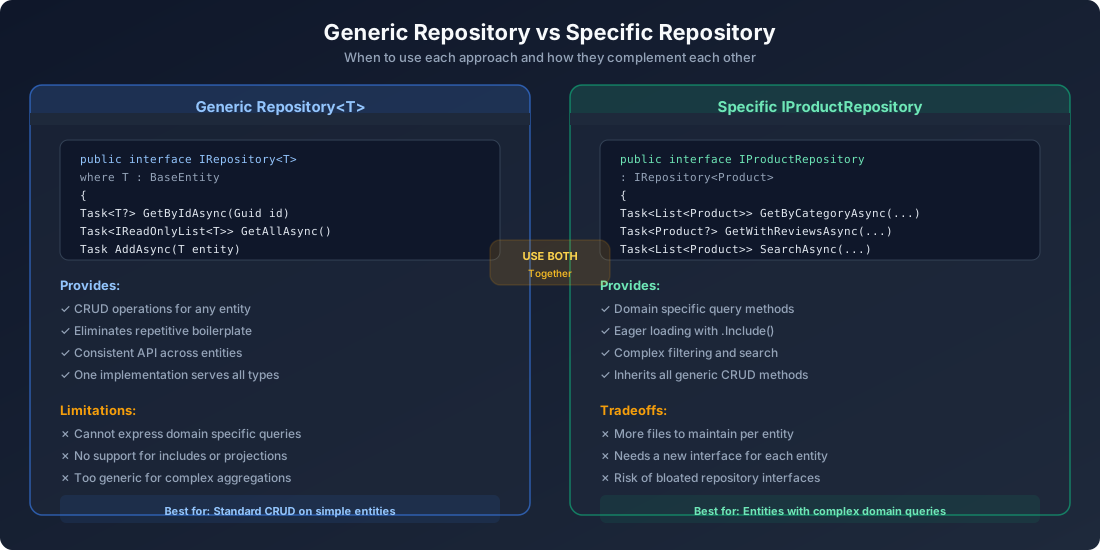
The idea is simple. The specific repository inherits from the generic repository and adds methods that only make sense for a particular entity.
The Specific Interface:
csharp
using ProductCatalog.Domain.Entities;
namespace ProductCatalog.Domain.Interfaces;
public interface IProductRepository : IRepository<Product>
{
Task<IReadOnlyList<Product>> GetByCategoryAsync(
string category, CancellationToken cancellationToken = default);
Task<IReadOnlyList<Product>> GetActiveProductsAsync(
CancellationToken cancellationToken = default);
Task<IReadOnlyList<Product>> SearchAsync(
string searchTerm, CancellationToken cancellationToken = default);
Task<IReadOnlyList<Product>> GetWithPaginationAsync(
int page, int pageSize, CancellationToken cancellationToken = default);
}
The Specific Implementation:
csharp
using Microsoft.EntityFrameworkCore;
using ProductCatalog.Domain.Entities;
using ProductCatalog.Domain.Interfaces;
namespace ProductCatalog.Infrastructure.Persistence;
public class ProductRepository : Repository<Product>, IProductRepository
{
public ProductRepository(AppDbContext context) : base(context) { }
public async Task<IReadOnlyList<Product>> GetByCategoryAsync(
string category, CancellationToken cancellationToken = default)
{
return await DbSet
.AsNoTracking()
.Where(p => p.Category == category && p.IsActive)
.OrderBy(p => p.Name)
.ToListAsync(cancellationToken);
}
public async Task<IReadOnlyList<Product>> GetActiveProductsAsync(
CancellationToken cancellationToken = default)
{
return await DbSet
.AsNoTracking()
.Where(p => p.IsActive)
.OrderByDescending(p => p.CreatedAt)
.ToListAsync(cancellationToken);
}
public async Task<IReadOnlyList<Product>> SearchAsync(
string searchTerm, CancellationToken cancellationToken = default)
{
return await DbSet
.AsNoTracking()
.Where(p => p.Name.Contains(searchTerm)
|| p.Description.Contains(searchTerm))
.OrderBy(p => p.Name)
.ToListAsync(cancellationToken);
}
public async Task<IReadOnlyList<Product>> GetWithPaginationAsync(
int page, int pageSize, CancellationToken cancellationToken = default)
{
return await DbSet
.AsNoTracking()
.Where(p => p.IsActive)
.OrderBy(p => p.Name)
.Skip((page - 1) * pageSize)
.Take(pageSize)
.ToListAsync(cancellationToken);
}
}
Notice how ProductRepository extends Repository<Product>. This gives it all the standard CRUD operations for free while allowing it to add product specific query methods. The service layer can depend on IProductRepository and get access to both the generic methods and the custom ones.
This is the sweet spot. Use the generic repository for entities that only need basic CRUD. Use specific repositories for entities that need domain specific queries. Do not force every entity to have its own specific repository if it does not need one.
The Unit of Work Pattern
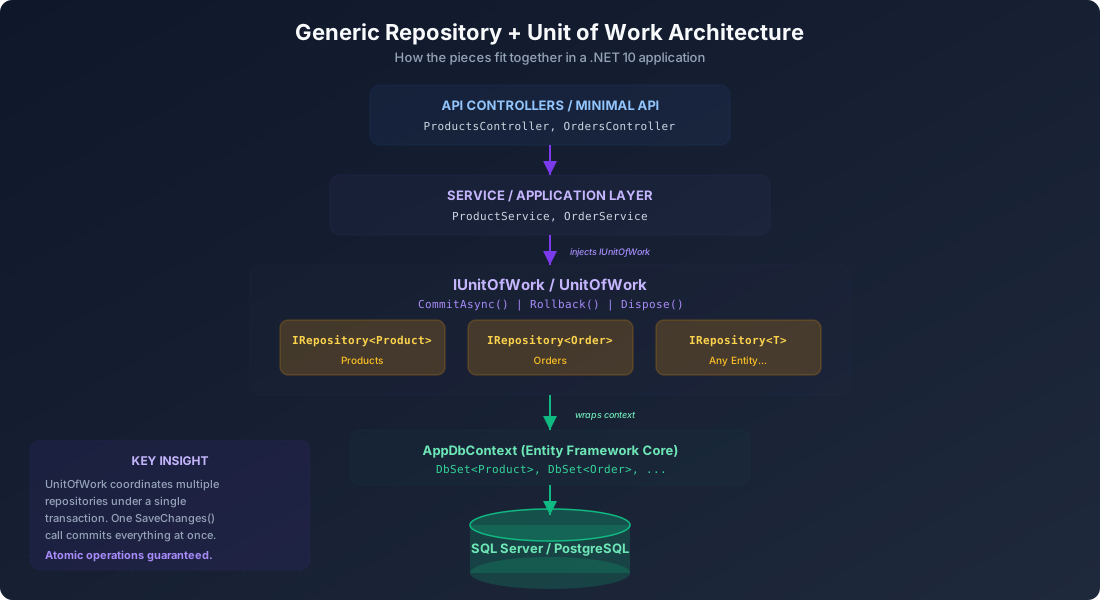
Here is where everything comes together. The Unit of Work pattern coordinates writes across multiple repositories so that all changes are committed in a single transaction. Without it, each repository would call SaveChangesAsync independently, which means a failure halfway through could leave your database in an inconsistent state.
The Interface:
csharp
namespace ProductCatalog.Domain.Interfaces;
public interface IUnitOfWork : IDisposable
{
IProductRepository Products { get; }
IRepository<Order> Orders { get; }
Task<int> CommitAsync(CancellationToken cancellationToken = default);
Task RollbackAsync();
}
The Implementation:
csharp
using ProductCatalog.Domain.Interfaces;
using ProductCatalog.Domain.Entities;
namespace ProductCatalog.Infrastructure.Persistence;
public class UnitOfWork : IUnitOfWork
{
private readonly AppDbContext _context;
private IProductRepository? _products;
private IRepository<Order>? _orders;
public UnitOfWork(AppDbContext context)
{
_context = context;
}
public IProductRepository Products =>
_products ??= new ProductRepository(_context);
public IRepository<Order> Orders =>
_orders ??= new Repository<Order>(_context);
public async Task<int> CommitAsync(
CancellationToken cancellationToken = default)
{
return await _context.SaveChangesAsync(cancellationToken);
}
public async Task RollbackAsync()
{
await _context.DisposeAsync();
}
public void Dispose()
{
_context.Dispose();
}
}
The lazy initialization pattern with ??= is important here. Repository instances are only created when they are actually accessed. If a particular operation only uses the Products repository, the Orders repository is never instantiated. This keeps things efficient.
The CommitAsync method is the single point where all changes made through any repository are persisted to the database. Entity Framework Core tracks all the changes internally, and a single SaveChangesAsync call writes them all in one transaction.
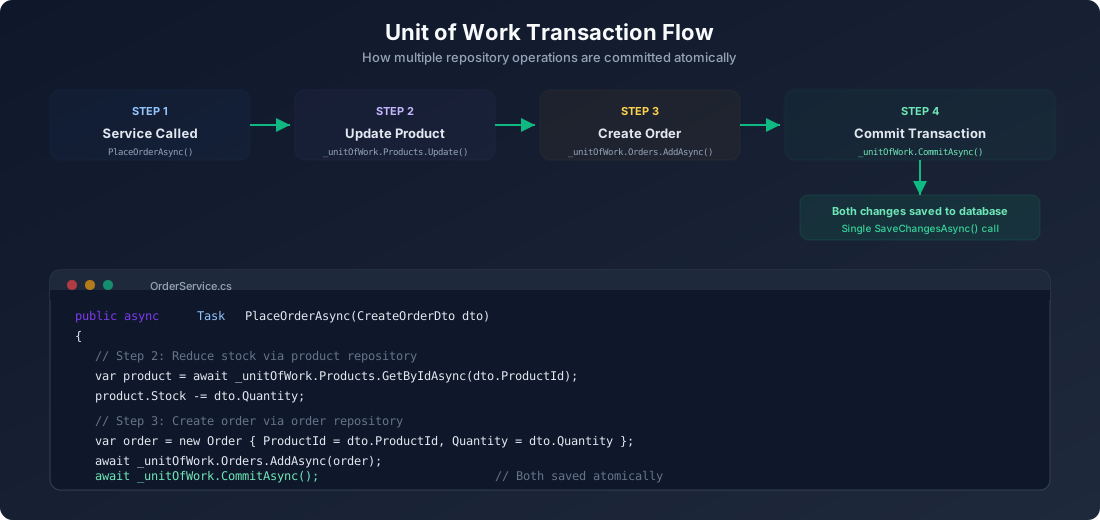
This atomic behavior is critical for operations that span multiple entities. When you place an order, you need to reduce the product stock and create the order record. Both of these operations must succeed or fail together. The Unit of Work guarantees that.
The DbContext
For completeness, here is the Entity Framework Core context that backs everything:
csharp
using Microsoft.EntityFrameworkCore;
using ProductCatalog.Domain.Entities;
namespace ProductCatalog.Infrastructure.Persistence;
public class AppDbContext : DbContext
{
public AppDbContext(DbContextOptions<AppDbContext> options) : base(options) { }
public DbSet<Product> Products => Set<Product>();
public DbSet<Order> Orders => Set<Order>();
protected override void OnModelCreating(ModelBuilder modelBuilder)
{
modelBuilder.Entity<Product>(entity =>
{
entity.HasKey(e => e.Id);
entity.Property(e => e.Name).HasMaxLength(200).IsRequired();
entity.Property(e => e.Description).HasMaxLength(2000);
entity.Property(e => e.Price).HasPrecision(18, 2);
entity.Property(e => e.Category).HasMaxLength(100).IsRequired();
});
modelBuilder.Entity<Order>(entity =>
{
entity.HasKey(e => e.Id);
entity.Property(e => e.TotalPrice).HasPrecision(18, 2);
entity.Property(e => e.Status).HasMaxLength(50);
entity.HasOne(e => e.Product)
.WithMany()
.HasForeignKey(e => e.ProductId)
.OnDelete(DeleteBehavior.Restrict);
});
}
public override Task<int> SaveChangesAsync(
CancellationToken cancellationToken = default)
{
foreach (var entry in ChangeTracker.Entries<BaseEntity>())
{
switch (entry.State)
{
case EntityState.Added:
entry.Entity.CreatedAt = DateTime.UtcNow;
break;
case EntityState.Modified:
entry.Entity.UpdatedAt = DateTime.UtcNow;
break;
}
}
return base.SaveChangesAsync(cancellationToken);
}
}
The overridden SaveChangesAsync method automatically sets audit timestamps on every entity. This is a common pattern in production applications that ensures you never forget to track when records were created or modified. The EF Core change tracking documentation explains how the ChangeTracker works under the hood.
Wiring Up Dependency Injection
.NET 10 makes dependency injection a first class citizen. Here is how we register everything in Program.cs:
csharp
using Microsoft.EntityFrameworkCore;
using ProductCatalog.Domain.Interfaces;
using ProductCatalog.Infrastructure.Persistence;
var builder = WebApplication.CreateBuilder(args);
builder.Services.AddDbContext<AppDbContext>(options =>
options.UseSqlServer(
builder.Configuration.GetConnectionString("DefaultConnection")));
builder.Services.AddScoped(typeof(IRepository<>), typeof(Repository<>));
builder.Services.AddScoped<IProductRepository, ProductRepository>();
builder.Services.AddScoped<IUnitOfWork, UnitOfWork>();
builder.Services.AddScoped<ProductService>();
builder.Services.AddScoped<OrderService>();
builder.Services.AddControllers();
builder.Services.AddEndpointsApiExplorer();
builder.Services.AddSwaggerGen();
var app = builder.Build();
if (app.Environment.IsDevelopment())
{
app.UseSwagger();
app.UseSwaggerUI();
}
app.UseHttpsRedirection();
app.MapControllers();
app.Run();
The open generic registration of IRepository<> to Repository<> is one of the most powerful features of .NET dependency injection. It means any service can request IRepository<Product>, IRepository<Order>, or IRepository<AnyFutureEntity> and the container will automatically provide the correct generic instance. You do not need to register each entity type individually.
The specific IProductRepository registration overrides the generic one for products, ensuring that when a service asks for IProductRepository, it gets the version with the custom query methods.
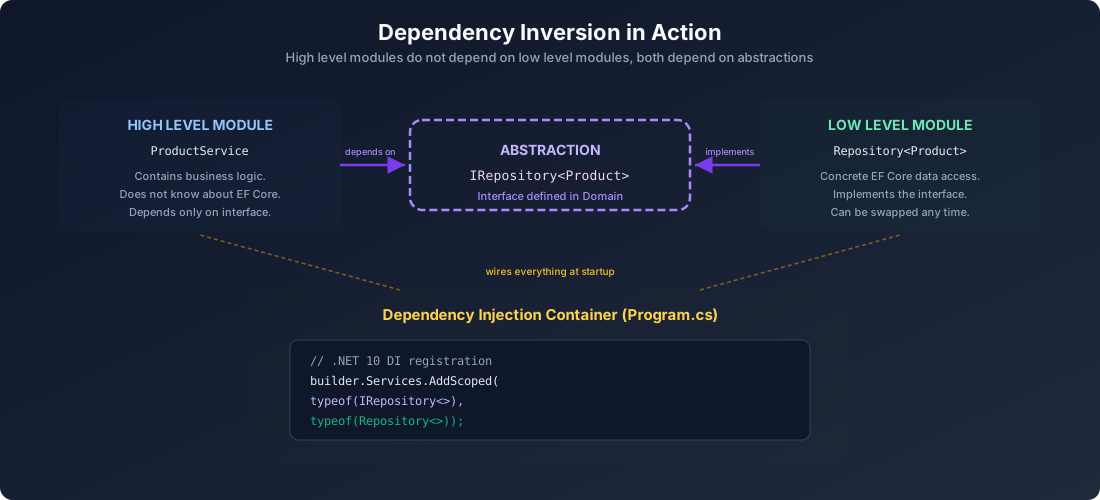
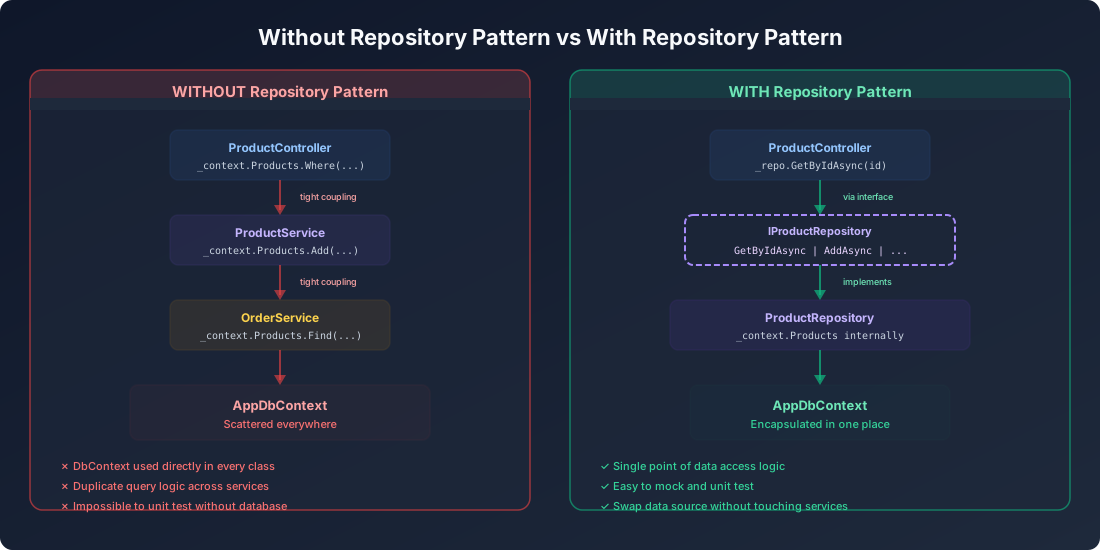
This is the Dependency Inversion Principle from SOLID in practice. The high level modules (services) depend on abstractions (interfaces). The low level modules (repositories) implement those abstractions. Neither depends on the other directly. The DI container wires them together at runtime.
Using the Repository in Application Services
Now let us see how application services consume the repository and Unit of Work.
Product Service:
csharp
using ProductCatalog.Domain.Entities;
using ProductCatalog.Domain.Interfaces;
namespace ProductCatalog.Application.Services;
public class ProductService
{
private readonly IUnitOfWork _unitOfWork;
public ProductService(IUnitOfWork unitOfWork)
{
_unitOfWork = unitOfWork;
}
public async Task<Product> CreateProductAsync(
string name, string description, decimal price,
string category, int stock,
CancellationToken cancellationToken = default)
{
var product = new Product
{
Id = Guid.NewGuid(),
Name = name,
Description = description,
Price = price,
Category = category,
Stock = stock
};
await _unitOfWork.Products.AddAsync(product, cancellationToken);
await _unitOfWork.CommitAsync(cancellationToken);
return product;
}
public async Task<Product?> GetProductByIdAsync(
Guid id, CancellationToken cancellationToken = default)
{
return await _unitOfWork.Products.GetByIdAsync(id, cancellationToken);
}
public async Task<IReadOnlyList<Product>> GetProductsByCategoryAsync(
string category, CancellationToken cancellationToken = default)
{
return await _unitOfWork.Products
.GetByCategoryAsync(category, cancellationToken);
}
public async Task<IReadOnlyList<Product>> SearchProductsAsync(
string searchTerm, CancellationToken cancellationToken = default)
{
return await _unitOfWork.Products
.SearchAsync(searchTerm, cancellationToken);
}
public async Task<bool> UpdatePriceAsync(
Guid productId, decimal newPrice,
CancellationToken cancellationToken = default)
{
var product = await _unitOfWork.Products
.GetByIdAsync(productId, cancellationToken);
if (product is null) return false;
product.Price = newPrice;
_unitOfWork.Products.Update(product);
await _unitOfWork.CommitAsync(cancellationToken);
return true;
}
public async Task<bool> DeactivateProductAsync(
Guid productId, CancellationToken cancellationToken = default)
{
var product = await _unitOfWork.Products
.GetByIdAsync(productId, cancellationToken);
if (product is null) return false;
product.IsActive = false;
_unitOfWork.Products.Update(product);
await _unitOfWork.CommitAsync(cancellationToken);
return true;
}
}
Order Service (demonstrating cross repository transactions):
csharp
using ProductCatalog.Domain.Entities;
using ProductCatalog.Domain.Interfaces;
namespace ProductCatalog.Application.Services;
public class OrderService
{
private readonly IUnitOfWork _unitOfWork;
private readonly ILogger<OrderService> _logger;
public OrderService(IUnitOfWork unitOfWork, ILogger<OrderService> logger)
{
_unitOfWork = unitOfWork;
_logger = logger;
}
public async Task<Order> PlaceOrderAsync(
Guid productId, int quantity,
CancellationToken cancellationToken = default)
{
var product = await _unitOfWork.Products
.GetByIdAsync(productId, cancellationToken);
if (product is null)
throw new InvalidOperationException(
$"Product with Id {productId} was not found.");
if (product.Stock < quantity)
throw new InvalidOperationException(
$"Insufficient stock. Available: {product.Stock}, Requested: {quantity}");
product.Stock -= quantity;
_unitOfWork.Products.Update(product);
var order = new Order
{
Id = Guid.NewGuid(),
ProductId = productId,
Quantity = quantity,
TotalPrice = product.Price * quantity,
Status = "Confirmed"
};
await _unitOfWork.Orders.AddAsync(order, cancellationToken);
await _unitOfWork.CommitAsync(cancellationToken);
_logger.LogInformation(
"Order {OrderId} placed for product {ProductId}, quantity {Quantity}",
order.Id, productId, quantity);
return order;
}
}
This PlaceOrderAsync method is the textbook example of why the Unit of Work matters. It modifies a product (reducing stock) and creates a new order. Both operations must succeed together. If CommitAsync fails, neither change is persisted. The database stays consistent.
The API Controller
Here is a complete controller that uses the service layer:
csharp
using Microsoft.AspNetCore.Mvc;
using ProductCatalog.Application.Services;
namespace ProductCatalog.Api.Controllers;
[ApiController]
[Route("api/[controller]")]
public class ProductsController : ControllerBase
{
private readonly ProductService _productService;
public ProductsController(ProductService productService)
{
_productService = productService;
}
[HttpGet]
public async Task<IActionResult> GetAll(
CancellationToken cancellationToken)
{
var products = await _productService
.GetProductsByCategoryAsync("all", cancellationToken);
return Ok(products);
}
[HttpGet("{id:guid}")]
public async Task<IActionResult> GetById(
Guid id, CancellationToken cancellationToken)
{
var product = await _productService
.GetProductByIdAsync(id, cancellationToken);
return product is not null
? Ok(product)
: NotFound();
}
[HttpGet("category/{category}")]
public async Task<IActionResult> GetByCategory(
string category, CancellationToken cancellationToken)
{
var products = await _productService
.GetProductsByCategoryAsync(category, cancellationToken);
return Ok(products);
}
[HttpGet("search")]
public async Task<IActionResult> Search(
[FromQuery] string term, CancellationToken cancellationToken)
{
var products = await _productService
.SearchProductsAsync(term, cancellationToken);
return Ok(products);
}
[HttpPost]
public async Task<IActionResult> Create(
[FromBody] CreateProductRequest request,
CancellationToken cancellationToken)
{
var product = await _productService.CreateProductAsync(
request.Name, request.Description, request.Price,
request.Category, request.Stock, cancellationToken);
return CreatedAtAction(
nameof(GetById),
new { id = product.Id },
product);
}
[HttpPatch("{id:guid}/price")]
public async Task<IActionResult> UpdatePrice(
Guid id, [FromBody] UpdatePriceRequest request,
CancellationToken cancellationToken)
{
var success = await _productService
.UpdatePriceAsync(id, request.NewPrice, cancellationToken);
return success ? NoContent() : NotFound();
}
}
public record CreateProductRequest(
string Name, string Description, decimal Price,
string Category, int Stock);
public record UpdatePriceRequest(decimal NewPrice);
The controller is thin. It does not contain business logic. It does not know about repositories, the database, or Entity Framework Core. It delegates everything to the service layer. That is exactly the level of separation we want.
The Complete Project Structure
Here is the full picture of how the solution is organized:
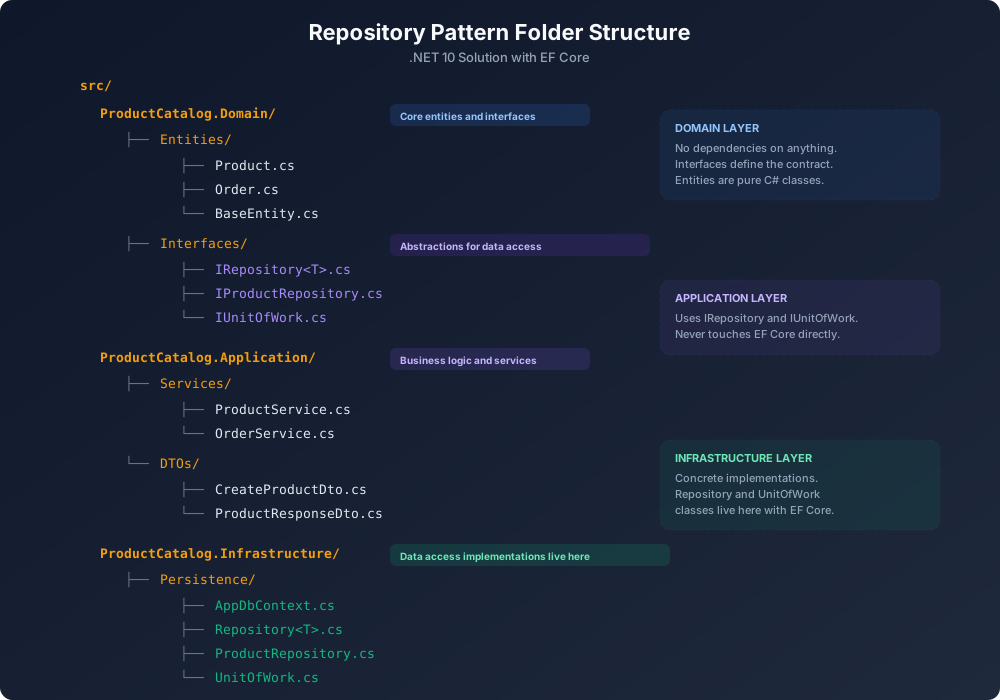
src/
  ProductCatalog.Domain/
    Entities/
      BaseEntity.cs
      Product.cs
      Order.cs
    Interfaces/
      IRepository<T>.cs
      IProductRepository.cs
      IUnitOfWork.cs

  ProductCatalog.Application/
    Services/
      ProductService.cs
      OrderService.cs
    DTOs/
      CreateProductDto.cs
      ProductResponseDto.cs

  ProductCatalog.Infrastructure/
    Persistence/
      AppDbContext.cs
      Repository<T>.cs
      ProductRepository.cs
      UnitOfWork.cs

  ProductCatalog.Api/
    Controllers/
      ProductsController.cs
      OrdersController.cs
    Program.cs
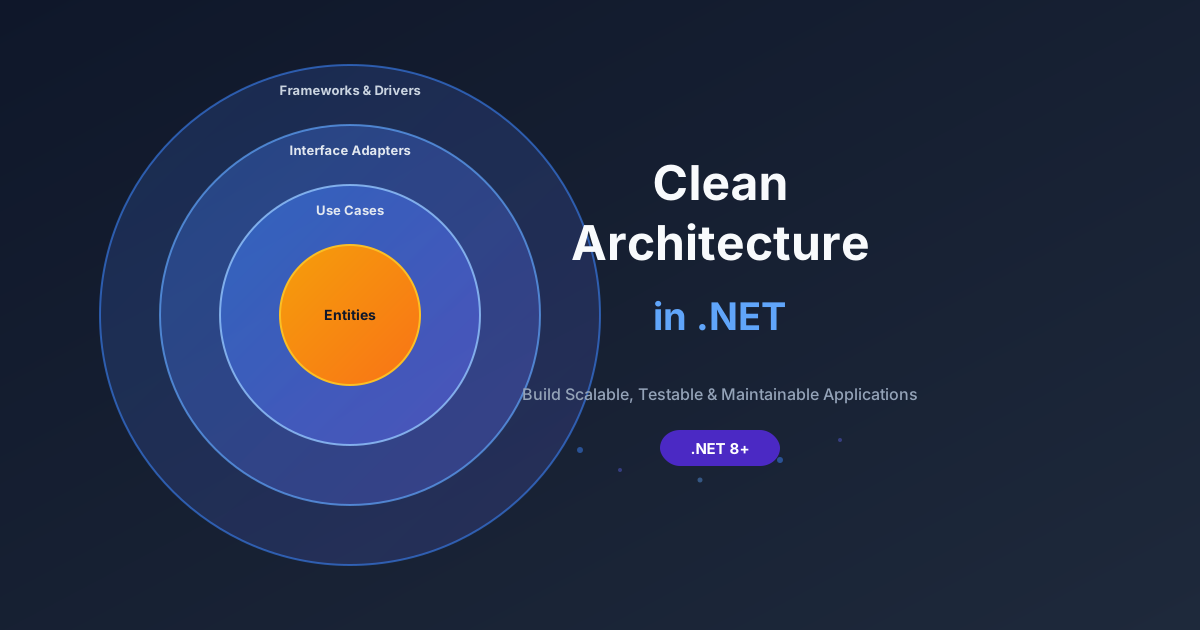
The dependency flow is strictly one directional. The API project references Application and Infrastructure. Application references only Domain. Infrastructure references Domain. Domain references nothing. This follows the Dependency Inversion Principle and aligns naturally with Clean Architecture, which I covered in detail in a separate article.
Testing the Repository Pattern
One of the biggest practical benefits of the repository pattern is how dramatically it simplifies testing. Because your services depend on interfaces rather than concrete implementations, you can mock the data access layer entirely.
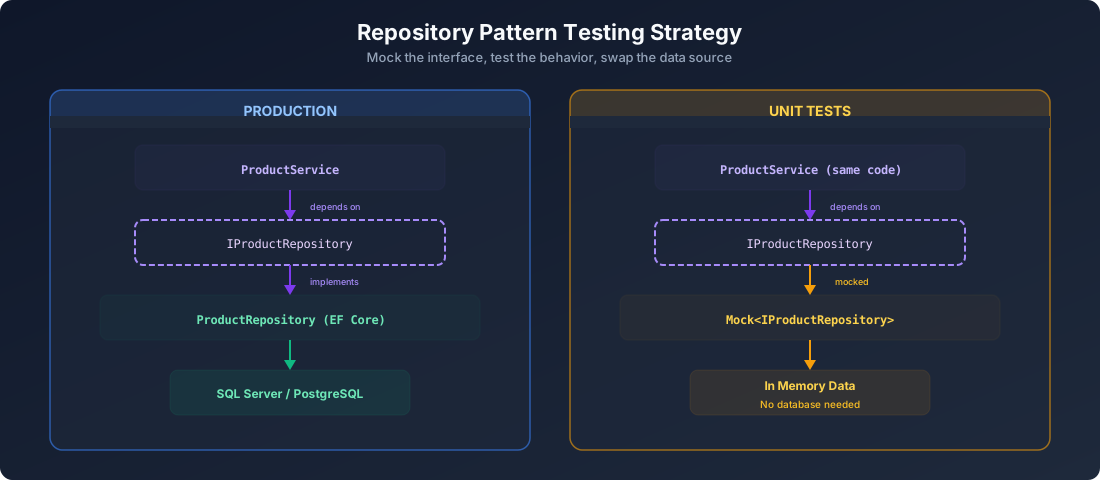
Unit Testing the Service Layer with Moq:
csharp
using Moq;
using ProductCatalog.Application.Services;
using ProductCatalog.Domain.Entities;
using ProductCatalog.Domain.Interfaces;
namespace ProductCatalog.Tests.Services;
public class ProductServiceTests
{
private readonly Mock<IUnitOfWork> _unitOfWorkMock;
private readonly Mock<IProductRepository> _productRepoMock;
private readonly ProductService _service;
public ProductServiceTests()
{
_unitOfWorkMock = new Mock<IUnitOfWork>();
_productRepoMock = new Mock<IProductRepository>();
_unitOfWorkMock.Setup(u => u.Products).Returns(_productRepoMock.Object);
_service = new ProductService(_unitOfWorkMock.Object);
}
[Fact]
public async Task CreateProductAsync_ShouldAddAndCommit()
{
_productRepoMock
.Setup(r => r.AddAsync(It.IsAny<Product>(), It.IsAny<CancellationToken>()))
.ReturnsAsync((Product p, CancellationToken _) => p);
_unitOfWorkMock
.Setup(u => u.CommitAsync(It.IsAny<CancellationToken>()))
.ReturnsAsync(1);
var result = await _service.CreateProductAsync(
"Test Widget", "A great widget", 29.99m, "Gadgets", 100);
Assert.NotNull(result);
Assert.Equal("Test Widget", result.Name);
Assert.Equal(29.99m, result.Price);
_productRepoMock.Verify(
r => r.AddAsync(It.IsAny<Product>(), It.IsAny<CancellationToken>()),
Times.Once);
_unitOfWorkMock.Verify(
u => u.CommitAsync(It.IsAny<CancellationToken>()),
Times.Once);
}
[Fact]
public async Task UpdatePriceAsync_WithNonExistentProduct_ReturnsFalse()
{
_productRepoMock
.Setup(r => r.GetByIdAsync(It.IsAny<Guid>(), It.IsAny<CancellationToken>()))
.ReturnsAsync((Product?)null);
var result = await _service.UpdatePriceAsync(Guid.NewGuid(), 19.99m);
Assert.False(result);
_unitOfWorkMock.Verify(
u => u.CommitAsync(It.IsAny<CancellationToken>()),
Times.Never);
}
[Fact]
public async Task GetProductsByCategoryAsync_ReturnsMatchingProducts()
{
var expectedProducts = new List<Product>
{
new() { Id = Guid.NewGuid(), Name = "Widget A", Category = "Gadgets" },
new() { Id = Guid.NewGuid(), Name = "Widget B", Category = "Gadgets" }
};
_productRepoMock
.Setup(r => r.GetByCategoryAsync("Gadgets", It.IsAny<CancellationToken>()))
.ReturnsAsync(expectedProducts);
var result = await _service.GetProductsByCategoryAsync("Gadgets");
Assert.Equal(2, result.Count);
Assert.All(result, p => Assert.Equal("Gadgets", p.Category));
}
}
Testing the Order Service with Cross Repository Operations:
csharp
public class OrderServiceTests
{
[Fact]
public async Task PlaceOrderAsync_WithSufficientStock_CreatesOrderAndReducesStock()
{
var unitOfWorkMock = new Mock<IUnitOfWork>();
var productRepoMock = new Mock<IProductRepository>();
var orderRepoMock = new Mock<IRepository<Order>>();
var loggerMock = new Mock<ILogger<OrderService>>();
var product = new Product
{
Id = Guid.NewGuid(),
Name = "Premium Widget",
Price = 49.99m,
Stock = 50
};
productRepoMock
.Setup(r => r.GetByIdAsync(product.Id, It.IsAny<CancellationToken>()))
.ReturnsAsync(product);
unitOfWorkMock.Setup(u => u.Products).Returns(productRepoMock.Object);
unitOfWorkMock.Setup(u => u.Orders).Returns(orderRepoMock.Object);
unitOfWorkMock.Setup(u => u.CommitAsync(It.IsAny<CancellationToken>()))
.ReturnsAsync(2);
var service = new OrderService(unitOfWorkMock.Object, loggerMock.Object);
var order = await service.PlaceOrderAsync(product.Id, 5);
Assert.Equal(45, product.Stock);
Assert.Equal(249.95m, order.TotalPrice);
Assert.Equal("Confirmed", order.Status);
productRepoMock.Verify(r => r.Update(product), Times.Once);
orderRepoMock.Verify(
r => r.AddAsync(It.IsAny<Order>(), It.IsAny<CancellationToken>()),
Times.Once);
unitOfWorkMock.Verify(
u => u.CommitAsync(It.IsAny<CancellationToken>()),
Times.Once);
}
[Fact]
public async Task PlaceOrderAsync_WithInsufficientStock_ThrowsException()
{
var unitOfWorkMock = new Mock<IUnitOfWork>();
var productRepoMock = new Mock<IProductRepository>();
var loggerMock = new Mock<ILogger<OrderService>>();
var product = new Product
{
Id = Guid.NewGuid(),
Price = 49.99m,
Stock = 2
};
productRepoMock
.Setup(r => r.GetByIdAsync(product.Id, It.IsAny<CancellationToken>()))
.ReturnsAsync(product);
unitOfWorkMock.Setup(u => u.Products).Returns(productRepoMock.Object);
var service = new OrderService(unitOfWorkMock.Object, loggerMock.Object);
await Assert.ThrowsAsync<InvalidOperationException>(
() => service.PlaceOrderAsync(product.Id, 10));
unitOfWorkMock.Verify(
u => u.CommitAsync(It.IsAny<CancellationToken>()),
Times.Never);
}
}
These tests run in milliseconds. There is no database to set up, no connection strings to configure, no test data to seed and clean up. The repository interface acts as the seam that lets you completely isolate the business logic from the data access layer.
This is arguably the most compelling argument for the repository pattern in .NET. If your team values unit testing (and you should), this pattern pays for itself almost immediately.
Common Mistakes to Avoid
I have reviewed a lot of codebases that use the repository pattern, and certain mistakes keep coming up. Here are the ones that cause the most pain.